
Best Runway ML Se Pro-Level AI Videos Banayein Aasani Se
AI-powered tools are changing the way many creators produce videos by making several editing and generation tasks faster and more accessible. In the past, creating high-quality videos often required professional editing software, technical skills, and capable hardware. Today, many AI tools help simplify parts of that workflow, although creative input and editing are still important.
If you want to create YouTube videos, Instagram Reels, short films, or AI content, If your workflow includes AI-assisted video generation or editing, Runway ML may help simplify certain creative tasks and speed up parts of the production process.
| Question | Answer |
|---|---|
| What is Runway ML? | Runway ML is an AI-powered creative platform that offers tools for video generation, editing, image-to-video workflows, and other AI-assisted content creation features. Available features may vary over time and by subscription plan. |
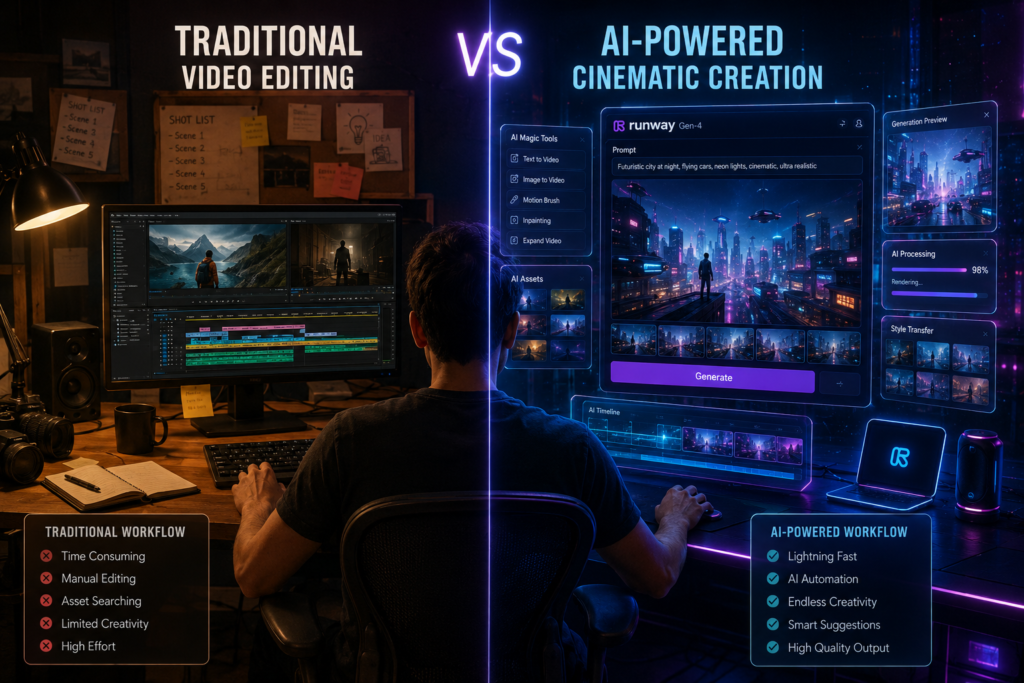
Whether you are a beginner exploring AI video tools or an experienced creator looking to speed up your workflow, understanding how Runway ML works can help you decide if it fits your content creation needs.
In this guide, you’ll learn what Runway ML is, its key features, how it works, common use cases, pricing considerations, and practical tips for getting better results with AI-assisted video creation.
Runway ML Kya Hai || What is Runway ML?
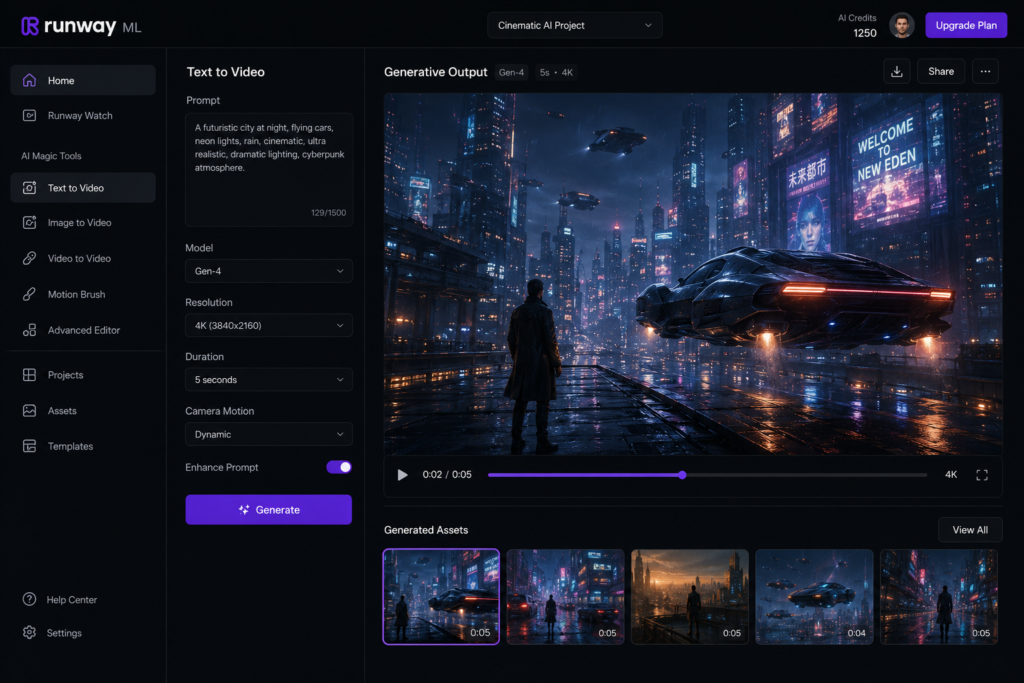
Runway ML is an AI-powered creative platform that offers tools for AI-assisted video generation, editing, and visual effects. It helps creators automate parts of the video production workflow while still allowing creative control.
To put it simply:
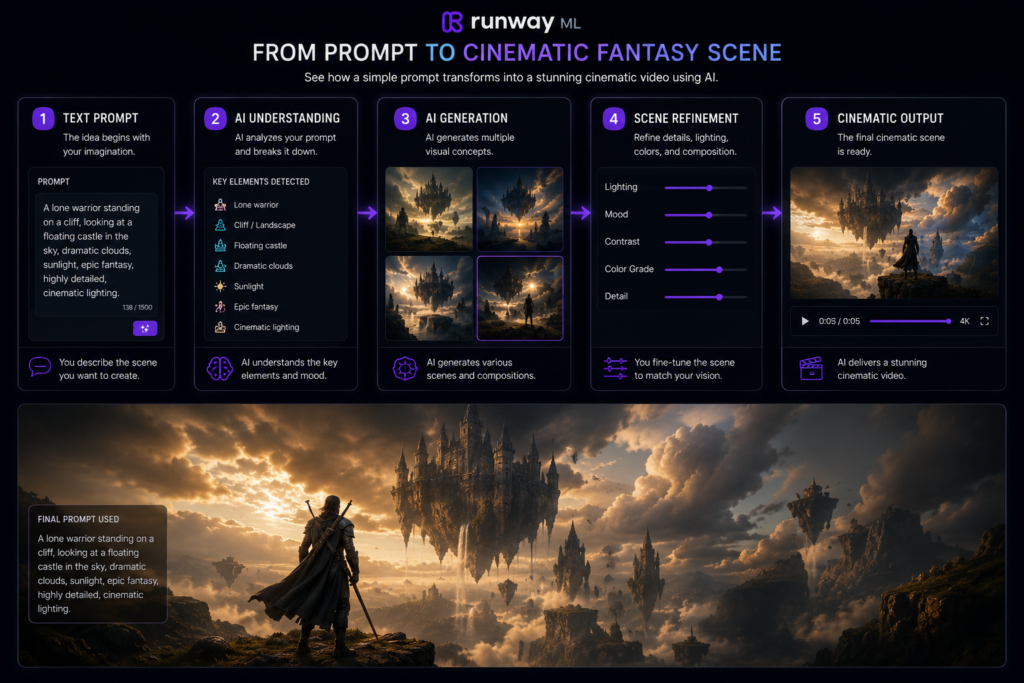
In supported workflows, you can enter a text prompt and the AI generates a video based on that description. The quality and style of the output depend on the prompt, selected model, and available features.
With this tool, you can:
- Text-to-Video – Generate video clips from written prompts (where supported).
- Background Removal – Remove or replace backgrounds without complex editing.
- Object Removal – Remove unwanted objects from video scenes.
- AI Effects – Apply AI-powered visual effects and creative edits.
- Cinematic Scene Generation – Create stylized visuals for storytelling and concept videos.
Key Features of Runway ML
| Feature | What It Does |
|---|---|
| Text-to-Video | Generates videos from text prompts (supported workflows) |
| Background Removal | Removes or replaces backgrounds |
| Object Removal | Removes unwanted elements from scenes |
| AI Effects | Adds AI-powered visual enhancements |
| Video Editing | Speeds up editing with AI-assisted tools |
Who Can Use Runway ML?
- YouTube creators
- Social media creators
- Marketing teams
- Designers
- Educators
- Video editors
- Creative professionals
Runway ML is used by many creators, designers, and production teams for AI-assisted video creation and editing workflows, depending on their project requirements. Runway ML
Note
Feature availability may vary depending on the subscription plan, selected AI model, and future platform updates. Reviewing generated videos before publishing is recommended.
🎬 Runway ML Kaise Kaam Karta Hai?
Runway ML uses machine learning and generative AI models to help create or edit videos from text prompts, images, or other supported inputs. The available workflows and features may vary depending on the selected model and subscription plan.
Basic Workflow
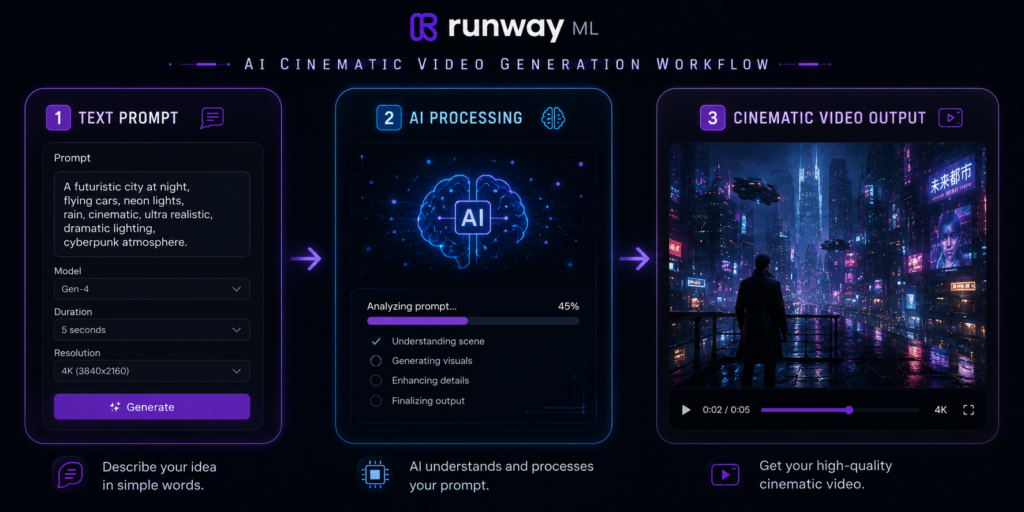
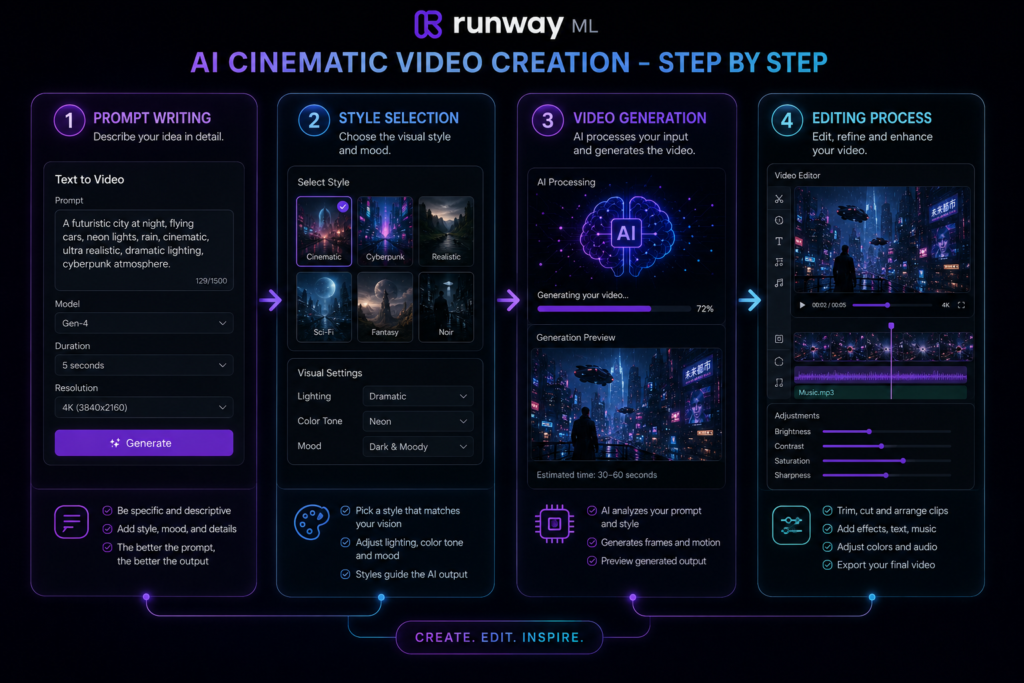
- Prompt likho
- Style choose karo
- AI video generate karega
- Edit aur export karo
For example, if you enter a prompt like:
“A warrior standing in the rain with cinematic lighting.”
Runway ML can generate a video based on that description. The final result depends on the prompt, selected AI model, generation settings, and any additional edits you make. Learn more about Runway ML features
| Step | What You Do | AI Response |
|---|---|---|
| 1 | Enter a text prompt or upload supported media | AI analyzes the input |
| 2 | Select a style or generation settings | AI prepares the generation |
| 3 | Generate the video | AI creates the initial output |
| 4 | Review and edit | Refine the video if needed |
| 5 | Export | Download the final version |
Beginner Tips
- Write clear and descriptive prompts.
- Experiment with different styles and camera angles.
- Generate multiple versions before choosing the best one.
- Review the final video for visual consistency before exporting.
Note: The quality of AI-generated videos depends on factors such as the prompt, selected AI model, source media (if used), and post-editing. Reviewing the generated video before publishing is recommended.
What are the key features of Runway ML?
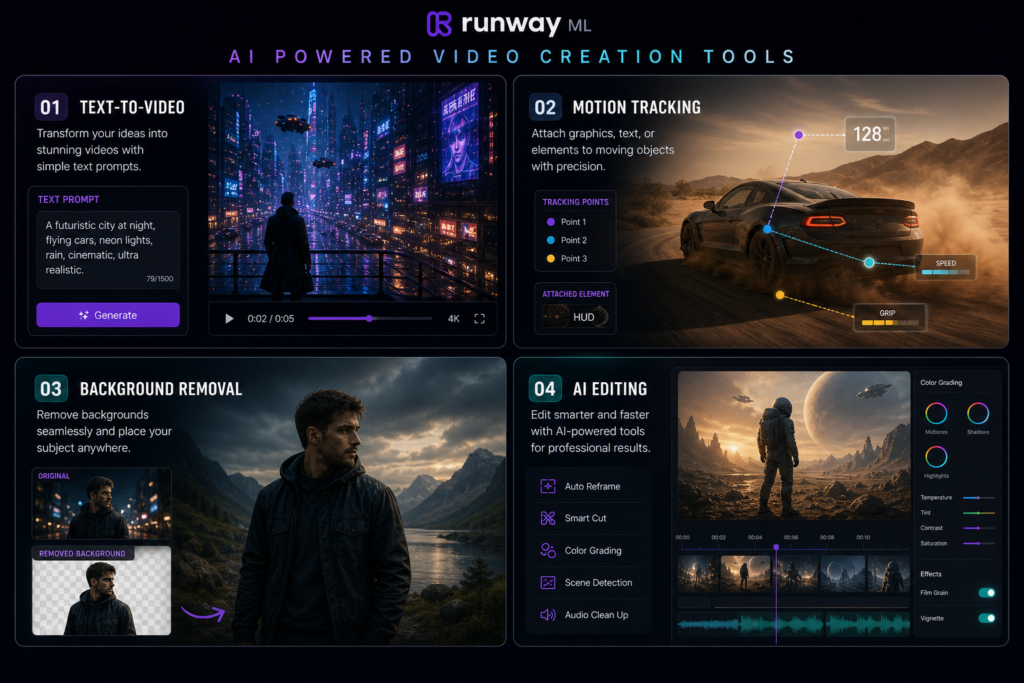
1. Text-to-Video Generation
This is the most popular feature.
In supported workflows, you can enter a text prompt to generate AI videos. The quality of the output depends on the prompt, selected AI model, and generation settings.
2. AI Video Editing
Runway ML offers AI-assisted editing tools that can help speed up common editing tasks, depending on the available features.
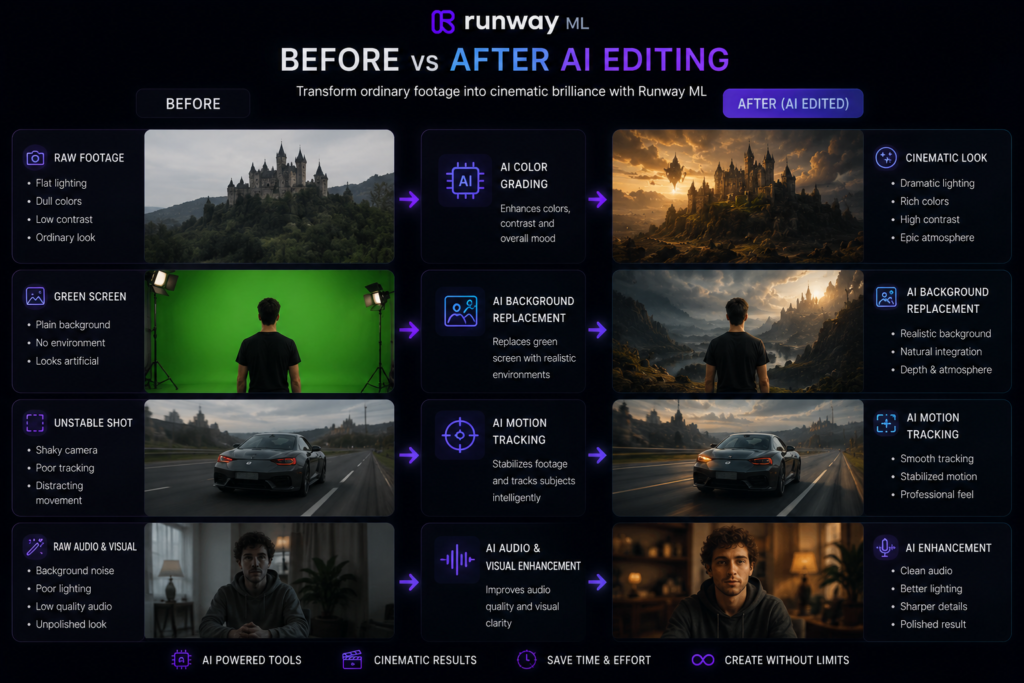
Jaise:
- Background remove
- Face blur
- Object erase
- Motion effects
3. Green Screen Without Green Screen
Runway ML includes AI-powered background removal tools that can reduce the need for a traditional green screen in supported workflows.
This can simplify background editing and reduce manual work for many projects.
4. Motion Tracking
Motion tracking tools can automatically follow selected objects or elements in supported editing workflows, making it easier to apply effects or adjustments.
It can be useful for creative edits, visual effects, and cinematic-style projects.
5. AI Image to Video
Image-to-video tools can generate animated video clips from supported images, depending on the selected AI model and generation settings.
Best Uses of These Features
| Feature | Best For |
|---|---|
| Text-to-Video | Concept videos, storytelling, marketing |
| AI Editing | Faster post-production |
| Background Removal | Product videos, social media |
| Motion Tracking | Visual effects and creative edits |
| Image-to-Video | Promotional videos, animations |
Important Note
Feature availability and performance may vary depending on your subscription plan, the AI model you choose, and future updates to the platform. Always review generated videos before publishing.
What are the benefits of using Runway ML?
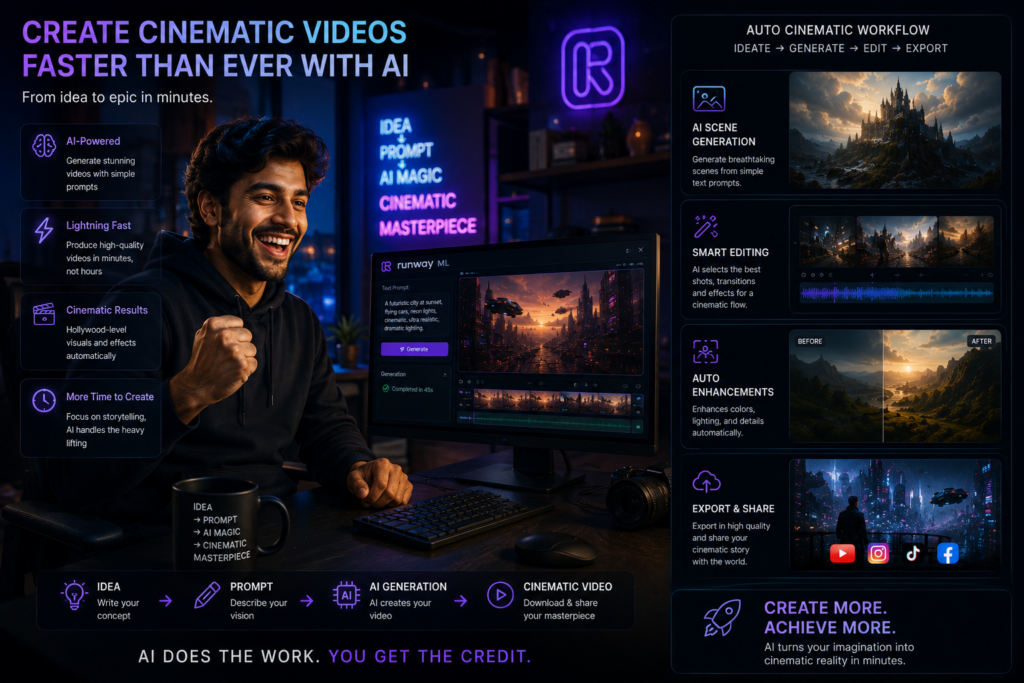
Time Bachata Hai
AI-assisted tools can automate several editing tasks, which may reduce the time required for parts of the video production process. The overall time depends on the project complexity and editing requirements.
Runway ML me kuch minutes me kaam ho jata hai.
Beginner Friendly
The interface is designed to be accessible for beginners, while also offering advanced features for experienced creators. Some tools may still require practice to achieve the best results.
Creative Freedom
Text prompts and AI-assisted generation can help turn creative ideas into visual concepts, which you can refine further through editing
Expensive Software Ki Zarurat Nahi
For some projects, AI-powered workflows can reduce the need for complex manual editing. However, professional editing software may still be useful for advanced production requirements.
Content Creation Fast Ho Jata Hai
Runway ML can help YouTubers, marketers, educators, and social media creators speed up parts of their content creation workflow, depending on the type of project.
Benefits of Using Runway ML
| Benefit | How It Helps |
|---|---|
| Saves Time | Automates parts of video editing and generation |
| Beginner-Friendly | Easier to learn than many traditional workflows |
| Creative Flexibility | Turns ideas into visual concepts with AI assistance |
| Faster Workflow | Reduces repetitive editing tasks |
| Supports Multiple Content Types | Useful for videos, ads, social media, and presentations |
Who Can Benefit from Runway ML?
- YouTube creators
- Social media creators
- Marketing teams
- Educators
- Designers
- Freelance video editors
- Small businesses
Tip: AI-generated videos often produce the best results when you use detailed prompts, review each output, and make manual refinements where needed.
How to use Runway ML?
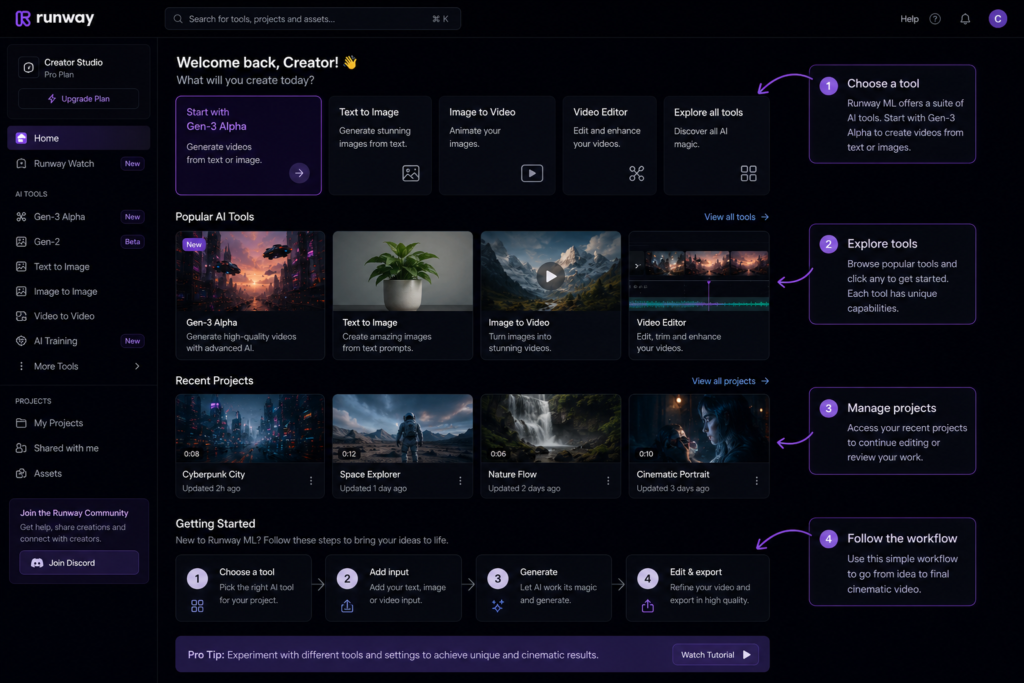
Step 1: Create an account
Sign up by visiting the official website.
A free version is also available.
Step 2: Start a new project
After signing in, open your dashboard and choose the video generation workflow or editing tool that matches your project. The available options may vary depending on platform updates and your subscription plan.
Step 3: Write a prompt
Clear and descriptive prompts generally produce more relevant AI-generated results. Include details such as the subject, environment, lighting, camera angle, and visual style whenever possible.
Example prompt:
“Ancient temple in fog, cinematic lighting, ultra realistic”
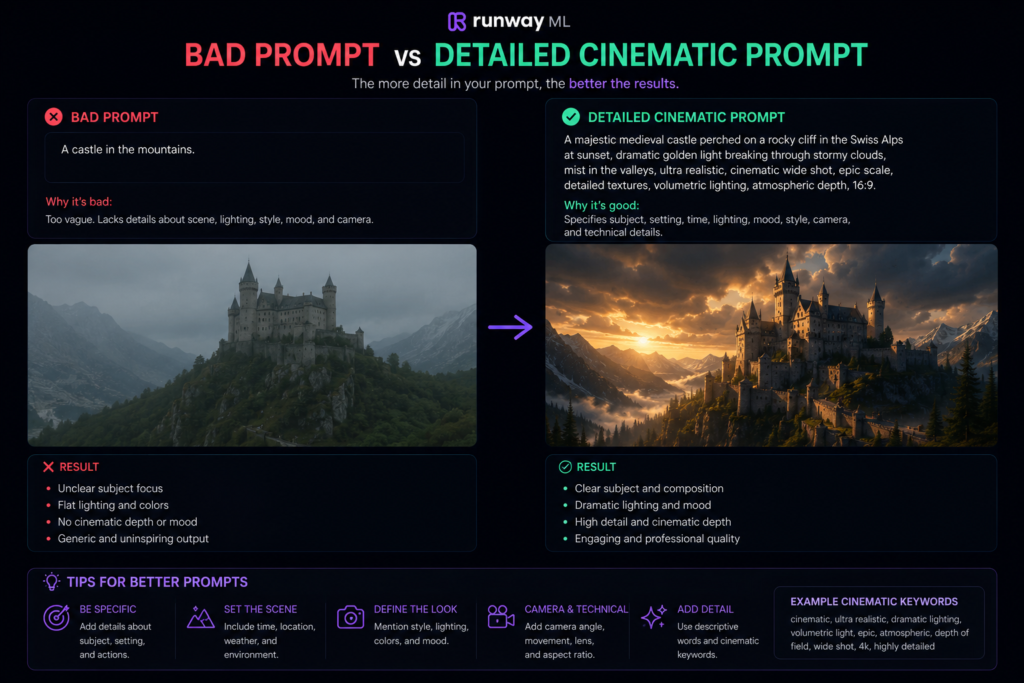
More specific prompts often help the AI generate outputs that are closer to your creative vision, although results may still vary.
Step 4: Style Select Karein
Choose the style or generation settings that best match your project. Available styles and controls may vary depending on the AI model and platform version.
Step 5: Generate & Edit
Once you start the generation process, the AI creates an initial video based on your prompt and selected settings.
Uske baad:
After generation, review the video and use the available editing tools—such as trimming, effects, transitions, or audio enhancements—to refine the final result.
Step 6: Review & Export
Before exporting, watch the complete video to check for visual consistency, motion quality, and any unwanted artifacts. Once you’re satisfied, export the video in your preferred format and resolution.
| Step | Action |
|---|---|
| 1 | Create an account |
| 2 | Start a new project |
| 3 | Write a detailed prompt |
| 4 | Select style and settings |
| 5 | Generate and edit the video |
| 6 | Review and export |
Tips for Better Results
- Use descriptive prompts instead of short keywords.
- Mention lighting, camera angle, and scene details.
- Generate multiple versions before selecting the best one.
- Review the final video carefully before publishing.
Practical Example
Maan lo aap ek YouTube Shorts banana chahte ho.
Topic:
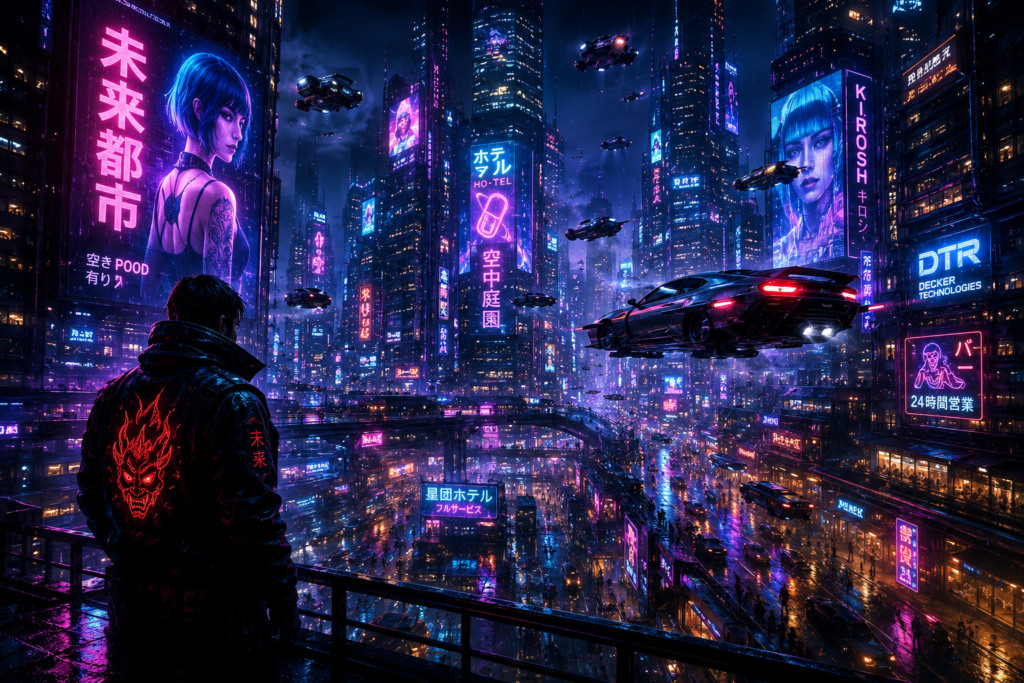
“Future city at night”
Aap Runway ML me prompt likhte ho:
“Cyberpunk future city with neon lights and flying cars”
Runway ML generates a video based on your prompt. The final output depends on the prompt, selected AI model, generation settings, and any edits you make afterward.
Then, you can add voiceover and music to it and upload it.
This workflow can help speed up video production while still allowing you to make creative adjustments before publishing.
Example Workflow
| Step | Action |
|---|---|
| Topic | Future City at Night |
| Prompt | Cyberpunk future city with neon lights and flying cars |
| AI Generation | Create an initial cinematic-style video |
| Editing | Add voiceover, music, subtitles, or effects |
| Export | Review and publish the final video |
Prompt Writing Tip
Tip: The more descriptive your prompt is, the more closely the generated video is likely to match your creative idea. Including details about lighting, environment, camera angle, and visual style can often improve the results.
Note: If the first generated video doesn’t match your expectations, try adjusting your prompt or generating another version. AI-generated outputs can vary between attempts.
Runway ML Me Success Pane Ke Tips
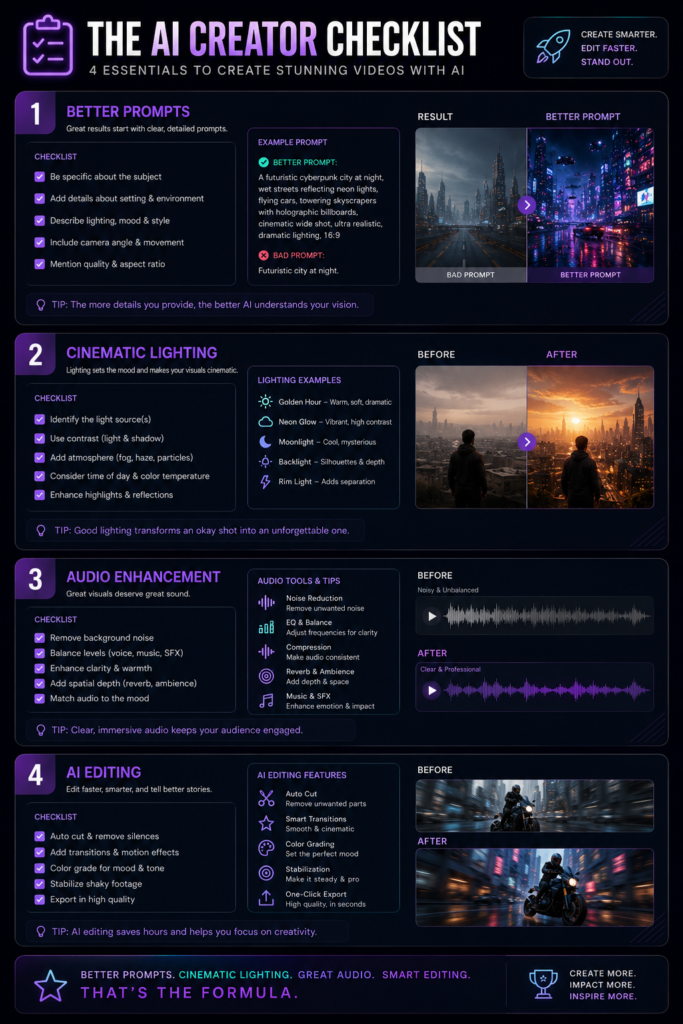
Detailed Prompts Likho
Include details such as the subject, environment, lighting, camera angle, mood, and visual style. Clear prompts generally help the AI produce results that are closer to your creative goal.
Cinematic Words Use Karo
Words like:
- cinematic
- ultra realistic
- dramatic lighting
- 8K
- realistic shadows
Descriptive terms such as cinematic, dramatic lighting, realistic shadows, or wide-angle shot can help guide the AI toward a specific visual style. The final output still depends on the AI model and prompt quality.
Multiple Variations Test Karo
Har prompt ka output different hota hai.
Experiment karna important hai.
AI + Manual Editing Mix Karo
Sirf AI par depend mat raho.
After generating the video, review it carefully and make manual adjustments such as trimming, color correction, subtitles, transitions, or audio improvements when needed.
Tips for Better Runway ML Results
| Tip | Why It Helps |
|---|---|
| Write Detailed Prompts | Gives the AI more context for generation |
| Describe Lighting & Camera | Helps define the visual style |
| Test Multiple Versions | Different generations may produce different results |
| Review Before Export | Improves overall quality |
| Combine AI with Manual Editing | Creates a more polished final video |
Common Prompt Mistakes to Avoid
- Using very short or vague prompts.
- Leaving out lighting or environment details.
- Expecting the first generation to be perfect.
- Publishing the first output without reviewing it
Pro Tip: Save your best prompts and reuse them as templates. This can help maintain a consistent visual style across multiple videos and make future projects faster.
Common Mistakes Jo Beginners Karte Hain
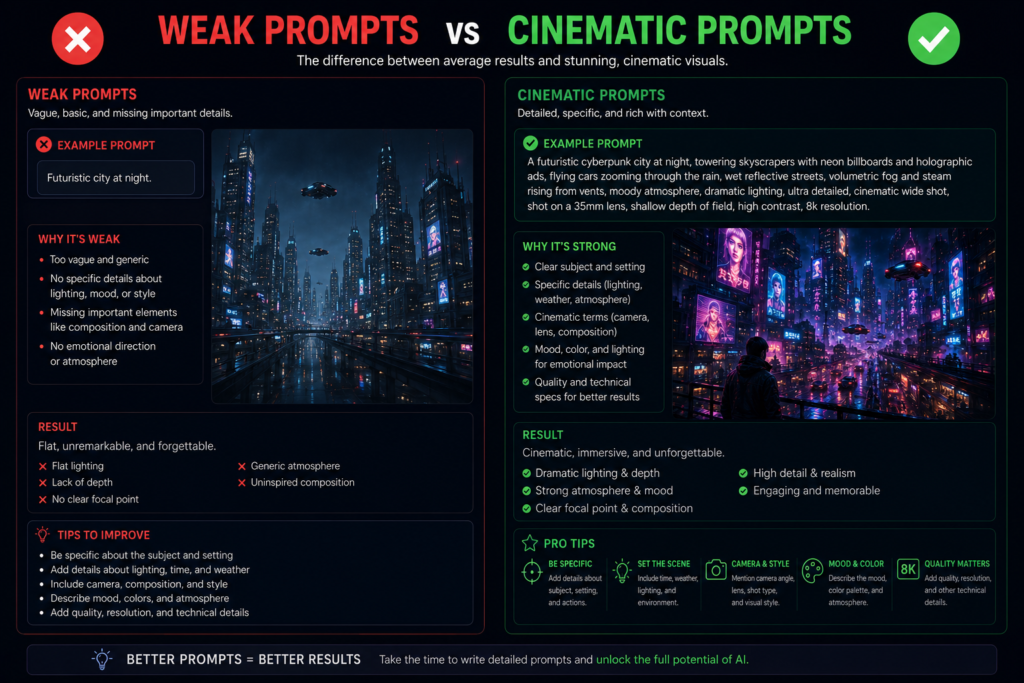
Bahut Short Prompt Likna
Example:
❌ “Temple”
Better:
✅ Ancient Indian temple surrounded by morning fog, cinematic lighting, wide-angle view, realistic architecture
Over Effects Use Karna
Applying too many visual effects or transitions can make a video look distracting. Use effects only when they support the overall style and story.
Wrong Aspect Ratio
Choose the aspect ratio based on the platform where you plan to publish. For example, vertical formats are commonly used for YouTube Shorts, Instagram Reels, and TikTok, while horizontal formats are often preferred for standard YouTube videos.
Patience Na Rakhna
AI-generated results can vary between attempts. If the first output doesn’t match your expectations, refine the prompt or settings and try generating another version.
Skipping the Final Review
Always watch the complete generated video before publishing. Check for visual consistency, unwanted artifacts, subtitles, transitions, and audio quality.
Common Beginner Mistakes
| Mistake | Better Approach |
|---|---|
| Very Short Prompts | Use descriptive prompts with lighting, style, and scene details |
| Too Many Effects | Keep editing clean and purposeful |
| Wrong Aspect Ratio | Match the format to the publishing platform |
| Publishing the First Output | Review and refine before exporting |
| Not Testing Variations | Generate multiple versions and compare results |
Quick Checklist Before Export
- ✅ Prompt is detailed.
- ✅ Aspect ratio matches the platform.
- ✅ Effects are not overused.
- ✅ Video has been reviewed.
- ✅ Audio and transitions are checked.
Future of Runway ML & AI Video Editing
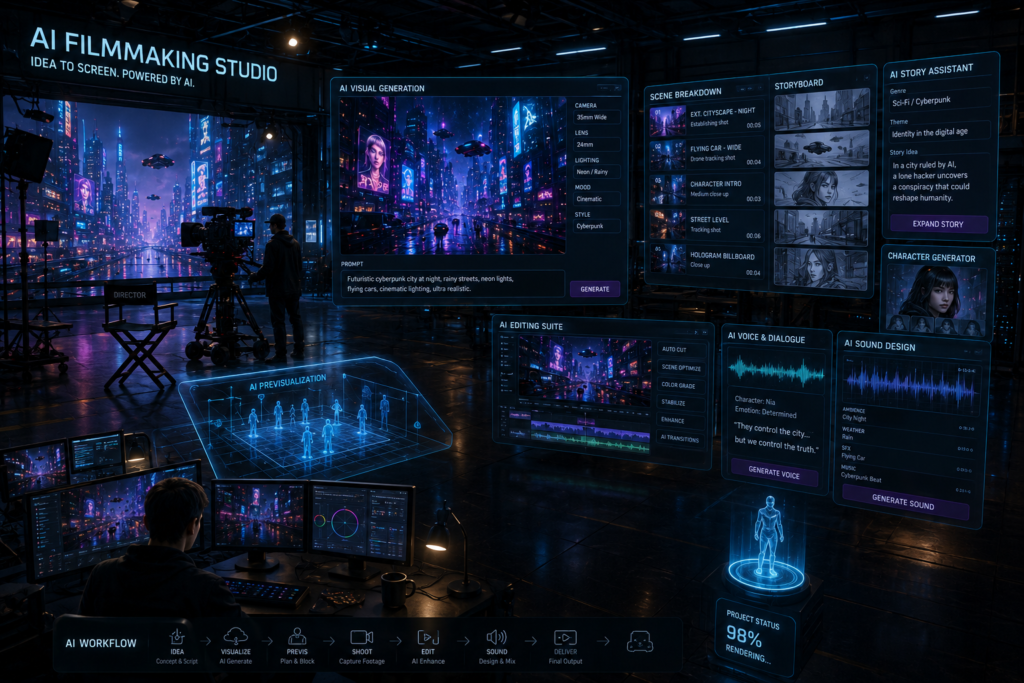
AI video generation is evolving rapidly, and new tools and features continue to expand what creators can do with AI-assisted workflows.
Right now:
AI-powered video tools are being adopted by many content creators, marketing teams, educators, designers, and production professionals to assist with different parts of the creative process.
…are all using AI tools.
In the future, As AI models continue to improve, video generation quality is expected to become more realistic and offer greater creative control.
In the coming years, AI may play a larger role in film production, including concept development, visual effects, editing, and some stages of video generation. Human creativity and professional production workflows are still expected to remain important.
Learning AI video tools today can help creators adapt to changing workflows and explore new creative opportunities as the technology continues to evolve.
Possible Future Trends in AI Video Editing
| Trend | Potential Impact |
|---|---|
| More Realistic Video Generation | Improved visual quality and consistency |
| Faster AI Editing | Reduced manual editing time for many tasks |
| Better Motion Generation | Smoother animations and transitions |
| Improved Collaboration | AI-assisted workflows for creative teams |
| Expanded Language Support | Easier localization and multilingual content |
Future Outlook
While AI video technology is advancing quickly, the best results are still likely to come from combining AI tools with human creativity, editing, and storytelling.
Note: Future developments depend on ongoing research, platform updates, and industry adoption. Features and capabilities may change over time.
Cinematic AI Video Maker
Cinematic AI Video Maker – AI Se Professional Videos Kaise Banayein?
Video content continues to grow across platforms such as YouTube, Instagram, and other social media channels, making video creation an important part of many content strategies. There is a massive surge in the popularity of YouTube Shorts, Instagram Reels, and cinematic storytelling. However, the challenge is that creating professional-quality videos isn’t easy for everyone.
Not everyone has access to high-end cameras, editing skills, or expensive software.
Cinematic AI video maker tools offer a solution to this problem.
Many AI video tools can generate or enhance videos from text prompts, images, or other supported inputs. The final output depends on the selected tool, prompt quality, and editing workflow
If your goal is to speed up video production or experiment with AI-assisted storytelling, cinematic AI video makers can be a useful addition to your creative workflow
What is a Cinematic AI Video Maker?
A cinematic AI video maker is an AI-powered tool that helps generate or edit videos with movie-style visuals using text prompts, images, or other supported inputs. Features and output quality vary depending on the platform, AI model, and editing settings.
Why People Use Cinematic AI Video Makers
Benefit How It Helps Faster Video Creation Automates parts of the production process Creative Visualization Turns ideas into visual scenes Easier Editing AI assists with common editing tasks Social Media Content Helps create videos for platforms like YouTube and Instagram Concept Videos Useful for storytelling and visual prototypes
In this guide, you’ll learn what cinematic AI video makers are, how they work, their key features, common use cases, practical tips, and factors to consider before choosing a tool.
Cinematic AI Video Maker Kya Hota Hai?
A cinematic AI video maker is an AI-powered software or platform that helps generate or enhance videos with cinematic-style visuals using text prompts, images, or other supported inputs. The available features and output quality depend on the specific tool and AI model.
You simply:
- Text prompt likhte ho
- Images upload karte ho
- Style select karte ho
The AI analyzes your input and generates an initial video based on the prompt and selected settings. You can then review and edit the result before exporting.
Example:
“A warrior walking in rain with dramatic lighting”
The AI can generate a cinematic-style video based on that prompt. The final result may vary depending on the AI model, prompt quality, and generation settings.
AI video generation tools are used by many content creators, marketers, educators, designers, and some production teams to support different stages of video creation.
How a Cinematic AI Video Maker Works
| Step | Description |
|---|---|
| Enter a Prompt | Describe the scene or idea |
| Upload Media (Optional) | Add images or reference files if supported |
| Choose Style | Select visual style or generation settings |
| Generate Video | AI creates an initial video |
| Review & Edit | Refine the video before exporting |
Who Can Use Cinematic AI Video Makers?
- YouTube creators
- Instagram creators
- Marketing professionals
- Educators
- Designers
- Small businesses
- Video editors
Note: AI-generated videos may require prompt refinement or manual editing to achieve the desired quality. Features and output can vary depending on the platform and subscription plan.
Cinematic AI Video Maker Kyun Popular Ho Raha Hai?
In today’s digital landscape, creators and businesses often need to produce video content more efficiently for different online platforms.
Main Reasons:
- Helps reduce the time required for many video creation tasks.
- Makes basic editing more accessible for beginners.
- Can help users get started without advanced video editing experience.
- Offers a cost-effective option for many creators compared to traditional production workflows.
- Supports faster content production for social media and marketing.
As AI technology continues to improve, more creators and businesses are exploring AI-assisted video generation as part of their content creation workflow.
Why Creators Choose Cinematic AI Video Makers
| Benefit | How It Helps |
|---|---|
| Faster Workflow | Speeds up parts of the video creation process |
| Beginner Friendly | Simplifies many editing tasks |
| Cost-Effective | Reduces the need for expensive production in many cases |
| Creative Support | Helps visualize ideas quickly |
| Social Media Ready | Useful for short-form and marketing videos |
Note: AI tools can speed up video creation, but the final quality still depends on factors such as the prompt, editing, source assets, and the capabilities of the chosen platform.
Best Cinematic AI Video Maker Tools
1. Runway ML
Runway ML is a widely used AI video platform that offers tools for video generation and AI-assisted editing.
Features:
- Text-to-video
- AI editing
- Motion tracking
- Background removal
Its interface is generally considered beginner-friendly, although some advanced features may require practice.
2. Pika Labs
Pika Labs is commonly used for creating stylized animations and imaginative AI-generated video content.
Aap creative prompts se Creative visual results
3. Kaiber AI
Kaiber AI music videos aur animated cinematic scenes ke liye Kaiber AI is often used for music videos, artistic visuals, and animated storytelling projects.
Kaafi creators YouTube intros aur storytelling videos me ise use karte hain.
4. Synthesia
Agar aap AI avatars aur presentation videos banana chahte ho to Synthesia is designed primarily for AI avatar videos, presentations, training materials, and business communication.
Business aur educational content me kaafi useful hai.
💡 Cinematic AI Video Maker Ke Benefits
Fast Video Creation
Traditional editing me hours lagte hain.
AI tools can automate many parts of the video creation process, helping reduce production time depending on the project.
Beginner Friendly
Many AI video tools make it easier for beginners to start creating videos, although learning prompts and basic editing can improve results.
Creative Freedom
AI can help visualize creative ideas by generating scenes based on detailed prompts and supported inputs
Cost Effective
Expensive AI tools can reduce production costs for certain types of projects, though some workflows may still benefit from traditional equipment.
Better Content Production
YouTube creators aur marketers ke liye yeh These tools can support faster content production for creators, marketers, educators, and businesses.
| Tool | Best For | Key Features |
|---|---|---|
| Runway ML | AI video generation & editing | Text-to-video, motion tracking, background editing |
| Pika Labs | Stylized animations | Creative AI video generation |
| Kaiber AI | Music videos & artistic visuals | Animated scenes, visual storytelling |
| Synthesia | AI avatar videos | Presentations, training, business communication |
How to Choose the Right Tool
- Runway ML – General AI video generation and editing.
- Pika Labs – Stylized or fantasy-style videos.
- Kaiber AI – Music videos and artistic storytelling.
- Synthesia – AI avatar and presentation videos.
Note: Features, pricing, export quality, and AI models vary by platform and subscription plan. Check the latest documentation before choosing a tool for your workflow.
Cinematic AI Video Maker Kaise Use Karein?
Step 1: Tool Select Karein
Apni need ke according AI tool choose karein.
Example:
- Storytelling → Runway ML
- Animation → Pika Labs
- Music videos → Kaiber AI
Step 2: Powerful Prompt Likhein
AI output prompt quality par depend karta hai.
Example:
❌ “Temple”
✅ “Ancient Indian temple in fog with cinematic lighting, ultra realistic”
👉 Detailed prompts generally help the AI understand your requirements more clearly, although the final output also depends on the AI model and generation settings.
Step 3: Style Choose Karein
Depending on the tool, you may be able to choose styles such as cinematic, realistic, fantasy, or anime. Available options vary by platform.
Step 4: Generate & Edit
Video generate hone ke baad:
- Music add karo
- Voiceover lagao
- Transitions use karo
Reviewing the generated video and making edits such as adding music, voiceovers, captions, or transitions can improve the overall viewing experience.
📌 Practical Example
Maan lo aap ek YouTube Shorts banana chahte ho.
Topic:
“Future city after 100 years”
Prompt:
“Cyberpunk futuristic city with flying cars, cinematic lighting, ultra realistic”
The AI can generate an initial cinematic-style video based on your prompt. The quality and appearance may vary depending on the model, prompt, and selected setting
Phir aap usme voiceover aur sound effects add kar sakte ho.
This workflow can help simplify video creation, especially for creators who want to experiment with AI-assisted content production.
AI Video Creation Workflow
| Step | What to Do |
|---|---|
| 1 | Choose the AI video tool based on your project |
| 2 | Write a detailed prompt with subject, environment, lighting, and style |
| 3 | Select the preferred visual style and settings |
| 4 | Generate the initial video |
| 5 | Review, edit, and export the final version |
Prompt Writing Tips
- A good prompt often includes:
- Subject
- Environment
- Lighting
- Camera angle
- Art style
- Mood
Example:
Ancient Indian temple surrounded by morning fog, cinematic lighting, realistic architecture, wide-angle camera shot.
Note: AI-generated videos may require multiple prompt revisions or manual editing to achieve the desired result. Output quality varies by platform, AI model, and subscription plan.
Cinematic AI Video Maker Me Success Pane Ke Tips
Detailed Prompts Use Karo
A detailed prompt generally helps the AI understand your requirements more clearly. The final output may still vary depending on the AI model and generation settings.
Cinematic Keywords Add Karo
Words like:
- cinematic lighting
- ultra realistic
- dramatic shadows
- 8K quality
- movie scene
Descriptive keywords can help guide the AI toward a specific visual style, although the final result depends on the platform and model.
Experiment Karna Seekho
Har prompt ka result alag hota hai.
Isliye multiple variations try karo.
Audio Par Focus Karo
Carefully selected background music and sound effects can enhance the overall viewing experience when they match the video’s mood and style.
❌ Common Mistakes Jo Log Karte Hain
Bahut Simple Prompt Likna
Very short prompts often provide limited context, which may result in less accurate or less detailed video generations.
Over Editing Karna
Using too many visual effects or transitions can make the final video appear distracting or less natural.
Wrong Aspect Ratio
Choose the aspect ratio according to your publishing platform. Vertical formats are commonly used for YouTube Shorts and Instagram Reels.
AI Par Fully Depend Karna
AI works best as a creative assistant. Reviewing and refining the generated video with your own editing and storytelling can improve the final result.
Tips for Better AI Videos
| Tip | Why It Helps |
|---|---|
| Write detailed prompts | Gives the AI more context |
| Use descriptive visual keywords | Helps guide the intended style |
| Test multiple prompt variations | Different prompts can produce different results |
| Add suitable audio | Improves the viewing experience |
| Review before publishing | Helps catch visual or audio issues |
Common Beginner Mistakes
| Mistake | Better Practice |
|---|---|
| Writing very short prompts | Include subject, lighting, environment, and style |
| Overusing effects | Keep edits clean and purposeful |
| Using the wrong aspect ratio | Match the video format to the target platform |
| Publishing without review | Watch the complete video before exporting |
| Depending only on AI | Combine AI output with manual editing and creativity |
Save your best-performing prompts in a document or notes app. Reusing and refining successful prompts can help maintain a consistent visual style across future projects.
Note: AI video quality varies depending on the selected platform, AI model, prompt quality, available source assets, and editing workflow.
Future of Cinematic AI Video Maker
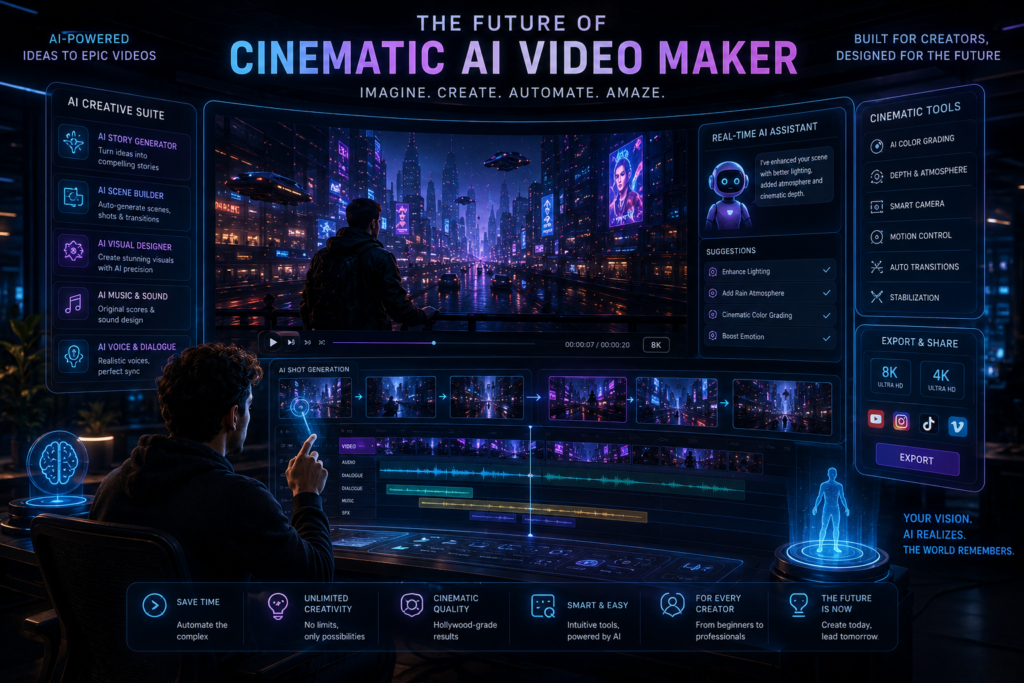
AI-powered video creation tools continue to evolve, with new features and workflows being introduced regularly.
In the coming years, AI may play a larger role in areas such as:
- AI-assisted filmmaking
- Digital avatars and virtual presenters
- More automated editing workflows
- Improved cinematic video generation
- Better storytelling support through AI tools
common ho sakta hai.
Learning AI video tools today may help creators adapt to evolving content creation workflows and explore new creative opportunities as the technology develops.
👉 Agar aap content creation field me grow karna chahte ho, to If you’re interested in content creation, learning AI-assisted video production can be a valuable skill alongside traditional editing and storytelling techniques.
Possible Future Trends in AI Video Creation
| Trend | Potential Impact |
|---|---|
| AI-Assisted Filmmaking | Faster concept visualization and production support |
| Improved Video Generation | More detailed and consistent AI-generated visuals |
| Smarter Editing Tools | Automation of repetitive editing tasks |
| Better Collaboration | AI support for creators and production teams |
| Multilingual Video Creation | Easier localization and global content creation |
AI is expected to become a stronger creative assistant rather than a complete replacement for human creativity. Storytelling, editing decisions, and artistic direction will continue to play an important role in professional video production.
Note: Future developments depend on ongoing research, software updates, and industry adoption. Features and capabilities may change over time.
🎯 Conclusion
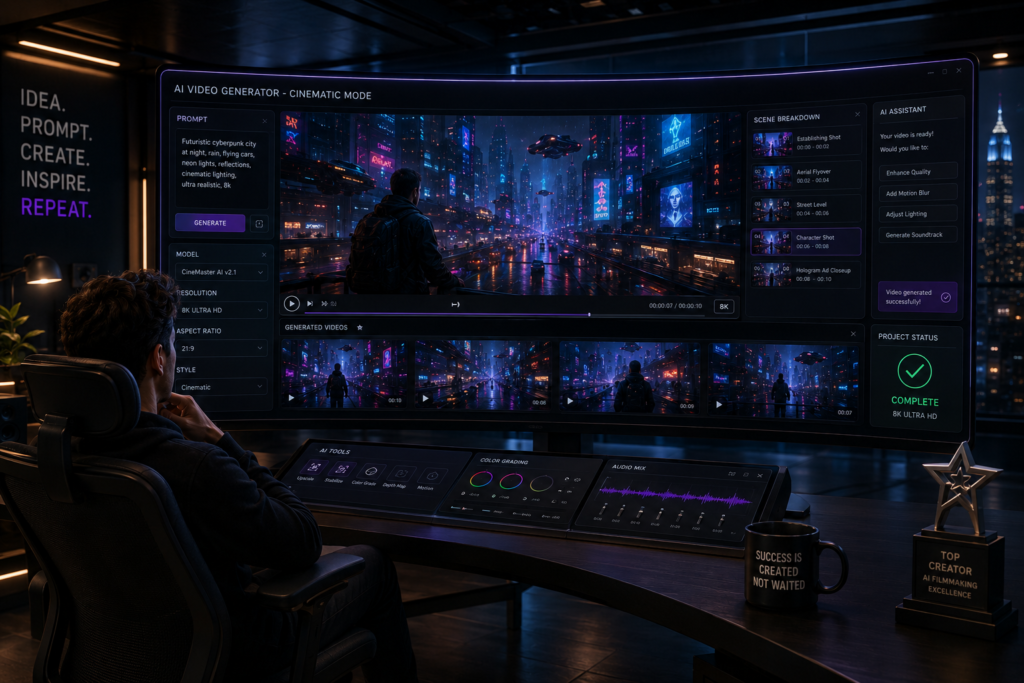
Runway ML is an AI-powered video creation platform that offers tools for AI-assisted video generation and editing. Its interface is generally beginner-friendly, while also providing advanced features for experienced users.
AI video generation tools make it possible to create cinematic-style videos from text prompts and supported inputs. The final quality depends on the platform, prompt design, editing, and creative direction.
If you’re interested in AI-assisted video creation, Runway ML is one option worth exploring based on your workflow and creative needs.
👉 Remember: “AI tools can become valuable creative skills when combined with storytelling, editing, and consistent practice.
If you enjoyed this article, be sure to If you found this guide helpful, consider sharing it with others who are exploring AI video creation, and continue learning as new AI tools and features evolve.
Final Takeaway
The best results usually come from combining AI tools with human creativity, thoughtful prompts, and careful editing. Treat AI as a creative assistant rather than a replacement for your ideas.
| Key Takeaway | Why It Matters |
|---|---|
| Learn Prompt Writing | Better prompts often produce more relevant outputs |
| Review AI Output | Manual refinement improves quality |
| Experiment Regularly | Different prompts can produce different results |
| Keep Learning | AI tools evolve quickly with new features |
| Combine AI with Creativity | Human storytelling remains important |
❓ Frequently Asked Questions (FAQs)
1. Cinematic AI Video Maker kya hota hai?
Cinematic AI Video Maker ek AI-powered tool hota hai jo text ya images ko professional cinematic videos me convert karta hai. Simple language me, aap idea do aur AI video bana deta hai.
2. Kya beginners bhi AI cinematic videos bana sakte hain?
Haan, bilkul. Aaj ke time me Runway ML, Pika Labs aur Kaiber AI jaise tools beginner-friendly hain. Agar aap basic prompts likhna jaante ho, to aap easily videos create kar sakte ho.
3. Best Cinematic AI Video Maker kaunsa hai?
Yeh aapki need par depend karta hai:
- Runway ML → cinematic storytelling
- Pika Labs → animated visuals
- Kaiber AI → music videos
- Synthesia → AI avatar videos
👉 Beginners ke liye Runway ML kaafi popular hai.
4. Kya AI video makers free hote hain?
Kai AI tools free trial provide karte hain. Lekin advanced features ke liye paid plans lene pad sakte hain.
5. AI cinematic videos kis kaam me use hote hain?
AI videos ka use:
- YouTube content
- Instagram Reels
- Short films
- Marketing ads
- Educational videos
- Storytelling content
me kiya jata hai.
6. Achha AI video prompt kaise likhein?
Detailed prompts best results dete hain.
Example:
❌ “City”
✅ “Cyberpunk futuristic city with neon lights and cinematic rain”
👉 Cinematic words use karna helpful hota hai.
7. Kya AI-generated videos monetized ho sakte hain?
Haan, agar aap original editing, voiceover aur creativity add karte ho to AI-generated videos YouTube aur social media par monetize kiye ja sakte hain.
8. Kya cinematic AI video makers mobile par bhi chalte hain?
Haan, kai AI tools browser-based hote hain aur mobile par bhi smoothly work karte hain.
9. AI video making ka future kaisa hai?
Future me AI video creation aur realistic hone wala hai. Ho sakta hai upcoming years me full movies bhi AI se banne lagen.
10. Kya AI video tools content creators ke liye useful hain?
Bilkul. Yeh tools creators ka time bachate hain aur low budget me professional-looking videos create karne me help karte hain.