
Imagine describing a scene in just a few words:
“A futuristic city, glowing with neon lights, on a rainy night.”
The AI tool processes your instructions and generates an image based on the description. Instead of manually creating every visual element from scratch, you can use a text prompt to guide an AI image generation system.
AI image generation has become an increasingly accessible tool for creators, marketers, bloggers, businesses, and other users who need visual content. These tools can be used for blog graphics, YouTube thumbnails, social media content, marketing materials, concept art, illustrations, and many other creative projects.
Yet many users still do not understand what happens between entering a prompt and receiving the final image.
How does an AI understand your words?
How can it generate faces, landscapes, products, and artistic scenes from a text description?
Why can different AI image generators produce different results from similar prompts?
And how should you choose an AI image generator in 2026?
In this comprehensive guide, you’ll learn how AI image generators work, explore the technologies behind them, compare different tools and their use cases, and learn practical techniques for writing better prompts and improving your generated images.
The Visual Content Problem Nobody Talks About
The Challenge of Creating Visual Content
Creating effective visual content can require time, technical skills, and access to suitable design tools.
Traditional graphic design may involve:
- Visual planning and creativity
- Basic or advanced design skills
- Suitable design software
- Time for creating and revising graphics
- Experience with visual composition and editing
For bloggers, marketers, and content creators, producing original visuals consistently can become a time-consuming part of the publishing workflow.
You may have experienced situations such as:
- Spending significant time searching for a suitable stock image
- Hiring a designer for graphics that require custom visual work
- Finding image-editing software difficult to learn
- Relying on widely used stock images that may not closely match your content
These challenges can make it harder to create a visual identity that feels specific to your brand or topic.
AI image generators offer another approach to creating visual content. Instead of relying only on existing images, creators can use text prompts to generate visuals tailored to a specific concept, subject, or content requirement.
The results can still require review, editing, and refinement, but AI image generation can provide an additional option for creators who need original visual concepts without starting every design from scratch.
What Is an AI Image Generator?
An AI image generator is a software system that uses machine learning models to create or modify visual content based on instructions such as text prompts, reference images, or other supported inputs.
A simple way to think about these systems is as models that have learned statistical patterns connecting visual features with language during training. The exact training process, model architecture, and data used can differ between AI systems.
For example, you might enter a prompt such as:
“A golden retriever playing on a beach during sunset”
The model processes the concepts and relationships described in the prompt, such as:
- A golden retriever
- A beach environment
- Sunset lighting
- The relationship between the subject, setting, and lighting
It then generates an image based on patterns represented in the model and the instructions provided in the prompt.
The output is generated by the model rather than simply retrieving one matching image from a traditional image search database. However, the legal and licensing implications of AI-generated content can vary by tool, jurisdiction, and how the output is used.
This ability to generate visual content from natural-language instructions is one of the main reasons AI image generation has become useful across creative, educational, marketing, and business workflows.
How AI Image Generators Work
Understanding this process can help you write more effective prompts and make better use of AI image-generation tools.
Modern AI image generators can create or assist with a wide range of visual content, including illustrations, thumbnails, artwork, marketing graphics, and other creative assets. The exact process varies between models, but many systems follow several broad stages.

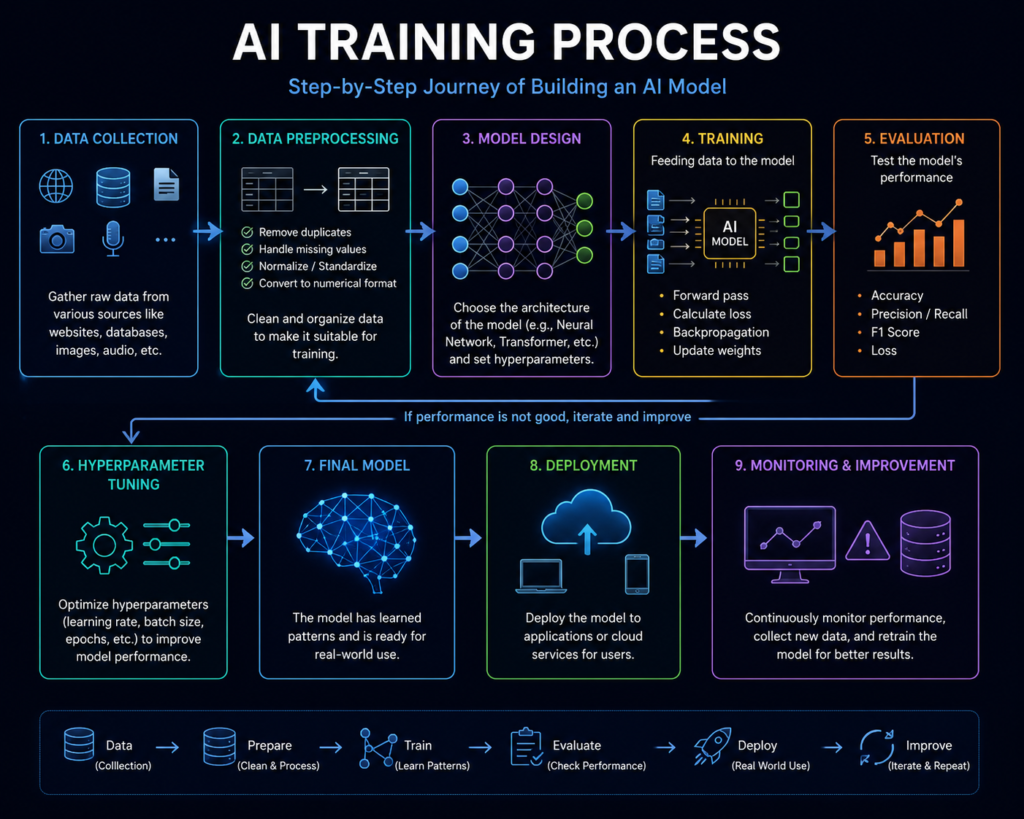
Step 1: Training the AI Model
Before an AI model can generate images, it must first be trained.
Developers train AI models on large datasets that can contain images, text descriptions, or other forms of visual and language data. The exact data, training method, and scale vary between models.
During training, the model learns statistical relationships between visual patterns and language. These learned patterns can relate to elements such as:
- Objects
- Colors
- Shapes
- Textures
- Lighting
- Visual styles
- Faces and people
- Animals
- Environments
Training large AI models can require substantial computing resources, but the exact hardware, training time, and infrastructure vary considerably between models and organizations.
In simple terms, training gives the model the ability to represent patterns connecting visual content with language.
Step 2: Processing Your Prompt
When you enter a prompt, the system processes the text and converts it into representations that guide the image-generation process.
For example:
“A cyberpunk city street at night with neon signs reflecting on wet pavement.”
The prompt contains several useful visual instructions:
Subject
City street
Style
Cyberpunk
Time
Night
Lighting
Neon
Surface Details
Wet pavement
Mood
Futuristic
A clear and specific prompt can give the model more useful guidance about the desired subject, style, composition, and other visual details.
This is why prompt writing can be an important part of getting more predictable results from AI image-generation tools.
Step 3: The Image Generation Process
Many widely used AI image-generation systems use diffusion-based techniques, although the underlying architectures and generation methods can differ between models.
In a typical diffusion-based system, generation starts from a noisy representation and progressively transforms it toward an image guided by the prompt.
The model progressively reduces the noise while using the prompt and learned patterns to guide the result. During this process:
- Shapes begin to form
- Objects become more defined
- Colors and textures develop
- Fine details are added
The number of generation steps and the time required can vary depending on the model, tool, resolution, hardware, and current workload.
Step 4: Image Formation and Refinement
During generation, the model uses learned patterns and conditioning information to influence elements such as:
- Object placement
- Composition
- Lighting
- Perspective
- Texture
- Visual style
These processes can produce detailed and visually coherent results, although output quality varies between models, prompts, settings, and use cases.
Step 5: Final Image Output
After the generation process is complete, the system produces the final image output.
Depending on the platform, additional tools may allow users to:
- Upscale an image
- Remove or replace backgrounds
- Edit selected areas
- Generate variations
- Apply different visual styles
- Expand an image beyond its original boundaries
The final result can then be reviewed, edited, and prepared for its intended use.
The Core Technologies Behind AI Image Generation
Understanding these technologies helps explain how modern AI systems can generate increasingly detailed and complex visual content. Different AI image generators may use different architectures and techniques, but several core concepts are useful for understanding how these systems work.
Diffusion-Based Models
Diffusion-based models are an important approach used by many AI image-generation systems.
Examples of AI image-generation systems include:
- Stable Diffusion
- Midjourney
- GPT Image
- Adobe Firefly
In simple terms, diffusion-based generation starts from a noisy representation and progressively transforms it into an image while using the prompt and learned patterns to guide the result. The exact architecture and generation process can vary between systems.
Neural Networks
Neural networks are computational models made up of interconnected layers that can learn patterns from data. They are a fundamental part of many modern AI systems.
In image-generation systems, learned representations can capture patterns related to:
- Faces and people
- Objects
- Shapes and textures
- Colors and lighting
- Visual styles
Neural-network-based methods provide the computational foundation for many current AI image-generation systems.
Machine Learning
Machine learning provides methods for training AI systems to learn patterns from data. Model improvements typically come from changes such as better training data, model architectures, optimization, evaluation, or additional training.
The quality and diversity of training data, together with the model architecture and training process, can influence the quality and range of generated results.
Advances in model architectures, training methods, data, computing resources, and evaluation techniques can contribute to improvements in AI image-generation systems over time.
In Simple Terms: How AI Image Generation Works
In simple terms, an AI image generator takes instructions provided by the user and uses a trained AI model to produce or modify visual content. When you enter a prompt such as:
“Create a futuristic city at sunset.”
the system processes the description and generates an image based on the visual concepts represented in the prompt.
Depending on the platform, AI image tools can support tasks such as creating illustrations, photorealistic-style images, marketing visuals, thumbnail concepts, and other creative assets.
The exact capabilities vary between tools, so the best choice depends on the type of visual content you want to create, the level of editing control you need, and the tool’s available features.
Why AI Image Generators Are Useful in 2026

Visual content plays an important role across websites, social media, marketing, education, and other digital communication channels. Creating suitable visuals for every piece of content can require time, design skills, and access to appropriate tools.
AI image generators provide another way to create visual assets without having to produce every graphic manually. Their usefulness depends on the type of project, the selected tool, and the amount of human editing required.
1. Faster Visual Prototyping
AI image tools can help users create an initial visual concept without building the entire design manually. Generation time varies by tool, model, resolution, and workload.
2. Lower the Technical Barrier
Many AI image tools provide prompt-based workflows that allow beginners to experiment with visual creation without advanced design software skills. However, producing consistent, high-quality results still requires practice and visual judgment.
3. Potentially Reduce Production Costs
AI tools can reduce some manual design work for certain projects. However, costs may still include subscriptions, generation credits, editing software, stock assets, or professional design services when required.
4. Explore More Visual Concepts
AI image generators allow users to experiment with different subjects, compositions, styles, and visual directions from text-based instructions. This can make it easier to explore multiple concepts before selecting or refining a final design.
5. Support Visual Communication
Relevant visuals can make some types of content easier to scan, understand, or present. Their effectiveness depends on factors such as relevance, quality, audience, platform, and context.
6. Create Content for Different Formats
Depending on the tool, creators can generate or adapt visual concepts for different formats such as blog graphics, social media posts, thumbnails, presentations, and marketing materials.
Key Benefits of AI Image Generator Tools
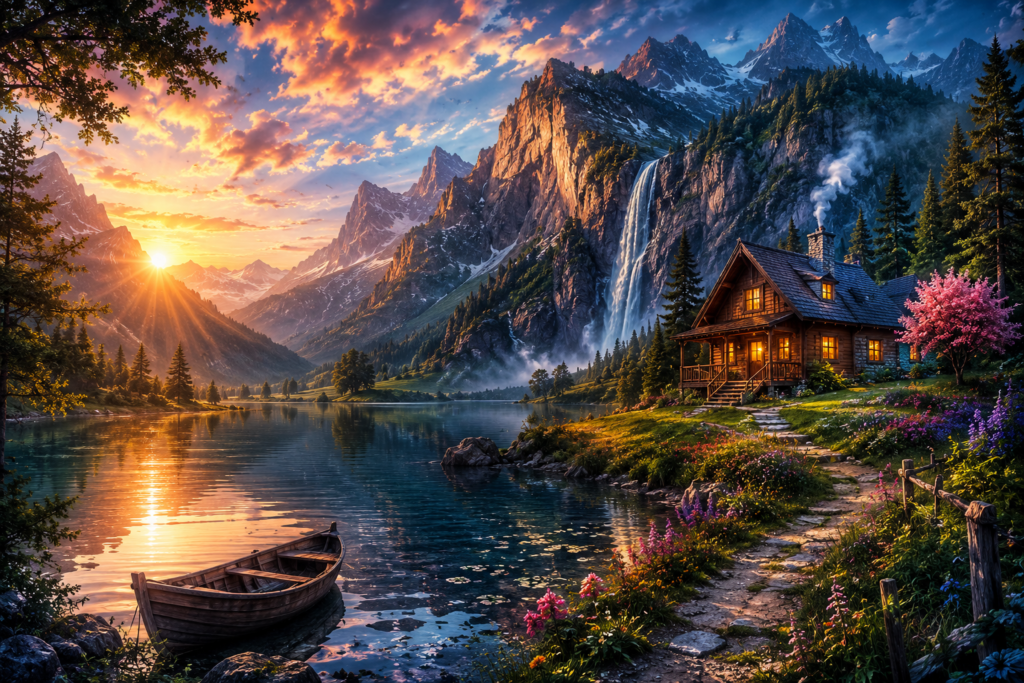
AI image generators can be useful for creators, marketers, bloggers, businesses, and other users who need to develop visual content. The available features and benefits vary between platforms, models, and subscription plans.
1. Generate Detailed Visuals
Many AI image tools can generate detailed visuals based on text prompts, although image quality depends on the model, prompt, settings, and intended use.
2. Explore Multiple Variations
Depending on the tool and plan, users can generate multiple variations of a concept and compare different compositions, styles, or visual approaches before selecting one for further editing.
3. Flexible Options for Different Budgets
AI image platforms may offer free plans, trials, or paid subscriptions with different usage limits. This gives users the option to test a workflow before deciding whether a paid plan is necessary.
4. Prompt-Based Creation
Many AI image tools use text prompts as a primary way to describe a desired visual. This can make image creation more accessible, although getting consistent results may require practice with prompt writing and image editing.
5. Iterate and Refine Visuals
Some platforms allow users to edit selected areas, create variations, expand an image, remove backgrounds, or make other changes. These features can make it easier to refine an initial concept instead of starting over.
6. Work From References
Depending on the platform, users may be able to provide reference images or other visual inputs to guide style, composition, or subject consistency. Available controls vary between tools.
Real-World Use Cases
AI image generators can be useful across different types of creative, educational, marketing, and business workflows. The exact use cases depend on the capabilities of the selected tool and the user’s requirements.
Bloggers
Bloggers can use AI image generators to create featured images, article illustrations, infographic concepts, and supporting visuals that match the topic and visual style of a post.
YouTubers and Video Creators
YouTubers can use AI image tools to develop thumbnail concepts, channel graphics, video backgrounds, storyboards, and visual ideas for upcoming videos. Final thumbnails and graphics may still require editing to match platform dimensions and branding.
Businesses and Marketers
Businesses can use AI-generated visuals for marketing concepts, social media graphics, campaign ideas, presentations, and product-related creative work. Before using generated or third-party assets commercially, businesses should review the AI platform’s licensing and usage terms.
Students and Educators
Students and educators can use AI image tools to create presentation visuals, educational illustrations, diagrams, and concept images. For academic work, AI-generated visuals should be reviewed for accuracy and should not be presented as factual evidence without appropriate verification.
Freelancers and Designers
Freelancers can use AI image tools during concept development and for certain client projects, such as social media graphics, marketing visuals, illustrations, or creative mockups. However, freelancers should check the tool’s commercial-use terms and clearly understand any licensing restrictions before delivering AI-generated assets to clients.
E-commerce and Product Creators
E-commerce sellers can use AI tools to explore product-scene concepts, promotional backgrounds, lifestyle compositions, and campaign visuals. Product images should accurately represent the actual product, and AI-generated modifications should not mislead customers about product features or appearance.
AI Image Generation in Simple Terms

At a high level, an AI image-generation workflow can be understood in four stages:
- Prompt: The user provides instructions describing the desired visual.
- Prompt Processing: The AI system processes the text and uses it to guide the generation process.
- Image Generation: The trained model generates an image based on the prompt and its learned representations.
- Review and Refinement: The generated result can be reviewed, edited, or regenerated depending on the tool and the user’s requirements.
The exact process varies between AI models and platforms, but these stages provide a simple way to understand the overall workflow.
Best AI Image Generator Tools in 2026
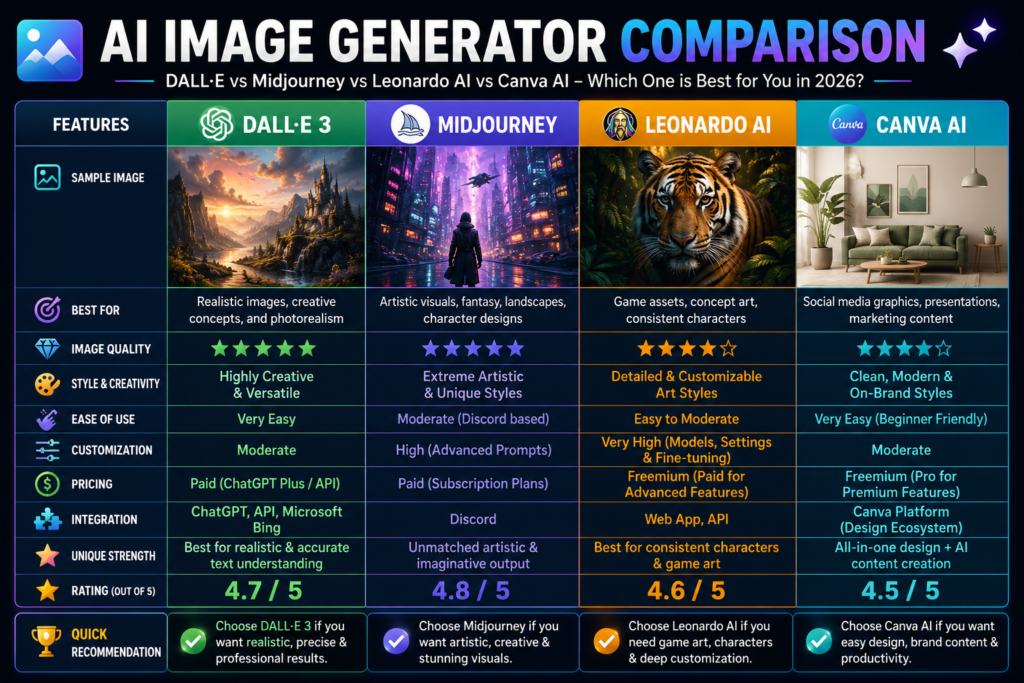
The best AI image generator depends on what you want to create, how much control you need, and which features matter most to your workflow. The tools below serve different use cases rather than being equally suitable for every creator.
1. DALL-E
DALL-E is an AI image-generation system designed to create visual content from natural-language instructions.
Best suited for:
- Creative concepts
- Illustrations
- General-purpose image generation
- Visual experimentation
What to consider:
Available features, image-generation limits, pricing, and commercial-use terms can vary depending on the current product and plan.
2. Midjourney
Midjourney is an AI image-generation platform widely used for creating stylized, artistic, and visually detailed images.
Best suited for:
- Creative artwork
- Concept visuals
- Stylized imagery
- Visual exploration
What to consider:
The available plans, generation limits, editing features, and usage terms should be checked before choosing the platform for a specific workflow.
3. Leonardo AI
Leonardo AI provides AI-assisted image-generation and creative tools for users working on visual concepts and digital assets.
Best suited for:
- Game-related assets
- Concept art
- Design exploration
- Creative projects
What to consider:
Users should compare its current generation features, editing capabilities, usage limits, and licensing terms with their specific requirements.
4. Adobe Firefly
Adobe Firefly is designed to integrate AI-assisted creative workflows with Adobe’s broader ecosystem.
Best suited for:
- Branding concepts
- Marketing creatives
- Image editing
- Adobe-based creative workflows
What to consider:
Its usefulness may be particularly relevant for creators already working with Adobe products. Current features, plan limitations, and commercial-use conditions should be reviewed before use.
5. Canva AI
Canva’s AI-powered image features are integrated into a broader visual design workflow, which can be useful for users who want to generate images and then place them into social posts, presentations, thumbnails, or other designs.
| Tool | Best Suited For | Main Strength | Ease of Use | Free/Paid |
|---|---|---|---|---|
| DALL-E | General creative work | Prompt-based generation | Verify | Verify |
| Midjourney | Artistic & creative visuals | Visual exploration | Verify | Verify |
| Leonardo AI | Creative assets | Design-oriented workflows | Verify | Verify |
| Adobe Firefly | Adobe workflows | Creative integration | Verify | Verify |
| Canva AI | Social/design workflows | Integrated design workflow | Verify | Verify |
Best suited for:
- Social media graphics
- Thumbnails
- Presentations
- Quick design workflows
What to consider:
Feature availability and usage limits can vary by Canva plan and may change as the platform updates its AI features.
How to Compare AI Image Generators
Before choosing a tool, compare it based on the requirements of your project rather than choosing solely because it is described as the “best.”
Important factors include:
- Image-generation quality
- Prompt adherence
- Editing capabilities
- Text rendering
- Reference-image support
- Ease of use
- Generation limits
- Pricing
- Commercial-use terms
- Export options
The right choice ultimately depends on your content type, creative workflow, budget, and the level of control you need.
Practical Tips for Using AI Image Generators
The quality and consistency of AI-generated images can depend on how clearly you describe the desired result. The following practices can help you create more specific prompts and refine your outputs.
1. Write a Clear and Specific Prompt
Describe the main subject, setting, visual style, composition, and other details that are important to the image. A more specific prompt can give the model clearer guidance, although results can still vary between tools and models.
2. Specify the Visual Style
If the style matters, include it in the prompt. For example:
- Photorealistic
- 3D-rendered
- Digital illustration
- Watercolor
- Cinematic
The available style controls and how they affect the output vary between AI image generators.
3. Add Relevant Visual Details
Include details that help communicate the desired result, such as:
- Lighting
- Background or setting
- Camera angle or composition
- Color palette
- Mood
- Subject position
- Important objects or textures
Avoid adding unnecessary instructions that do not contribute to the intended visual.
4. Describe the Composition
When composition matters, specify elements such as close-up, wide shot, centered subject, overhead view, portrait orientation, or space for text. This can help communicate how you want the visual arranged.
5. Improve the Prompt Through Iteration
If the first result does not match your expectations, identify what is wrong and modify the relevant part of the prompt. You may need to adjust the subject, composition, style, lighting, or other instructions rather than rewriting the entire prompt from scratch.
6. Check Text and Visual Details
If an image contains text, logos, labels, numbers, or other important details, review the output carefully. AI-generated text and small visual elements may contain errors or inconsistencies, depending on the tool.
Common Mistakes to Avoid
Even with a capable AI image generator, common prompting and workflow mistakes can reduce the quality or usefulness of the final result. Avoiding these issues can make the image-generation process more efficient and predictable.
1. Using Vague Prompts
A vague prompt may leave important visual decisions unspecified. Instead of writing “Create a nice city,” describe the subject, setting, visual style, lighting, composition, and other details that matter to the intended result.
2. Making Too Many Unnecessary Edits
Repeatedly changing an image without a clear goal can make the workflow inefficient and may reduce consistency. Make targeted edits based on a specific problem, such as composition, lighting, subject details, or unwanted elements.
3. Choosing the Wrong Output Resolution
Select an output size and resolution appropriate for the intended use. Higher resolution can be useful for print or detailed designs, while web content may require optimized dimensions and file sizes for faster loading.
4. Publishing the Image Without Reviewing It
AI-generated images can contain unexpected details, distorted objects, incorrect text, or other visual inconsistencies. Review the image carefully before publishing, especially when it will be used for business, educational, or public-facing content.
5. Ignoring Licensing and Usage Terms
Do not assume that every AI-generated image can be used anywhere without restrictions. Check the tool’s current terms, commercial-use conditions, and the rights associated with any reference images, stock assets, logos, or other third-party content used in the workflow.
6. Expecting the First Generation to Be Final
The first result may not match your requirements perfectly. Instead of accepting or completely discarding it, identify the specific issue and adjust the prompt, settings, or editing instructions before generating another version.
Expert Tips
The following practices can help improve the consistency and usefulness of AI-generated images.
1. Test Multiple Prompt Variations
If the first result does not match your requirements, try different versions of the prompt. Small changes to the subject, composition, lighting, style, or level of detail can produce different results.
2. Experiment With Different Visual Styles
Test different visual approaches such as photorealistic, editorial, cinematic, 3D-rendered, or illustrated styles when appropriate. Compare the results and choose the style that best fits the purpose of the content.
3. Combine AI Generation With Human Editing
AI-generated images can be treated as starting points rather than automatically finished designs. Use editing tools to correct unwanted details, adjust composition, add branding, resize the image, or prepare it for the intended platform.
4. Keep a Record of Effective Prompts
When a prompt produces a useful result, save it along with the tool, model, settings, and any important modifications. This can make it easier to reproduce or adapt successful visual concepts later.
Future of AI Image Generators
AI image-generation technology is likely to continue developing across image creation, editing, personalization, and multimodal workflows. The exact capabilities and timeline will vary between models and platforms.
- Real-Time and Interactive Generation
Future systems may make image generation and editing more interactive, allowing users to adjust visual elements with less delay.
- Image-to-Video and Multimodal Workflows
AI tools may increasingly connect image generation with video, animation, and other media workflows, allowing creators to use generated visuals as starting points for more complex content.
- More Interactive Animation and Editing
Future AI systems may provide more advanced ways to animate generated images, modify individual visual elements, and create motion-based content from still visuals.
As these technologies develop, AI may become a more integrated part of creative workflows, while human direction, editing, fact-checking, and creative judgment remain important.
AI Image Generator Comparison
Different AI image generators are designed for different workflows, so there is no single tool that is objectively the best for every user. Instead of assigning fixed scores, it is more useful to compare the tools based on their common use cases, strengths, and practical considerations.
| Tool | Best Suited For | Key Strength | Important Consideration |
|---|---|---|---|
| ChatGPT Image Generation | General-purpose image creation and conversational workflows | Prompt-based creation and iterative visual tasks | Available features and limits can vary by plan |
| Midjourney | Artistic and stylized visual creation | Creative visual exploration | Workflow and available features may differ from other platforms |
| Adobe Firefly | Adobe-based creative workflows | Integration with Adobe’s creative ecosystem | Check current plan features and usage terms |
| Leonardo AI | Creative assets and concept development | Design-oriented generation workflows | Features and usage limits vary by plan |
| Stable Diffusion | Customizable and advanced workflows | Flexibility and customization | Setup and workflow can require more technical knowledge |
| Ideogram | Text-heavy graphics and visual designs | Useful for designs where typography is important | Features and output quality can vary by model and use case |
How to Choose the Right Tool
Consider your specific workflow before choosing a platform:
- For general-purpose image creation: Consider a tool that offers a straightforward prompt-based workflow.
- For artistic and stylized visuals: A platform focused on creative image generation may be more suitable.
- For Adobe-based workflows: Adobe Firefly may be worth considering if you already use Adobe’s creative tools.
- For customizable workflows: Stable Diffusion-based solutions can provide more flexibility for users who are comfortable with technical configuration.
- For text-focused graphics: A tool designed to handle typography and text within images may be more appropriate.
Features, pricing, generation limits, model capabilities, and usage terms can change over time. Check the current official information for each platform before making a decision.
Pros and Cons of AI Image Generators
AI image generators can be useful for many creative workflows, but they also have limitations. Understanding both sides can help you decide when these tools are appropriate for your needs.
Pros
✔ Can reduce some manual design work
✔ May reduce costs for some visual-content workflows
✔ Accessible for many beginners
✔ Makes it easier to explore different visual concepts
✔ Can speed up some visual-creation workflows
✔ Can support visual-content production at scale
Cons
✘ Can produce inaccurate or inconsistent details
✘ Better results may require practice with prompt writing
✘ Licensing and commercial-use terms vary between tools
✘ Output quality and capabilities vary between models and platforms
✘ Generated images may require manual review and editing before publication
Final Thoughts
Understanding how AI image generators work can help creators make more informed decisions about when and how to use these tools.
Creators who learn to use these tools effectively may be able to explore visual ideas more efficiently and integrate AI into their existing content workflows.
AI image generation is not about replacing creativity.
Used thoughtfully, it can support human creativity by helping with idea exploration, visual experimentation, and repetitive production tasks.
The most useful approach is to combine AI-generated possibilities with human judgment, editing, and creative direction.
Conclusion
AI image generators combine machine learning, image-generation techniques, and user instructions to create or modify visual content. As these tools continue to develop, they are becoming an increasingly useful part of many creative and content-production workflows.
Bloggers, YouTubers, marketers, businesses, freelancers, and other creators can use AI image generators to explore visual concepts, create supporting graphics, develop marketing materials, and speed up parts of their content workflow.
There is no single AI image generator that is best for everyone. The right choice depends on your content type, required features, budget, level of control, and intended use.
If AI image generation fits your workflow, start by testing a tool that matches your specific requirements. Experiment with prompts, review the generated results carefully, and use editing tools when necessary.
AI image generation works best as a creative tool rather than a replacement for human judgment. The most practical approach is to combine AI-generated ideas with human review, editing, fact-checking where relevant, and creative direction.
FAQ
What Is an AI Image Generator?
An AI image generator is a software system that uses machine learning models to create or modify visual content based on inputs such as text prompts, reference images, or other supported instructions.
Are AI Image Generators Free?
Some AI image generators offer free plans, trials, or limited usage, while others require a paid subscription or credits. Features, generation limits, and pricing can vary between platforms and plans.
Which AI Image Generator Is Best?
There is no single AI image generator that is best for every user. The right choice depends on your workflow. For example, some tools may be better suited to artistic visuals, others to general-purpose image creation, Adobe-based workflows, customizable generation, or text-focused graphics.
Can Beginners Use AI Image Generators?
Yes. Many AI image generators provide prompt-based interfaces that beginners can use without advanced design skills. However, creating consistent results may require practice with prompt writing, image selection, and basic editing.
How Do AI Image Generators Create Images?
Many AI image-generation systems process a text prompt and use a trained model to generate an image based on learned visual and language patterns. Some systems use diffusion-based techniques, while architectures and generation methods can vary between models.
Are AI-Generated Images Copyright-Free?
Not necessarily. Whether an AI-generated image can be used commercially or what rights apply to the output depends on the tool’s terms, the content used to create the image, applicable laws, and how the image is used. Users should review the current licensing and commercial-use terms of the specific platform before publishing or selling AI-generated images.
Can AI-Generated Images Be Used Commercially?
Commercial use depends on the specific platform’s terms, the plan you are using, and applicable laws or licensing conditions. Always check the current commercial-use terms before using an AI-generated image in advertisements, products, client work, or other commercial projects.