
Introduction :
Have you ever wondered whether you can draft articles, get coding assistance, or generate YouTube script ideas directly from your mobile phone? If yes, the ChatGPT app can assist you with these tasks.
Today, AI-powered apps are helping users with writing, learning, brainstorming, coding assistance, and everyday productivity. ChatGPT is one of the most popular AI assistants designed to support these language-based tasks.
In this guide, you’ll learn:
- What the ChatGPT app is
- How it works
- How to use it
- Its key features, benefits, and limitations
- Practical ways people use it for content creation, learning, and productivity
Note: AI-generated responses should always be reviewed, edited, and fact-checked before being used for academic, business, or professional purposes.
What is ChatGPT? Complete Beginner’s Guide (2026)
Artificial Intelligence (AI) is increasingly being used across education, business, content creation, software development, and everyday productivity. One of the most widely used AI assistants in this field is ChatGPT.
If you’ve ever wondered what ChatGPT is, how it works, what it can do, and how people are using it in 2026, this guide is for you.
In this article, we’ll explain ChatGPT in simple Hindi with practical examples. You’ll learn its features, common use cases, benefits, limitations, and tips for using it more effectively as a beginner.
Note: AI-generated responses should always be reviewed and verified before being used for important academic, professional, business, legal, medical, or financial purposes
What is ChatGPT? (Chat GPT Kya Hai in Hindi)
ChatGPT is an ( Chat GPT kya hai in Hindi ) – Artificial Intelligence (AI)-based application developed by OpenAI that can generate natural-language responses based on the prompts or questions provided by users. Artificial Intelligence
In simple words:
- It is an AI assistant that can answer questions.
- It can help explain concepts, generate ideas, and assist with different writing and productivity tasks.
- Users can interact with it by typing questions or instructions in natural language.
Example
You: “How do I write a blog?”
ChatGPT: Can provide a step-by-step outline, writing suggestions, and content ideas based on your request.
ChatGPT may assist with tasks such as:
- Writing and editing
- Coding assistance
- Learning and studying
- Business communication
- YouTube content ideas
- Brainstorming and research support
Note: AI-generated responses should always be reviewed and fact-checked before being used for academic, business, or professional purposes.
Why Do People Use ChatGPT?
People commonly use ChatGPT to:
- Learn new topics
- Draft articles and emails
- Brainstorm ideas
- Summarise information
- Get coding assistance
- Improve productivity
What is Chat GPT in Hindi? (Chat GPT क्या है?)

What is ChatGPT in Hindi? (ChatGPT क्या है?)
ChatGPT is an AI chatbot developed by OpenAI. It uses Artificial Intelligence (AI) and Natural Language Processing (NLP) to understand user prompts and generate natural-language responses.
In simple words:
ChatGPT is an AI assistant that can help users by:
- Answering questions
- Drafting articles and emails
- Explaining concepts
- Assisting with coding
- Brainstorming ideas
- Summarising information
You can interact with ChatGPT by typing questions or instructions in natural language.
Why Do People Use ChatGPT?
People commonly use ChatGPT to:
- Learn new topics
- Create content drafts
- Improve writing
- Generate coding examples
- Brainstorm ideas
- Increase productivity
Example
User: What is the capital of India?
ChatGPT: The capital of India is New Delhi.
User: Write a blog post about AI tools.
ChatGPT: It can generate a draft blog post based on your instructions, which you can review, edit, and refine before publishing.
Important: ChatGPT may occasionally generate inaccurate or incomplete information. Always verify important facts before using AI-generated content for academic, business, legal, medical, or financial purposes.
Why Was ChatGPT Developed?
The internet contains a vast amount of information, but finding the right answer is not always easy.
Common challenges include:
- Finding reliable information can take time.
- Important details are often spread across multiple websites.
- Reading lengthy articles is not always practical.
- Many users need quick explanations or summaries.
ChatGPT was developed to help users interact with information more efficiently. It can generate responses, explain concepts, summarise text, and assist with a variety of language-based tasks based on the user’s prompt.
Important: ChatGPT may occasionally generate inaccurate or incomplete information. Important facts should always be verified using reliable sources.
How ChatGPT Helps
People commonly use ChatGPT to:
- Understand complex topics
- Summarise long text
- Draft content
- Brainstorm ideas
- Get coding assistance
- Improve productivity
The quality of the response depends on the prompt and the user’s review of the generated output.
How does ChatGPT work?

ChatGPT is based on Large Language Models (LLMs).
It has been trained on billions of words and sentences.
When you ask a question, ChatGPT:
Step 1: Understands your question
The AI analyzes your prompt to identify its meaning and context.
Step 2: Recognizes patterns
It utilizes patterns learned from its training data.
Step 3: Generates a response
It generates a response based on your prompt and the patterns learned during training.
Step 4: Continues the conversation
It can provide subsequent responses by keeping previous questions in mind.
The quality of the response depends on the clarity of the prompt and the context available in the conversation.
Why is ChatGPT important?
AI tools can help users complete certain tasks more efficiently when used appropriately.
ChatGPT offers you:
- It saves time.
- It provides ideas.
- May help improve productivity
- AI Tool
Real Scenario:
Imagine you are a blogger…
- Earlier: It used to take 2–3 hours to write an article.
- Now: ChatGPT can help create an outline or first draft more quickly, reducing the time needed for writing and research. The final content should still be reviewed and edited.
That is why it is essential for every digital creator to understand what ChatGPT is.
7 Useful Facts About ChatGPT (2026)
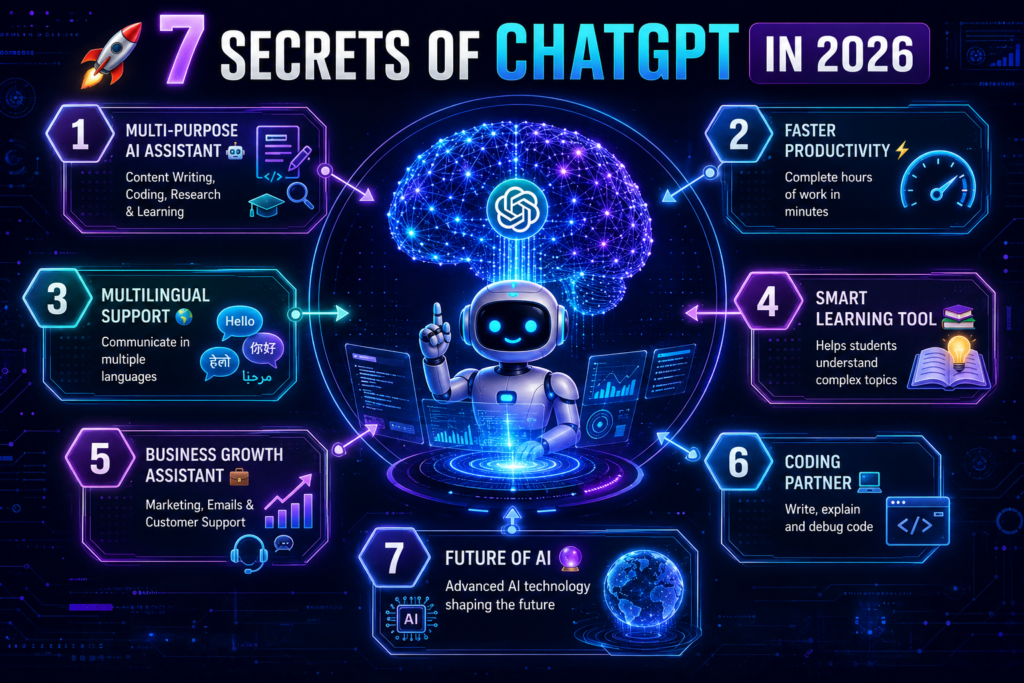
ChatGPT has continued to evolve with new features and capabilities.
Here are 7 important secrets that most new users don’t know.
Secret 1: ChatGPT is not just a chatbot.
Many people view it merely as a Q&A tool.
In reality, it is:
- Content Writer
- Coding Assistant
- Research Assistant
- Marketing Helper
- Business planning assistance
- Learning Companion
It can also function like…
Secret 2: It can help users complete certain writing and research tasks more efficiently.
ChatGPT saves a lot of time when preparing blog posts, social media content, emails, scripts, or research notes.
Example:
It can quickly generate a first draft or outline, potentially reducing the time required for writing. The actual time depends on the task and the editing needed.
Secret 3: Multiple Languages Support
Chat GPT isn’t limited to English.
It:
- Hindi
- English
- Spanish
- French
- German
- Japanese
It can work in several languages.
Secret 4: A Powerful Learning Tool for Students
Students can use this:
- In making notes
- In understanding concepts
- In essay writing
- In homework assistance
- In exam preparation
Secret 5: It can assist businesses with tasks such as drafting emails, creating content, and brainstorming ideas, which may help improve workflow efficiency.
Small and large businesses are using ChatGPT:
- Customer Support
- Marketing
- Content Creation
- Product Descriptions
- Email Campaigns
For.
Secret 6: Helps with coding.
Developers may use ChatGPT
- Code Writing
- Debugging
- Code Explanation
- Documentation
For.
Secret 7: AI is becoming increasingly common across many industries.
By 2026, AI-based tools are being used in almost every industry.
Many individuals and organizations use AI assistants such as ChatGPT as part of their digital workflows, depending on their needs.
Chat GPT Ke Benefits
✔ 1. Time Saving
It can help reduce the time required for certain tasks, depending on the prompt and the type of work. It can help reduce the time required for certain tasks.
✔ 2. Easy to Use
Basic tasks can be performed without advanced technical knowledge, although learning how to write clear prompts can improve the results.
✔ 3. Multi-purpose Tool
- Writing : Draft articles, emails, reports, and social media content.
- Coding : Explain programming concepts, generate sample code, and help identify errors.
- Marketing :Brainstorm campaign ideas, create ad copy, and write product descriptions.
- Learning : Explain difficult concepts, summarize information, and support exam preparation
✔ 4. Free Version Available
Basic use ke liye free hai
✔ 5. 24/7 Available
The service is generally available online, although access may depend on internet connectivity, platform availability, and account status.
✔ Real-Life Example
A blogger can use ChatGPT to create a blog outline, draft the first version of an article, and generate content ideas. A student can use it to summarize long chapters and understand complex topics more easily.
Who Can Benefit from ChatGPT?
ChatGPT can be useful for:
- Students
- Bloggers
- Freelancers
- Developers
- Business owners
- Content creators
- Marketing professionals
Important: AI-generated responses should always be reviewed and verified before being used for academic, business, legal, medical, financial, or other important purposes.
The quality of the output depends on the prompt provided by the user. Clear and detailed prompts generally produce more relevant results.
How does Chat GPT work?
Step 1: User Enters a Prompt
The process begins when you type a question, instruction, or request into ChatGPT.
Step 2: ChatGPT Analyzes the Prompt
It analyzes the words, context, and intent of your prompt using its language model.
Step 3: Response Generation
Based on the prompt and the patterns learned during training, ChatGPT generates a relevant response.
Step 4: Conversation Continues
ChatGPT can use the previous conversation as context to provide more relevant follow-up responses.
Natural Language Processing (NLP) is the technology that enables ChatGPT to understand user prompts and generate responses in natural language.
Real-Life Example
Example:
A student asks:
“Explain Newton’s First Law in simple words.”
ChatGPT can provide a simplified explanation with examples, making the concept easier to understand.
Limitation
The quality of the response depends on the clarity of the prompt. ChatGPT may occasionally generate inaccurate or incomplete information, so important facts should always be verified
Simple Example:
You write:
👉 You review, edit, and customize the script before using it. You review, edit, and customize the script before publishing
👉 “Give me a YouTube script”
Step-by-Step: How to Use the ChatGPT App
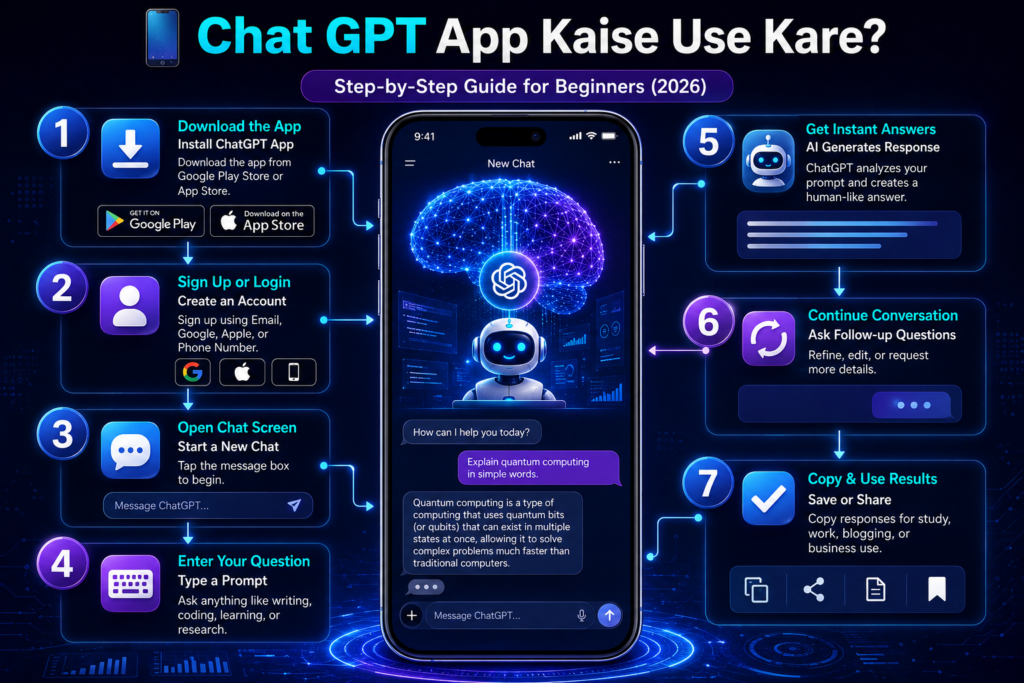
Step 1: Download the App
Download the official ChatGPT app from the Google Play Store (Android) or the Apple App Store (iPhone/iPad).
Step 2: Create an Account (If You’re a New User)
If you don’t already have a ChatGPT account, sign up using your:
- Email address
- Google account
- Apple account (where available)
- Microsoft account (where available)
Once your account is created, you can log in to access the app.
Step 3: Log In
Open the ChatGPT app and sign in using your registered account credentials.
Step 4: Open the Chat Window
After logging in, the chat interface will open. This is where you can type your questions, requests, or instructions.
Step 5: Enter Your Prompt
Type a clear and specific question or instruction.
Example:
“What is the ChatGPT app in Hindi?”
Tip: The more specific your prompt is, the more relevant the response is likely to be.
Step 6: Review the Response
ChatGPT will generate a response based on your prompt. Read the response carefully and edit or verify important information before using it for academic, business, or professional purposes.
Simple Example
You type:
“Write a YouTube script about AI tools.”
ChatGPT may:
- Understand your request
- Create a structured outline
- Generate a draft script
- Suggest titles or content ideas
You should then:
- Review the draft
- Edit it as needed
- Add your own insights or examples before publishing
Important Note
The quality of ChatGPT’s responses depends on the clarity of your prompt. Clear, detailed instructions generally produce more relevant and useful results. AI-generated content should always be reviewed and fact-checked before being used for important purposes.
What all can you do with ChatGPT?
- Blog Writing – Generate blog outlines, first drafts, and content ideas
- YouTube Scripts – Create structured video scripts with introductions, main points, and conclusions.
- Instagram Captions – Draft captions, hashtags, and content ideas for social media posts.
- Resume Writing – Help create or improve resumes and cover letters.
- Coding Help – Explain programming concepts, suggest code examples, and help identify common errors.
- Business Ideas – Brainstorm startup ideas, marketing strategies, and business plans.
Real-Life Example
A freelancer can use ChatGPT to draft client emails, generate blog ideas, and prepare social media content, while reviewing and editing the final output before sending or publishing.
🔥 Best Tips & Strategies
✔ Clear Prompt Likho
Incorrect: “Wrote an article”
Correct: “Wrote a 1000-word SEO-friendly article on tools”
✔ Specific Bano
The clearer the input, the better the output.
✔ Follow-up Questions Pucho
The first response may not always meet your requirements. You can ask follow-up questions or request revisions to improve the result.
✔ Review and Refine the Output
Always review the generated response and make changes where necessary to improve accuracy, clarity, and originality.
Important: ChatGPT can generate helpful drafts and suggestions, but important content should always be reviewed, edited, and fact-checked before use.
Who Uses ChatGPT?”
- Students
- Bloggers
- Freelancers
- Developers
- Business owners
- Marketing professionals
❌ Common Mistakes
🚫 1. Copy Paste Content
Publishing AI-generated content without editing can reduce originality and may affect content quality.
🚫 2. Over Dependence
Use ChatGPT as a writing assistant, not a replacement for your own knowledge, research, or creativity.
🚫 3. Wrong Prompts
Clear and detailed prompts generally produce more relevant and useful responses than short or vague instructions.
🧠 Expert Tips (Pro Level)
🔥 Tip 1: AI + Human Mix
Review AI-generated drafts, add your own examples, insights, and experiences to improve originality and usefulness.
🔥 Tip 2: SEO Optimize karo
Use keywords naturally in headings and content without overusing them. Focus on readability first.
🔥 Tip 3: Content Rewrite karo
Rewrite and personalize AI-generated content to make it unique and suitable for your audience.
Instead of publishing an AI-generated article directly, review the draft, verify the facts, add original examples, and optimize the headings before publishing.
Important: AI tools are designed to assist with content creation. Always review, edit, and fact-check AI-generated content before using it for academic, business, or professional purposes.
Best Practice
- Write a clear prompt.
- Review the response.
- Verify important facts.
- Edit the content.
- Add your own expertise before publishing.
Real Life Use Cases (Most Important)
🧑💻 Blogger
ChatGPT can help bloggers brainstorm topics, create outlines, and prepare first drafts. The final article should be reviewed, edited, and optimized before publishing.
🎥 YouTuber
It can assist with video script ideas, titles, descriptions, and content planning.
🧑🎓 Student
Students can use ChatGPT to understand concepts, summarize notes, and prepare for exams. Important information should always be verified.
💼 Freelancer
Freelancers can use ChatGPT to draft client content, emails, and proposals, while reviewing the final output before delivery.
💰 Online Earning
Some users incorporate ChatGPT into blogging, freelancing, or affiliate marketing workflows to improve productivity. Income depends on individual skills, experience, audience, and business model.
ChatGPT can support content creation and productivity for blogging, freelancing, and affiliate marketing. However, earning depends on the quality of your work, audience, clients, and overall business strategy.
🔮 Future of Chat GPT
AI technology continues to evolve, and new features and capabilities are being introduced over time.
👉 Voice-based AI
👉 Video generation
👉 Personal AI assistants
👉 Automation tools
In the near future:
AI is expected to assist with a growing number of tasks, while human judgement and expertise will continue to play an important role.
AI is expected to play an increasing role in many industries by assisting with writing, coding, research, automation, and other productivity tasks. Human expertise and oversight will continue to remain important.
As AI technology evolves, users should continue to review AI-generated content and use it responsibly, especially for important academic, business, legal, or professional work.
Mini Case Study
Example:
Case Study: A freelance content writer uses ChatGPT to prepare article outlines and first drafts, then edits the content, verifies facts, and delivers the final version to clients.
Kya Chat GPT safe hai?
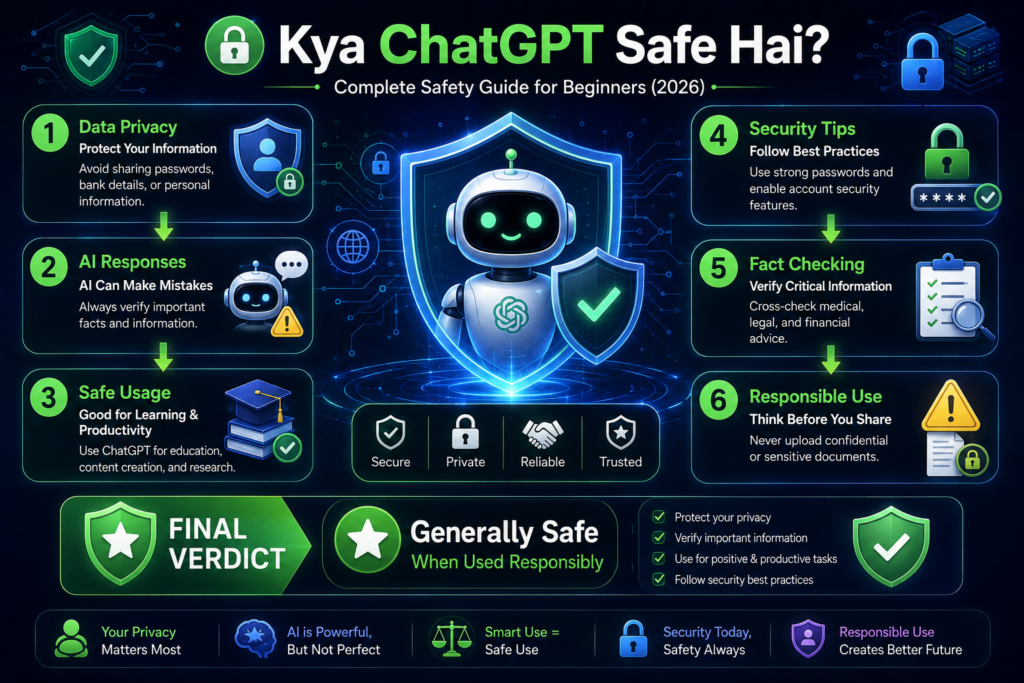
In today’s world, where AI tools are being used everywhere, a common question arises in everyone’s mind: Is ChatGPT safe? If you are already using ChatGPT or planning to use it, then this article is for you.
To put it simply, ChatGPT is an AI chatbot that answers your questions. It was developed by OpenAI, a company dedicated to artificial intelligence research and development. Therefore, at a basic level, ChatGPT is safe. However, safety depends not only on the platform itself but also on how you use it.
For example, users should avoid sharing sensitive personal information, verify important facts, and review AI-generated responses before relying on them.
⚠️ Safety Ke Liye Important Tips
Agar aap Chat GPT ko safely use karna chahte ho, to ye tips follow karo:
- ❌ Kabhi bhi password share na kare
- ❌ Bank details, OTP ya personal info mat dale
- ✔ General questions aur learning ke liye use kare
- ✔ Sensitive data avoid kare
Kya Chat GPT 100% Safe Hai?
To be honest, no tool on the internet is 100% safe. Since ChatGPT is an AI, it can sometimes provide incorrect or incomplete information. Therefore, make sure to verify any important information you receive.
For important decisions related to health, finance, legal matters, or business, always verify the information using reliable sources or consult a qualified professional.
How does data privacy work in ChatGupt?
When discussing whether ChatGPT is safe, data privacy is the most important aspect.
Depending on your account settings and the services you use, some conversations may be used to help improve AI models. Users can review the available privacy controls for more information.
👉 Put simply:
- Depending on your settings and the services you use, some conversations may be used to improve AI systems. Users can review the available privacy controls and settings for more information.
- Avoid sharing personal, confidential, or sensitive information while using AI tools
Still, to stay safe:
If you are working with confidential documents, review your organization’s policies before using AI tools to process that information.
- Apni identity related details avoid karo
- Confidential business info share na karo
For important decisions involving legal, medical, financial, or business matters, always verify information using reliable sources or consult a qualified professional.
Users can also review the available privacy settings in their account to manage how their conversations and data are handled, where such controls are available.
Chat GPT Use Karte Time Konsi Galtiyaan Avoid Kare?
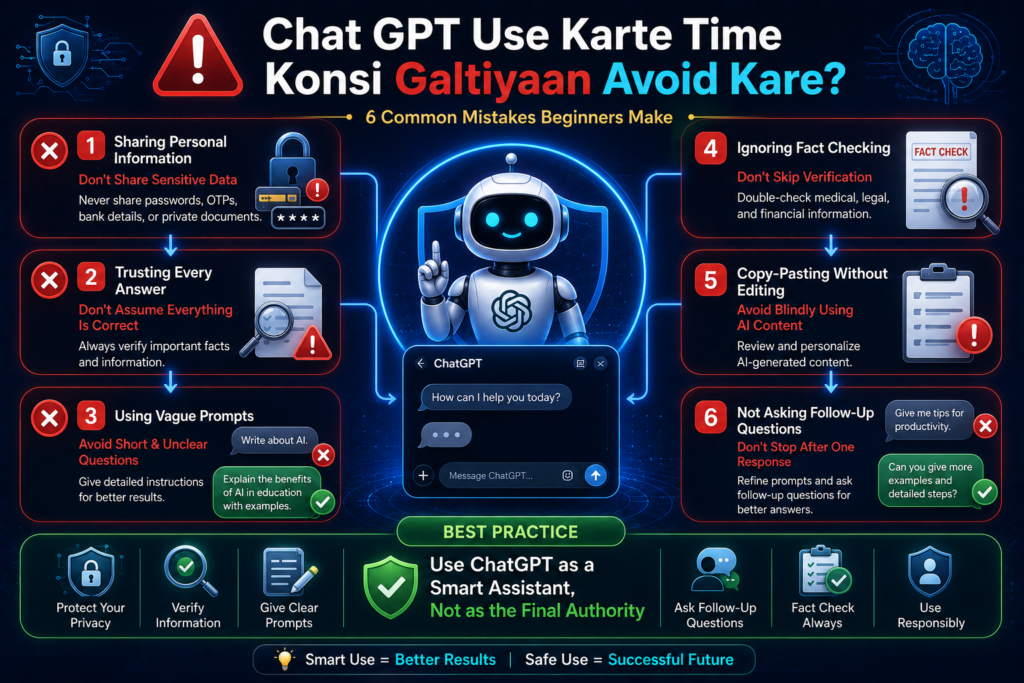
Bahut log unknowingly galti kar dete hain, jisse risk badh jata hai.
❌ Common Mistakes:
- Uploading Personal Documents
Avoid uploading documents that contain sensitive personal or confidential information unless you understand how the service handles your data. - Entering Your Password or OTP
Never enter passwords, one-time passwords (OTPs), banking credentials, or other authentication details into an AI chatbot. - Blindly Trusting AI-Generated Answers
Always review and verify important information, especially when it relates to education, business, finance, healthcare, or legal matters. - Following Medical or Legal Advice Without Verification
AI can provide general information, but important medical or legal decisions should always be verified with qualified professionals.
Best Practice: Use ChatGPT as a helpful assistant for learning, writing, and brainstorming, but always apply your own judgment and verify important information before acting on it
👉 By following these best practices, you can use ChatGPT more safely and reduce the risk of sharing sensitive information or relying on inaccurate responses
Best Practices for Safe ChatGPT Usage
- Use strong account security.
- Avoid sharing confidential information.
- Verify important facts.
- Review AI-generated content before using it.
- Keep the app updated.
Does ChatGPT store your data?
This is an important question 👇
👉 Depending on your account settings and the services you use, some conversations may be stored and may be used to help improve AI models.
If you are privacy-conscious:
- Avoid sensitive chats.
- Check data controls in Settings:
Reviewing your privacy settings can help you understand and manage how your conversations and data are handled, where such controls are available.
How to Use ChatGPT More Safely
If you want to ensure ChatGPT is safe for you, follow these golden rules:
Keep the ChatGPT app or website updated and use a secure internet connection, especially when accessing your account.
✔ Smart Safety Tips:
- Ask only general queries
- Use fake or test data
- Mask important information
- Verify the output
Is it safe for students and beginners?
👉 Yes, ChatGPT can be a useful tool for students and beginners when used responsibly.
Students ke liye Chat GPT:
- Homework Help
ChatGPT can explain questions, provide examples, and help students understand how to solve problems instead of simply giving answers. - Note Taking
It can summarize long chapters into short revision notes, making study sessions more efficient - Understanding Concepts
Students can ask ChatGPT to explain difficult topics in simple language with examples.
ChatGPT should be used as a learning assistant, not as a replacement for studying or independent thinking. Always review and understand the information before submitting assignments or completing exams.
It is very helpful.
But:
👉 Do not copy-paste directly.
👉 Use it after understanding it yourself.
Kya Business Me Chat GPT Safe Hai?
One has to be a bit careful in that business.
Safe use:
- Content Writing
ChatGPT can help draft blogs, emails, product descriptions, and other business content that should be reviewed before publishing. - Idea Generation
It can assist in brainstorming new business ideas, campaign concepts, and content strategies. - Marketing Strategy
ChatGPT can help organize marketing ideas and draft campaign plans, but business decisions should always involve human review.
Avoid:
- Client data share karna
- Confidential documents upload karna
Businesses should avoid sharing confidential client information, proprietary data, or sensitive documents with AI tools unless they understand how the service handles such information.
Future Me Chat GPT Aur Safe Hoga?
AI companies continue to invest in improving security, privacy controls, and overall reliability.
AI companies continuously:
- Security improve kar rahi hain
- Privacy controls better bana rahi hain
AI tools are expected to continue improving in areas such as security, privacy features, response quality, and productivity, although future developments may vary.
Regardless of future improvements, users should continue to review AI-generated content and avoid sharing sensitive information unless they understand the platform’s privacy practices.
Key Features of ChatGPT
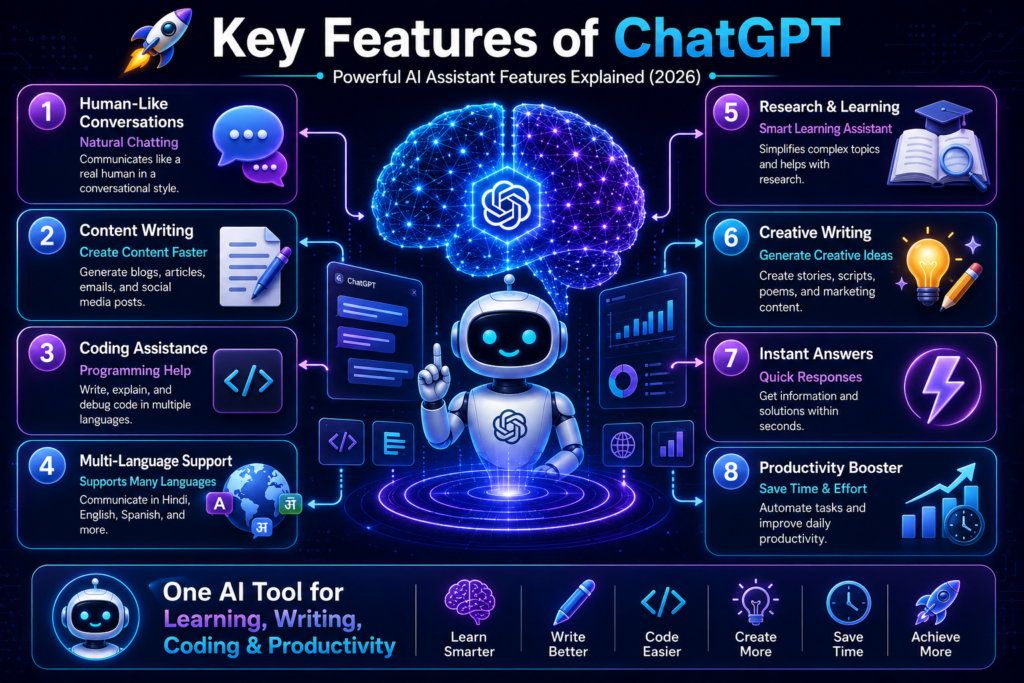
- Natural Conversations : ChatGPT can generate natural-language responses, making it easier for users to ask questions and receive clear explanations.
- Content Writing : It can help create blog drafts, emails, reports, social media posts, and other written content based on user instructions.
- Coding Support : ChatGPT can explain programming concepts, generate sample code, and help identify common coding errors across various programming languages.
- Translation : It can assist with translating text between multiple languages while helping preserve the original meaning. Users should review translations for accuracy when needed.
- Learning Assistant : Students and learners can use ChatGPT to understand difficult concepts, summarize study materials, and explore new topics more easily.
- Creative Writing : It can assist with brainstorming and drafting stories, poems, scripts, and other creative writing projects.
Example
A content creator can use ChatGPT to brainstorm ideas, draft an article, translate it into another language, and refine the final version before publishing.
Note: The quality of the output depends on the prompt provided by the user. AI-generated content should always be reviewed and verified before being used for important purposes.
| Feature | Use Case |
|---|---|
| Content Writing | Blogs, emails, articles |
| Coding Support | Programming assistance |
| Translation | Multi-language communication |
| Learning | Study support |
| Creative Writing | Stories, scripts |
Chat GPT vs Google Comparison
| Current | Better |
|---|---|
| Conversation → Google: No | Limited (through AI features/search experiences, where available) |
| Content Creation → Google: No | Limited |
| Learning Assistant → Excellent / Moderate | Strong / Good |
| Personal Guidance → Yes / Limited | Can provide guidance / Primarily search-based information |
Note: ChatGPT and Google serve different purposes. ChatGPT is designed for conversational assistance and content generation, while Google is primarily a search engine for discovering information from across the web.
❤️ Conclusion
If you want to grow online these days, it is essential to understand what ChatGPT is.
ChatGPT is an AI assistant that can help users with writing, learning, coding, brainstorming, and many other language-based tasks.
- 👉 Saves you time
- 👉 Can help improve productivity and support tasks related to blogging, freelancing, business, and content creation.
- 👉 Can help you learn new concepts and complete tasks more efficiently.
- 👉 If you haven’t used it yet, start today.
To get the best results, use ChatGPT as a tool to support your work, review the generated responses, and verify important information before relying on it.
❓ FAQ
Q1: What is the Chatgpt app?
ChatGPT is an AI chatbot that understands user prompts and generates natural-language responses. It can assist with writing, learning, coding, brainstorming, and other language-based tasks.
Q2: Kya Chat GPT free hai?
Haan, basic version free hai.
Q3: How to make money with ChatGPT?
ChatGPT can support tasks related to blogging, freelancing, content creation, and other online work. However, earning depends on your skills, experience, audience, and the quality of your work.
Q4: Is ChatGPT safe?
Yes, but do not share personal data. Always review important information and avoid sharing confidential or sensitive details while using AI tools.
Q5: Kya Chat GPT mobile me use kar sakte hai?
Haan, Android aur iOS dono me available hai.
Q6: Can ChatGPT replace Google?
No. ChatGPT and Google serve different purposes. ChatGPT is useful for conversations and content generation, while Google is primarily used to search and discover information from across the web.
Q7: Do I need coding skills to use ChatGPT?
No. Beginners can use ChatGPT by typing questions or instructions in natural language. Learning how to write clear prompts can help improve the quality of the responses.
🚀 CTA
Explore more AI guides and tutorials to learn how AI tools can improve your productivity and support your online work.