
Introduction
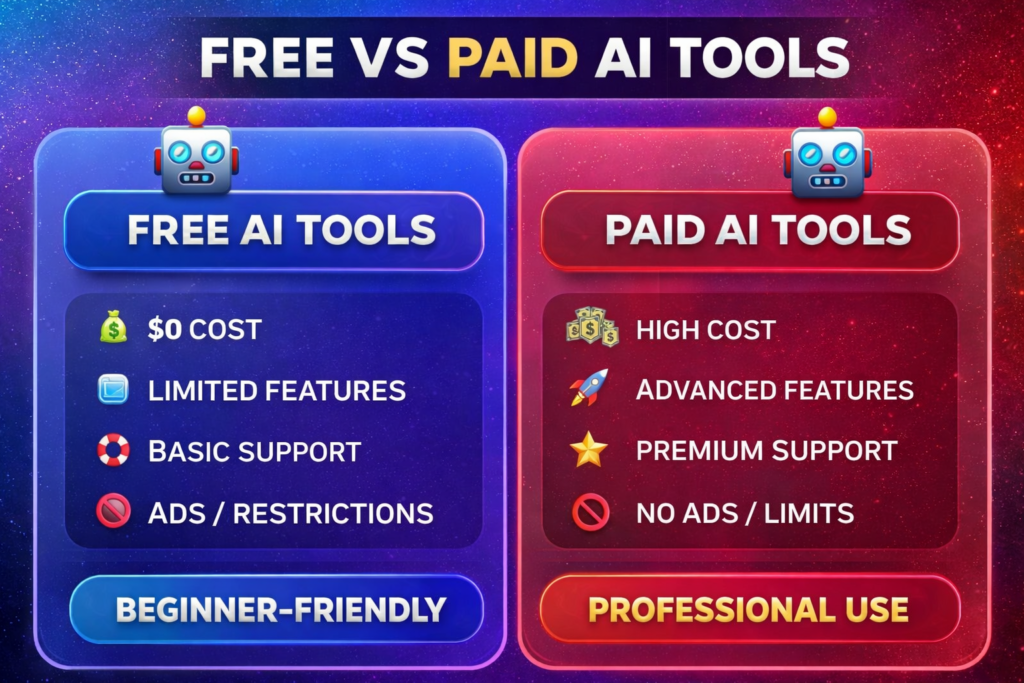
Artificial Intelligence (AI) has become an essential part of content creation, learning, business, and everyday productivity. However, many popular AI tools require paid subscriptions, making them difficult to afford for students, freelancers, and small businesses.
Many popular AI tools offer advanced features through paid subscription plans, while their free versions often have usage limits.
Whether it’s writing, image generation, or video editing—there are subscription fees everywhere 💰
But guess what?
Fortunately, several free AI tools provide similar core features and are capable of handling many common tasks without requiring a paid subscription.
In this guide, you’ll learn:
- What free alternatives are available for popular paid AI tools
- Which AI tools are best for writing, image generation, coding, SEO, productivity, and video editing
- The advantages and limitations of free AI tools
- Which tools are suitable for students, beginners, creators, and professionals
- How to choose the right AI tool based on your specific needs
By the end of this guide, you’ll have a clear understanding of which free AI tools offer the best value and which ones are worth considering based on your requirements.
The recommendations in this guide are based on factors such as available free features, ease of use, reliability, popularity, and practical use cases. Since AI tools evolve quickly, we recommend checking each tool’s official website for the latest features and pricing before making a decision.
Free AI Tool Alternatives 2026
Artificial Intelligence (AI) has significantly changed the way people work, create content, learn new skills, and manage businesses. However, there is a catch—monthly subscriptions for many popular AI tools are quite expensive.
If you are a blogger, freelancer, student, or creator, spending $20 to $100 a month on AI tools can be a heavy financial burden.
Fortunately, several free AI tools now provide useful features that can meet the needs of many everyday users without requiring a paid subscription.
In 2026, there are many excellent free AI tools available that offer similar core features for many everyday tasks, although some advanced capabilities remain available only in paid plans. without straining your budget.
In this guide, you will discover the some of the most useful free AI alternatives for writing, image generation, coding, SEO, productivity, and more.
This guide is designed to help you compare free AI tools, understand their strengths and limitations, and choose the option that best matches your needs and budget.
The recommendations in this guide are based on factors such as available free features, ease of use, reliability, popularity, and practical use cases. Because AI tools continue to evolve, we recommend checking each tool’s official website for the latest features, pricing, and usage policies before making a decision.
Why Are People Searching for Free AI Tool Alternatives in 2026?
As AI tools become more popular, many advanced features are available through paid subscription plans, making it important for users to find cost-effective alternatives.
Common problems users face:
- Expensive monthly fees
- Limited free plans
- Multiple subscriptions for different tasks
- Budget constraints for students and creators
For example, a user may need different AI tools for writing, image generation, SEO, and coding, each with its own subscription cost.
Depending on the tools you choose, the combined monthly subscription cost can become significant, especially for students, freelancers, and small businesses working with a limited budget.
For this reason, many users are searching for reliable free AI tools that can handle everyday tasks without requiring multiple paid subscriptions.
Fortunately, many free AI tools now provide practical features for writing, design, coding, productivity, and research. While they may not include every premium feature, they are often sufficient for everyday use and learning.
What makes a good free AI tool?
Before choosing an AI tool, consider:
1. Ease of Use
Beginners should be able to use it without technical knowledge.
2. Useful Features
A good free AI tool should include practical features that help users complete everyday tasks, such as writing, image generation, coding assistance, or productivity, without requiring an immediate paid upgrade
3. Reliability
The tool should produce generally useful and relevant responses. However, important information should always be verified, as AI tools can occasionally make mistakes.
4. Community Support
Tools with active user communities, official documentation, and learning resources are often easier to use because users can quickly find tutorials, guides, and solutions to common problems.
5. Privacy and Data Protection
Before using any AI tool, review its privacy policy and avoid sharing sensitive personal or confidential information. Choosing tools with clear privacy practices helps protect your data and improves overall trust.
6. Free Plan Limitations
Before choosing a free AI tool, check its daily usage limits, available features, export options, and upgrade requirements. Understanding these limitations helps you decide whether the free version is suitable for your needs.
What Are Free AI Tool Alternatives?
In simple terms, free AI tool alternatives are applications or platforms that provide similar core features to popular paid AI tools without requiring a paid subscription.
Free AI tool alternatives are tools that:
These tools are designed to help users perform common tasks such as writing, image generation, coding, research, and productivity. While they may not include every premium feature, they are often sufficient for everyday use and learning.
Example:
For example, if a free AI writing tool can help you create blog outlines, emails, or social media content without a subscription, it can serve as a practical alternative for users with basic or moderate requirements.
Why Use Free AI Tools?
Free AI tools can be a practical choice for users who want to complete everyday tasks without paying for advanced features they may not need.
Benefits of Free AI Tools
- No subscription cost for basic usage
- Easy to use for beginners
- Suitable for learning and everyday tasks
- Helps improve productivity for common workflows
- Allows users to explore AI before upgrading to a paid plan
Choosing the right free AI tool depends on your goals, required features, and usage needs rather than simply selecting the most popular option.
It is also important to understand that free AI tools usually have certain limitations, such as daily usage caps, fewer advanced features, or restricted access to the latest AI models. Reviewing these limitations before choosing a tool helps you make a more informed decision.
Paid vs Free AI Tools Comparison
| Feature | Paid AI Tools | Free AI Tool Alternatives |
|---|---|---|
| Cost | Paid subscription required | Free to use (may include usage limits) |
| Features | Advanced features with fewer restrictions | Core features suitable for everyday tasks |
| Availability | Full access with a paid plan | Available without a subscription, with some limitations |
| Daily Usage Limits | Higher or unlimited | Daily or monthly usage limits may apply |
| Customer Support | Priority support | Community support or self-help resources |
| AI Models | Access to the latest and most advanced models | Limited access depending on the tool |
| Suitable For | Professionals, businesses, and advanced users | Students, beginners, freelancers, and everyday users |
| Best Choice | Ideal for complex or large-scale projects | Ideal for learning, testing, and regular productivity tasks |
Free AI Tool Alternatives 2026
The following categories highlight some of the most common AI tools and their free alternatives. Each category includes typical use cases to help you choose the right tool for your needs.
Chatbot AI Tools

Popular Paid AI Chatbots
- ChatGPT Plus (GPT-4 level features)
- Ora (AI workspace and chatbot platform)
Free Alternatives
- ChatGPT Free
- Microsoft Copilot (Free)
- Google Gemini (Free)
- Claude Free (where available)
Common Use Cases
- Summarising notes and documents
- Answering general questions
- Brainstorming ideas
- Writing emails and blog drafts
- Learning programming concepts
- Assisting with basic coding tasks
AI chatbots can help users complete everyday tasks more efficiently, such as summarising information, generating ideas, explaining concepts, and assisting with writing or coding. However, important information should always be reviewed for accuracy before use.
Limitations
Free chatbot tools may include message limits, slower response times, or restricted access to advanced AI models. Users who need higher usage limits or premium features may eventually benefit from a paid plan.
🎨 Image Generation Tools

Popular Paid Tool
- MidJourney – Known for creating high-quality AI-generated artwork and creative illustrations.
Free Alternative
- NightCafe – Offers a free plan that allows users to generate AI images with daily credits, making it suitable for beginners and casual creators.
Common Use Cases
- Creating blog and website illustrations
- Designing YouTube thumbnails
- Generating social media graphics
- Creating posters and marketing visuals
- Producing concept art and creative designs
Limitations
Free image generation tools may limit the number of images you can create each day, offer fewer customization options, or restrict access to premium AI models. These limitations should be considered before choosing a tool for professional work.
Who Should Use It?
Free image generation tools are a good choice for students, bloggers, content creators, and small businesses that need visuals for everyday projects without investing in a paid subscription.
🎬 Video AI Tools

Popular Paid Tools
- Advanced AI video editing platforms with premium features.
Free Alternatives
- Runway
- Visla
- Gamma (if this is the intended tool, verify the name before publishing)
Common Use Cases
- Creating short-form videos
- Editing YouTube content
- Generating AI-assisted video presentations
- Producing social media videos
Limitations
Free plans may include export restrictions, watermarks, or monthly usage limits.
✍️ Writing Tools
Popular Paid Tool
- Flick AI
Free Alternatives
- QuillBot
- Beacons AI
Common Use Cases
- Drafting assignments
- Improving grammar and readability
- Creating blog content
- Writing social media posts
Limitations
Free plans may limit daily usage, advanced writing modes, or export options.
🖥 Website Builder
Popular Paid Tool
- Durable
Free Alternatives
- Leia
- Opus
Common Use Cases
- Creating portfolio websites
- Building personal blogs
- Launching simple business websites
Limitations
Free plans may include branded domains, storage limits, or fewer customization options.
✂️ Editing Tools
Popular Paid Tool
- Captions App
Free Alternatives
- Blink
- Opus Clip
- GetMunch
Common Use Cases
- Editing short-form videos
- Automatically generating captions
- Repurposing long videos into clips
- Improving content for social media
Limitations
Some free plans include watermarking, export limits, or restricted AI features.
📊 Productivity Tools
Popular Paid Tool
- Monday
Free Alternative
- Taskade
Common Use Cases
- Organising daily tasks
- Planning study schedules
- Managing personal projects
- Collaborating with small teams
Limitations
Free plans may limit workspace size, integrations, or advanced collaboration features.
The right combination of free AI tools can help students, creators, freelancers, and professionals complete everyday tasks more efficiently. The best choice depends on your goals, workflow, and the features you need.
Best Free AI Tool Alternatives 2026
1. ChatGPT Alternative: Google Gemini
Why Use It?
Google Gemini is a free AI assistant that can help with writing, brainstorming, coding, summarising information, and answering general questions. It is particularly useful for users who frequently use Google’s ecosystem and need an AI assistant for everyday productivity.
Limitations
The free version may have usage limits or restricted access to the latest AI models compared with premium plans.
Best For
- Students
- Bloggers
- Researchers
Pros
✅ Free access available
✅ Google ecosystem integration
✅ Multimodal capabilities
Cons
❌ Some advanced features may require paid plans
2. Midjourney Alternative: Microsoft Designer
Microsoft Designer allows users to create AI-generated images, social media graphics, presentations, and marketing visuals through an easy-to-use interface. It is a practical option for beginners who need quick designs without purchasing premium software.
Limitations
Some AI design features or higher usage limits may require a Microsoft account or premium access.
Microsoft Designer provides:
- AI image creation
- Social media graphics
- Design templates
Best For
- Instagram creators
- Bloggers
- Small businesses
3. Copy AI Alternative: ChatGPT Free Version
The free version of ChatGPT can help users generate ideas, create outlines, draft emails, summarise text, and answer general questions. It is suitable for everyday writing tasks and learning purposes.
The free version of ChatGPT helps with:
- Blog outlines
- Social media posts
- Emails
- Content ideas
Practical Example
Example: A blogger can use ChatGPT to create an article outline and then add personal research, examples, and experience before publishing.
4. Grammarly Alternative: LanguageTool
LanguageTool helps with:
LanguageTool helps identify grammar, spelling, punctuation, and style issues in multiple languages. It is useful for improving the clarity and readability of emails, articles, assignments, and other written content.
Limitations
Some advanced writing suggestions are available only in the premium version.
Useful for:
- Students
- Bloggers
- Professionals
5. Canva Pro Alternative: Canva Free
The free version of Canva still offers:
- Templates
- Social media designs
- Presentations
- Basic AI features
Canva Free includes a wide range of templates, design elements, and basic AI-powered features. It is suitable for creating presentations, social media graphics, and simple marketing materials, although premium assets require a paid subscription.
6. GitHub Copilot Alternative: Codeium
Codeium provides AI-assisted code completion, code suggestions, and support for multiple programming languages. It is useful for students, developers, and programmers looking for coding assistance without paying for premium AI coding tools.
Limitations
The quality of suggestions may vary depending on the programming language and project complexity.
- AI code suggestions
- Autocomplete
- Multi-language support
Ideal for:
- Developers
- Students
- Programmers
7. SEO Tool Alternative: Google Search Console
One of the best free SEO tools.
Features include:
- Keyword performance
- Indexing reports
- Website health checks
- Search analytics
Google Search Console is a valuable free tool for monitoring website performance, indexing status, search queries, and technical SEO issues. It is particularly useful for website owners and bloggers who want to understand how their content performs in Google Search.
8. Keyword Research Alternative: Google Keyword Planner
Perfect for:
- Keyword research
- Search volume analysis
- SEO planning
Google Keyword Planner helps users discover keyword ideas, estimate search volume, and plan SEO or advertising strategies. Access typically requires a Google Ads account, although many features can be used without running active advertising campaigns.
Important: The availability of free features may change over time as AI platforms update their pricing and subscription plans. Before selecting a tool, review its official website to confirm the latest features, usage limits, and pricing.
Best Free AI Tools for Students
Free AI Tool Alternatives 2026
Students often need different AI tools for studying, writing, presentations, and project planning. The following combination of free tools covers many common academic tasks without requiring paid subscriptions.
| Task | Recommended Free Tool | Why It Is Useful |
|---|---|---|
| Note Taking & Research | ChatGPT Free or Google Gemini | Summarise topics, explain concepts, and answer questions |
| Writing | QuillBot | Improve grammar, paraphrase text, and enhance readability |
| Presentations | Canva Free | Create professional slides using templates |
| Video Projects | Runway | Edit videos and generate AI-assisted visuals |
| Planning | Taskade | Organise assignments, deadlines, and study schedules |
Using the right combination of free AI tools can help students organise their work more efficiently, save time on repetitive tasks, and focus more on learning. The actual benefits depend on how the tools are used and the user’s individual workflow.
⚖️ Pros and Cons
Advantages
- No subscription cost for basic usage
- Easy for beginners to learn
- Helpful for writing, studying, designing, and organising tasks
- Allows users to explore AI before investing in premium software
Limitations
- Daily or monthly usage limits may apply
- Some advanced AI features are available only in paid plans
- Free versions may include advertisements or watermark restrictions
- Performance and available features can change over time
Tip: Instead of relying on a single AI tool, consider combining multiple free tools based on your workflow. For example, you can use an AI chatbot for research, QuillBot for writing improvements, Canva for presentations, and Taskade for planning projects.
Remember that AI-generated content should always be reviewed and edited before submitting assignments or publishing work. Verifying facts and adding your own ideas helps improve accuracy, originality, and overall quality.
Features and Benefits of Free AI Tools
Save Money
Free AI tools allow users to complete many everyday tasks without purchasing multiple subscriptions, making them a practical choice for students, freelancers, and small businesses.
Improve Productivity
AI tools can assist with drafting content, summarising information, organising ideas, and automating repetitive tasks, helping users complete work more efficiently.
Learn AI Skills
Using free AI tools helps beginners understand how AI works and develop practical skills before investing in premium software.
Handle More Tasks
By combining different free AI tools, users can manage writing, design, coding, planning, and research more efficiently.
Are Free AI Tools Safe to Use?
Free AI tools are widely used for studying, content creation, coding, research, and productivity. However, before using any AI platform, it is important to understand how your information is handled and what privacy protections are available. in studies, content creation, coding, and more 🚀
But One of the most common questions users ask is whether free AI tools are safe to use. The answer depends on the platform you choose and the type of information you share.
“Are free AI tools safe?” 😳
The reality is a bit mixed—Most well-known AI platforms are generally safe for everyday tasks, but users should still review the platform’s privacy policy and avoid sharing confidential or sensitive information.
When are free tools safe?
Examples of everyday use include:
- Summarising notes
- Getting explanations for study topics
- Brainstorming ideas
- Drafting emails or articles
- Learning programming concepts
👉 Free AI tools are generally safe (Free AI Tool Alternatives 2026)
When you use AI tools for general tasks and avoid entering passwords, financial details, personal identification numbers, confidential business information, or other sensitive data, the privacy risk is generally lower.
Safety Tips Before Using Any Free AI Tool
- Read the platform’s privacy policy.
- Avoid uploading confidential or personal information.
- Verify AI-generated facts before using them.
- Download software only from the official website.
- Review permissions before connecting third-party accounts.
When can free tools be risky?
Privacy risks can increase when users upload or share sensitive information without understanding how a platform collects, stores, or processes data.
Examples of information you should avoid sharing with AI tools include:
- Government identification numbers (such as Aadhaar or passport details)
- Passwords and login credentials
- Banking or payment information
- Medical or highly personal records
- Confidential business or academic documents
- Private client information
👉 There is a risk in such cases because:
- Some AI platforms may store user prompts or interactions according to their privacy policies, although practices vary between providers.
- Depending on the platform and your account settings, submitted content may be retained or used in ways described in the provider’s privacy policy. Users should review those policies before sharing important information.
- As with many online services, there is always some level of privacy risk when uploading sensitive information. Limiting what you share helps reduce that risk.
Simple rule:
A good rule of thumb is to avoid uploading any information that could cause problems if it were accidentally exposed or accessed by others.
Best Practices for Using Free AI Tools Safely
- Read the platform’s privacy policy before using it.
- Avoid sharing passwords, financial details, or confidential documents.
- Verify AI-generated information before relying on it.
- Download AI software only from official sources.
- Review your account’s privacy settings whenever available.
Free vs Paid AI Tools – Kya Difference Hai?
Free and paid AI tools can differ in their security features, privacy controls, customer support, and available functionality. However, the level of protection depends on the individual platform rather than whether it is free or paid.
But that doesn’t mean free tools are unsafe —
Using reputable platforms responsibly and following basic privacy practices can help reduce potential risks.
Best Practices for Using AI Tools Safely
Agar tum AI tools safely use karna chahte ho, to yeh rules follow karo 👇
1. ❌Avoid Sharing Personal Information
Never enter passwords, one-time passwords (OTPs), financial details, government identification numbers, or other sensitive personal information into AI tools.
2. 📄 Avoid Uploading Confidential Documents
Do not upload confidential academic, business, legal, or personal documents unless you understand the platform’s privacy practices and have permission to share them.
3. 🔍 Choose Reputable AI Platforms
Use well-known AI tools from trusted providers and review their privacy policies before sharing information.
4. ✅ Verify AI-Generated Content
AI-generated responses can contain mistakes or outdated information. Always verify important facts using reliable sources before relying on them.
⚠️ Real Life Example
For example, if a user uploads confidential financial records or private business documents to an AI platform without understanding its privacy policy, there may be unnecessary privacy risks. Reviewing a platform’s data practices before sharing sensitive information is a safer approach.
So, always remember —
AI tools are designed to assist with tasks, but they should not be used to store or manage sensitive personal information.
🎯 Final Verdict
So, are free AI tools safe?
Most well-known free AI tools are suitable for everyday tasks such as learning, writing, brainstorming, coding, and productivity. However, users should avoid sharing confidential information, review privacy policies, and verify important AI-generated content before relying on it. Responsible use is the key to using AI tools safely.
Before Using Any AI Tool, Check:
- Does the platform have a clear privacy policy?
- Can you control your data or conversation history?
- Are your prompts used for model training?
- Does the tool allow you to delete your chat history?
- Is the platform operated by a reputable company?
Can free tools replace paid tools?
In today’s digital world, there is a common question:
Many users wonder whether free AI tools can completely replace paid software. The answer depends on your requirements, the features you need, and how frequently you use the tools.
Many popular AI platforms offer advanced features through paid subscription plans. However, several free alternatives are also available and can handle many everyday tasks effectively.
But at the same time, Many free AI tools provide useful features for writing, image generation, coding, productivity, and design, making them suitable for everyday use.
So, what is the truth? The following comparison highlights the main differences between free and paid AI tools.
⚖️ Free vs Paid Tools
First, understand the basic difference:
| Feature | Paid AI Tools | Free AI Tools |
|---|---|---|
| Cost | Subscription required | Free to use, often with usage limits |
| Features | Advanced tools and customization | Core features for common tasks |
| Usage Limits | Higher or unlimited | Daily or monthly limits may apply |
| Customer Support | Priority or dedicated support | Community or standard support |
| AI Models | Access to advanced models | Access may be limited depending on the platform |
| Best For | Professionals and business users | Students, beginners, freelancers, and everyday users |
Free AI tools are often sufficient for learning, personal projects, and everyday productivity. However, users who need advanced features, higher usage limits, or specialised workflows may benefit from upgrading to a paid plan.
Can Free AI Tools Replace Paid Tools?
For many users, the answer is yes—at least for everyday tasks. Students, bloggers, freelancers, and casual creators can often complete writing, research, design, coding, and planning tasks using free AI tools. However, professionals working on large-scale projects or requiring advanced AI models, collaboration features, or commercial support may find paid tools more suitable.
When Should You Upgrade to a Paid Tool?
Consider a paid plan if you:
- Frequently reach free usage limits
- Need advanced AI models or premium features
- Require faster performance or priority support
- Use AI tools for professional or commercial projects
- Need team collaboration and enterprise features
✅ Can Free Tools Replace Them?
The short answer is yes—but not in every situation. Whether free AI tools can replace paid tools depends on your goals, workload, and the features you require.
Free AI tools are often sufficient when:
- You are learning how AI tools work.
- Your tasks involve writing, brainstorming, studying, or basic design.
- You have a limited budget.
- You do not require advanced automation or premium features.
- Your daily usage is within the free plan limits.
Example:
| Task | Free Tool Suitable? | Explanation |
|---|---|---|
| Writing | ✅ Yes | Suitable for drafts, grammar improvements, and brainstorming |
| Presentations | ✅ Yes | Canva Free provides templates for most everyday presentations |
| Study & Research | ✅ Yes | AI chatbots can explain concepts and summarise information |
| Basic Image Editing | ✅ Yes | Free AI editors are often enough for simple projects |
For many everyday tasks, free AI tools can provide enough functionality to meet the needs of students, beginners, and casual users.
A paid AI tool may be a better choice if you:
- Work on commercial or client projects.
- Require advanced AI models or specialised features.
- Frequently reach free usage limits.
- Need faster performance, collaboration tools, or dedicated customer support.
❌ Replace nahi kar sakte agar:
- You are doing professional-level work.
- You need high-quality output.
- You need to use advanced features.
- You need to handle large-scale projects.
👉 Example:
| Professional Task | Why Paid Tools May Be Better |
|---|---|
| Advanced Video Editing | More effects, exports, and automation |
| Professional Graphic Design | Premium templates and collaboration tools |
| Large Coding Projects | Higher limits, advanced models, and better integrations |
Yahan paid tools better perform karte hain 🚀
🎯 Real-Life Example
Example: A student preparing class notes, presentations, or assignments can often complete these tasks using free AI tools. In contrast, a professional content creator or designer managing client work may benefit from paid tools that offer higher usage limits, advanced features, and dedicated support.
In summary, free AI tools are sufficient for many everyday tasks, especially for students and beginners. However, professionals with advanced requirements may find greater value in paid AI tools because of their additional features, higher usage limits, and productivity-focused capabilities.
Should You Start with a Free or Paid AI Tool?
If you are new to AI, starting with free tools is usually the best approach. They allow you to learn how different platforms work and identify the features you actually need. Once your workload grows or you need advanced capabilities, you can evaluate whether upgrading to a paid plan is worthwhile.
A Practical Strategy
For many users, the most effective approach is to combine free and paid AI tools. Free tools can handle everyday tasks such as writing, research, brainstorming, and planning, while paid tools can be reserved for advanced projects that require additional features, higher usage limits, or professional support.
| Use Case | Free AI Tools | Paid AI Tools |
|---|---|---|
| Daily writing and research | ✅ Suitable | ✅ Suitable |
| Learning and experimentation | ✅ Recommended | Optional |
| Professional client work | Limited | ✅ Better choice |
| Advanced automation | Limited | ✅ Available |
| Large-scale projects | Usage limits may apply | ✅ More suitable |
From this:
This approach can help reduce software costs while allowing you to upgrade only when advanced features or higher usage limits become necessary.
🔥 Hidden Truth
Some users subscribe to paid AI tools before fully exploring the capabilities of free alternatives. Comparing available features first can help you decide whether a paid plan is actually necessary.
A practical approach is to start with the free version of a tool and upgrade only if your workflow requires additional features, higher usage limits, or professional support.
Advantages of Free AI Tools
- No subscription cost for basic usage
- Suitable for learning and experimentation
- Easy to access and start using
- Covers many common productivity tasks
Limitations of Free AI Tools
- Usage limits may apply
- Some advanced features require a paid plan
- Performance and available features vary by platform
- AI-generated responses should always be reviewed for accuracy
Free AI tools are capable of handling many everyday tasks, including writing, research, planning, presentations, and basic content creation. However, users with professional requirements, advanced workflows, or high-volume usage may benefit from paid AI tools that offer additional capabilities and higher limits.
- For many beginners and students, free AI tools are often sufficient for learning, studying, and completing everyday tasks.
- Professionals may be able to use free AI tools for some tasks, but paid solutions are often more suitable when advanced features, collaboration tools, dedicated support, or higher usage limits are required.
Final Recommendation
If you are just starting with AI tools, begin with reliable free options and evaluate whether they meet your needs. As your projects become more complex or your workload increases, you can decide whether investing in a paid plan offers enough additional value. Choosing tools based on your actual requirements is usually more effective than paying for features you may never use.
Which is the best tool for students? (2026 Guide)
These days, every student has the same question on their mind:
With so many AI tools available in 2026, choosing the right one can be challenging for students. The best option depends on your needs, whether you want help with writing, research, presentations, coding, or study planning
With so many tools flooding the market, it’s only natural to feel confused.
Some are best for writing, others for notes, and some for presentations 🚀
But the truth is this 👇
Instead of relying on a single application, many students benefit from using different AI tools for different tasks. Choosing the right combination can improve productivity while keeping costs low.
Let’s break it down in a simple, practical way 👇
🤖 🥇 All-in-One Best Tool
ChatGPT is one of the most versatile AI tools for students because it can assist with writing, brainstorming, explaining concepts, coding, and study support. However, it works best when combined with other specialised tools for tasks such as presentations or grammar checking.
Why is it the best?
| Feature | How It Helps Students |
|---|---|
| Study Support | Explains difficult concepts in simple language |
| Writing Assistance | Helps draft essays, assignments, and summaries |
| Coding Help | Explains code and programming concepts |
| Brainstorming | Generates ideas for projects and presentations |
For many students, ChatGPT can handle a wide variety of everyday academic tasks, although some specialised tools may provide better results for specific purposes.
Agar tum beginner ho, to yahi se start karo
📝 Best tools for writing
QuillBot
- Helps paraphrase and rewrite text.
- Improves sentence clarity and readability.
- Useful for refining drafts after writing.
Grammarly
- Identifies grammar and spelling mistakes.
- Suggests improvements for clarity and tone.
- Helps improve overall writing quality.
Using grammar and writing tools together can help students produce clearer and better-structured assignments
📚 Notes & Study Planning ke liye
Notion AI
- Helps organise notes and study material.
- Assists with task management and planning.
- Useful for keeping assignments and deadlines organised.
🎨 Presentation & Design ke liye
Canva AI
- Creates presentations using templates.
- Helps design posters, slides, and educational graphics.
- Suitable for school and college presentations.
🔍 Research ke liye
Perplexity AI
- Useful for research and exploring information from multiple sources.
- Provides citations for many responses, making it easier to verify information.
Google Gemini
- Can help students understand topics and generate ideas.
- Assists with research, brainstorming, writing, and coding.
The best AI toolkit for students depends on individual learning needs. Starting with free versions of these tools allows students to discover which platforms best support their studies before deciding whether a paid plan is necessary.
| Student Task | Recommended Tool |
|---|---|
| Writing | ChatGPT + QuillBot + Grammarly |
| Research | Perplexity AI + Google Gemini |
| Presentations | Canva AI |
| Study Notes | Notion AI |
| Coding | ChatGPT |
| Brainstorming | ChatGPT + Gemini |
Important: AI tools should support learning rather than replace it. Always review AI-generated content, verify important facts, and follow your school’s or university’s academic integrity policies before submitting assignments.
AI Toolkit for Students (2026)
Instead of relying on a single AI tool, students can combine different free tools based on their study needs. This approach helps complete different academic tasks more efficiently.
| Task | Recommended Tool | Why It Helps |
|---|---|---|
| Study & Concept Learning | ChatGPT | Explains concepts and answers questions |
| Writing | QuillBot | Improves sentence clarity and paraphrasing |
| Presentations | Canva Free | Creates professional slides quickly |
| Notes & Planning | Notion | Organises notes and study schedules |
| Research | Perplexity AI | Helps explore information with source references |
Using a combination of these tools can help students organise their work more efficiently and reduce the time spent on repetitive tasks. The actual benefits depend on individual study habits and how the tools are used. read more..
⚠️ Important Tip
Responsible AI Usage Tips
- Review AI-generated content before submitting assignments.
- Verify important facts using reliable sources.
- Add your own understanding and analysis instead of copying AI responses directly.
- Follow your school’s or university’s academic integrity policies.
Free AI Tool Alternatives 2026 Comparison Table
| Paid Tool | Free Alternative | Primary Use |
|---|---|---|
| ChatGPT Plus | ChatGPT Free / Google Gemini | AI Chat & Study Support |
| Midjourney | Microsoft Designer | AI Image Generation |
| Copy.ai | ChatGPT Free | Writing Assistance |
| Grammarly Premium | LanguageTool | Grammar Checking |
| GitHub Copilot | Codeium | Coding Assistance |
| Ahrefs | Google Search Console | Basic SEO Analysis |
| Canva Pro | Canva Free | Presentations & Design |
🏁 Final Verdict
There is no single AI tool that is best for every student. ChatGPT is one of the most versatile options for learning, writing, brainstorming, and coding, but combining it with tools such as Canva, QuillBot, Notion, and Perplexity AI can provide a more complete study workflow.
👉 But for the best results, use a smart combination of multiple tools.
Choose AI tools based on your learning needs, use them responsibly, and always review AI-generated content before relying on it for academic work.
Conclusion
If you want to be smart in this day and age… AI tools have become valuable learning and productivity assistants for many students, professionals, and creators. When used responsibly, they can support research, writing, planning, presentations, and everyday problem-solving.
Free AI tool alternatives 2026 prove karte hain ki:
Many everyday tasks can be completed using free AI tools, while paid plans may be worthwhile for users who require advanced features, higher usage limits, or professional workflows.
Learning how to use AI tools effectively can help improve productivity and develop valuable digital skills that are increasingly useful in education and the workplace.
Disclaimer
The information in this article is provided for educational and informational purposes only. AI tools, features, pricing, and free plans may change over time. Before using any AI tool, always review its official website, privacy policy, and terms of service. The recommendations in this guide are based on general use cases and are not intended as professional, legal, financial, or academic advice. Users should verify AI-generated content and follow their school’s, university’s, or organization’s policies when using AI tools.
Frequently Asked Questions
Can free AI tools replace paid tools?
For many everyday tasks, yes. However, advanced workflows and professional use cases may require paid features.
Which AI tool is best for students?
There is no single best option. The right choice depends on your needs, such as writing, research, coding, or presentations.
Should students use AI for assignments?
AI can assist with learning and drafting ideas, but students should review, edit, and follow their institution’s academic integrity guidelines.