
Introduction
Creating blog posts, marketing copy, emails, and social media content can take a significant amount of time, especially for bloggers, freelancers, and small business owners.
Whether it’s writing a blog, creating a YouTube script, or crafting ad copy—everything takes time and effort.
AI writing assistants are designed to speed up this process by helping users generate drafts, ideas, and marketing content more efficiently.
An AI writing tool that can generate content drafts, marketing copy, and ideas within seconds, while still requiring human review and editing for accuracy and quality.
Sounds a bit unreal, doesn’t it? 😳
In this article, we will take a deep dive into what is Copy AI is, how it works, and The guide also explains practical ways freelancers, marketers, and content creators may use Copy.ai as part of their workflow to support client work and content creation.
This guide is based on the current features available in 2026. Because AI tools are updated regularly, some features, pricing, and plan limits may change over time. Always check the official Copy.ai website for the latest information before making a decision.
What is Copy AI?

Copy.ai is an AI-powered writing assistant that helps users generate drafts, ideas, and different types of written content more quickly using artificial intelligence.
👉 In simple terms:
“Copy AI = Your personal content writer”
This tool uses advanced AI technology The platform uses advanced large language models (LLMs) to understand prompts and generate human-like text. The underlying AI models may change over time as the platform is updated, enabling it to:
Copy.ai can help generate:
- Blog outlines and article drafts
- Marketing and advertising copy
- Social media captions
- Product descriptions
- Email marketing drafts
- Website copy
- Content ideas and brainstorming
👉 Meaning:
It is particularly useful for bloggers, marketers, freelancers, small businesses, and content creators who want to speed up their writing workflow.
Instead of spending hours writing blog posts, social media captions, emails, or marketing copy, Users provide a prompt or brief instruction, and the AI generates a draft that can then be reviewed, edited, and refined before publishing, and In many cases, the platform can generate an initial draft within a short time, although the quality and length of the output depend on the prompt and selected features.
The platform uses advanced language models to understand human language and generate The AI is designed to produce readable text based on the user’s instructions, though the output should always be reviewed for accuracy and originality.
In simple terms, Copy.ai acts as an AI writing assistant that helps users prepare content drafts more efficiently. Human editing is still recommended to ensure accuracy, originality, and the appropriate tone.
Copy.ai supports a variety of writing tasks, but the availability of features depends on the selected plan. Some advanced tools, templates, or higher usage limits may require a paid subscription.
AI-generated content should be treated as a starting point rather than a finished product. Reviewing facts, editing the language, and adding personal expertise can improve both quality and originality.
Why is Copy AI Popular in 2026?
The popularity of AI writing tools has increased significantly as more individuals and businesses look for ways to improve productivity and streamline content creation. Several factors have contributed to the growing popularity of Copy.ai among bloggers, marketers, freelancers, and businesses. These include:
Common reasons include:
- Reducing the time required to create first drafts
- Generating ideas for blogs, emails, and marketing campaigns
- Improving productivity by automating repetitive writing tasks
- Supporting content creation across multiple platforms
- Assisting freelancers and businesses with everyday writing workflows
- Many freelancers, marketers, and agencies use AI writing tools to support client work and increase productivity, but success depends on skills, experience, and the quality of the final content.
Many freelancers, bloggers, digital marketers, and small business owners use Copy.ai to speed up content creation while still reviewing and editing the output before publishing.
Copy.ai is particularly popular because it offers ready-to-use templates for tasks such as blog writing, product descriptions, social media captions, email campaigns, and advertising copy. These templates can help users save time when creating the first draft of their content.
Although AI can speed up the writing process, the generated content should always be reviewed for accuracy, originality, and tone before it is published or shared.
Problem: Why Can Traditional Content Creation Be Time-Consuming?
Creating high-quality content often requires research, planning, writing, editing, and proofreading. These steps can take considerable time, especially for individuals or small teams producing content on a regular basis. creating content was often challenging because:
Common challenges include:
- Researching reliable information before writing
- Organising ideas into a clear structure
- Experiencing writer’s block or difficulty generating new ideas
- Spending time editing and proofreading content
- Maintaining a consistent publishing schedule
- Managing content costs when hiring professional writers
Example: A blogger who publishes multiple articles every month may spend several hours researching, drafting, editing, and proofreading each article before it is ready for publication.
Without AI:
Depending on the topic and writing process, creating a well-researched article can require several hours of work, including research, drafting, editing, and fact-checking.
Total = 6 hours per article.
AI writing tools such as Copy.ai can help generate an initial draft more quickly, allowing writers to spend more time reviewing, improving, and personalising the content rather than starting from a blank page.
That is why As AI writing tools continue to evolve, many bloggers, marketers, freelancers, and businesses use them to improve productivity and streamline parts of the content creation process.
It is important to remember that AI-generated drafts should always be reviewed, fact-checked, and edited before publication. Human expertise and original insights remain essential for creating accurate and high-quality content.
AI tools are most effective when used as writing assistants rather than complete replacements for human writers. They can reduce repetitive work, but the final responsibility for accuracy, originality, and quality remains with the user.
How Copy AI Works?

Understanding how Copy.ai works can help you use the platform more effectively and generate better content.
Copy.ai uses advanced artificial intelligence and natural language processing (NLP) to understand user prompts and generate text based on patterns learned from large language models. The underlying AI models may change as the platform is updated
Working Process:
- You provide input (a prompt).
- The AI analyzes it.
- Based on the prompt, the AI generates a draft by predicting relevant words and sentences. The quality of the output depends on the clarity of the prompt and may require human editing before publication.
Example:
If you enter the prompt:
“Write an Instagram caption for a fitness brand.”
Copy.ai can generate one or more caption suggestions, which you can edit and customise to match your brand’s tone and audience.
Key Features & Benefits
1. ⚡ Instant Content Creation
Can generate an initial draft quickly, helping users save time during the writing process. The output should still be reviewed and edited before publishing.
2. ✍️ Multiple Content Types
Supports a variety of content formats, including blog outlines, marketing copy, emails, product descriptions, and social media content.
3. 🧠 AI Brainstorming
Helps generate topic ideas, headlines, content outlines, and marketing concepts when you need inspiration.
4. 🌍 Multi-language Support
Supports multiple languages, allowing users to create content for different audiences. Language availability and quality may vary depending on the selected model and features.
5. 💰 Time & Money Saving
Can reduce the time required to prepare first drafts and repetitive writing tasks. Businesses and freelancers may use it to improve productivity, although human review remains important.
Biggest Benefit:
One of the main advantages of Copy.ai is that it can reduce the time spent creating initial drafts, allowing users to focus more on editing, fact-checking, and improving content quality.
Limitations
Although Copy.ai can generate content quickly, the output may occasionally contain factual errors, repetitive wording, or generic suggestions. Users should review, edit, and verify important information before publishing.
Best Use Cases
Copy.ai is commonly used for:
- Blog outlines
- Product descriptions
- Email marketing drafts
- Social media captions
- Advertising copy
- Content brainstormin
How to use Copy AI

Step 1: Create an account
Visit the official Copy.ai website, create an account, and choose the available plan that best suits your needs. If a free plan is available, you can explore the platform before deciding whether a paid subscription is necessary.
You can start with the available plan and explore the features before upgrading.
Step 2: Choose a Template
Copy AI provides templates for these:
- Blog writing
- Social media posts
- Product information
- Email marketing
- Ad content
- SEO content
- Landing pages
Copy.ai offers a variety of templates designed for different writing tasks. Selecting the appropriate template helps the AI generate content that is more relevant to your objective.
Step 3: Enter Details
Provide information such as:
- Subject
- Keywords
- Tone of conversation
- Audience/Listeners
- Content goals
The availability of templates may vary depending on the selected plan and future platform updates.
Clear and specific prompts generally produce more relevant and useful results. Including your target audience, writing style, keywords, and objectives can improve the quality of the generated draft.
Step 4: Generate Content
Click generate and review the results.
Review each generated version carefully and choose the one that best matches your purpose. You can also refine the prompt and generate additional variations if needed.
Step 5: Human Editing
AI-generated content should be treated as a first draft rather than a finished article. Review the text for factual accuracy, clarity, originality, grammar, and tone before publishing.
Consider strengthening the content by adding:
- Personal experience or practical insights
- Real-world examples
- Case studies where relevant
- Original analysis or expert observations
- Updated facts from reliable sources
Adding original insights and carefully reviewing AI-generated text helps improve accuracy, usefulness, and overall content quality. This approach aligns with Google’s emphasis on creating helpful, people-first content.
Common Mistakes to Avoid
- Using vague prompts that produce generic results.
- Publishing AI-generated content without editing.
- Skipping fact-checking and source verification.
- Ignoring the target audience and search intent.
- Copying AI output directly without adding original value.
If the first result does not meet your expectations, refine your prompt instead of publishing the initial draft. Small changes to the prompt can often produce significantly better results.
Important Note
Copy.ai assists with content creation, but it does not replace human expertise. Users remain responsible for verifying facts, respecting copyright, and ensuring that published content is accurate and original.
Use Cases & Examples

Blogging
Copy.ai can help create blog outlines, introductions, and first drafts. However, articles should always be reviewed, edited, and enriched with original insights before publication.
YouTube Scripts
Copy.ai can generate script ideas, outlines, and draft content for educational, marketing, or informational videos. The final script should be edited to match your style and audience
Affiliate Marketing
Copy.ai can assist in drafting product descriptions, comparison content, promotional emails, and marketing copy. Always ensure that product information is accurate and complies with affiliate disclosure requirements.
Freelancing
Freelancers can use Copy.ai to prepare initial drafts for blog posts, marketing content, emails, and social media posts. Reviewing and customising the content before delivering it to clients is recommended.
Social Media
Copy.ai can help generate caption ideas, post drafts, and campaign concepts, making it easier to maintain a consistent publishing schedule.
Example: A blogger can use Copy.ai to prepare article outlines and first drafts more quickly, allowing more time for research, editing, fact-checking, and adding original insights before publishing.
Advantages
- Easy for beginners to learn.
- Helps reduce the time required to prepare first drafts.
- Offers templates for different writing tasks.
- Supports multiple types of marketing and content creation.
Limitations
- AI-generated content may occasionally sound generic.
- Human editing and fact-checking are necessary before publishing.
- Some advanced features and higher usage limits require a paid subscription.
- The quality of the output depends on the prompt provided.
Truth:
Copy.ai is best used as a writing assistant rather than a replacement for human expertise. Combining AI-generated drafts with original research, editing, and personal insights produces better-quality content.
Who Should Use Copy.ai?
Copy.ai can be useful for:
- Bloggers
- Freelancers
- Digital marketers
- Small business owners
- Social media managers
- Students preparing content drafts
Who May Need a Paid Plan?
A paid subscription may be worth considering if you:
- Create content every day.
- Need access to advanced templates or features.
- Work with multiple clients.
- Require higher usage limits for professional projects.
Copy AI vs Other AI Tools
Copy AI vs ChatGPT
| Feature | Copy.ai | ChatGPT |
|---|---|---|
| Primary Purpose | Marketing and content creation | General-purpose AI assistant |
| Templates | Offers dedicated writing templates | Prompt-based content generation |
| Ease of Use | Beginner-friendly interface | Flexible but may require better prompts |
| Content Types | Marketing copy, blogs, emails, product descriptions | Writing, coding, research, brainstorming, learning, and more |
| Customization | Template-based customization | Highly flexible through detailed prompts |
| Best For | Content creators, marketers, and businesses | Students, professionals, developers, and general productivity |
Conclusion
Copy.ai is well suited for users who primarily need marketing content, blog drafts, emails, and ready-made writing templates. ChatGPT is a more general-purpose AI assistant that supports a wider range of tasks, including writing, coding, research, brainstorming, and learning. The better choice depends on your specific workflow and content requirements rather than your experience level alone.
Things to Consider
- Copy.ai focuses mainly on content creation and marketing workflows.
- ChatGPT supports a broader range of tasks beyond writing.
- Features, usage limits, and pricing may vary depending on the selected plan.
- Reviewing AI-generated content is recommended regardless of the platform.
Which Tool Should You Choose?
- Choose Copy.ai if your main goal is creating marketing copy, product descriptions, emails, and social media content using built-in templates.
- Choose ChatGPT if you need a versatile AI assistant for writing, research, coding, learning, brainstorming, and general productivity.
Pricing (2026)
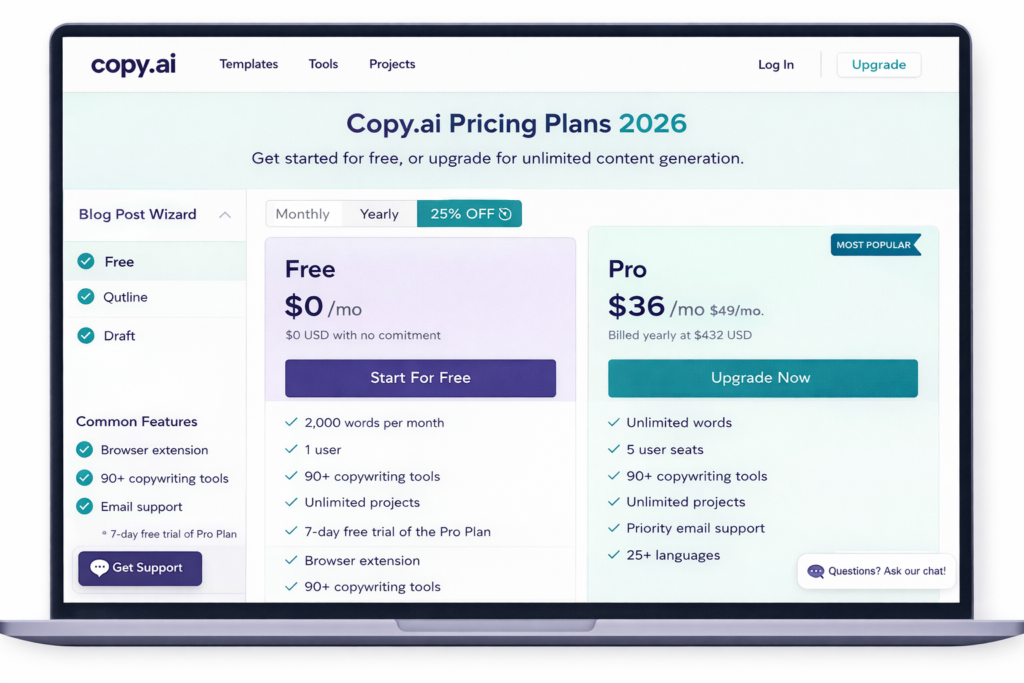
Copy.ai offers both free and paid plans designed for different types of users. The available features, usage limits, and pricing may change over time, so it is always a good idea to check the official pricing page before choosing a plan.
Free Plan
- Suitable for exploring the platform and basic content creation.
- Includes access to core features with usage limits that may change over time.
- A good option for beginners who want to test the platform before upgrading.
Paid Plans
Paid plans provide higher usage limits and additional features. Depending on the selected plan, users may receive access to more workflow capabilities, collaboration features, advanced AI models, and other productivity tools. The exact features vary by plan.
👉 In the paid plan, you get:
- Depending on the plan, users may receive higher or unlimited chat usage, increased workflow credits, additional collaboration features, and access to more advanced AI capabilities.
Additional benefits may include:
- Higher usage limits
- More workflow and automation features
- Team collaboration tools
- Access to additional templates and AI capabilities
- Priority support (depending on the selected plan)
Which Plan Should You Choose?
| User Type | Recommended Plan |
|---|---|
| Beginner | Free Plan |
| Student | Free Plan |
| Blogger | Start with Free, upgrade if needed |
| Freelancer | Depends on workload |
| Business | Paid Plan if advanced workflows are required |
Important Note
Copy.ai updates its plans, pricing, and included features from time to time. Before purchasing a subscription, review the latest information on the official pricing page to ensure it meets your requirements.
Key Features of Copy AI
1. AI Content Generation
Copy.ai can assist in generating first drafts for various types of content, including blog articles, emails, marketing copy, product descriptions, and social media posts. The generated content should always be reviewed and edited to ensure accuracy, originality, and relevance.
2. Multiple Writing Templates
Copy.ai offers templates for common writing tasks such as blog introductions, product descriptions, advertisements, email campaigns, and social media content. These templates help users structure their content more efficiently, even if they have limited writing experience.
3. Workflow Automation
Copy.ai includes workflow features that can help automate repetitive writing processes, such as generating similar types of marketing content. This can reduce manual effort and improve workflow efficiency, depending on how the platform is used.
4. Team Collaboration
Depending on the selected plan, Copy.ai provides collaboration features that allow team members to work on content projects together, making it useful for agencies, marketing teams, and businesses managing multiple writers.
5. Content Rewriting
Copy.ai can help rewrite and improve existing text by suggesting alternative wording and improving readability. Users should ensure that the final content is original, factually accurate, and does not infringe on copyright or plagiarism policies.
Additional Features
Depending on the selected plan, Copy.ai may also offer:
- Content brainstorming and idea generation
- Marketing campaign assistance
- Email writing support
- Product description generation
- Content workflow management
Note: Feature availability may change as the platform is updated.
Important Note
The availability of specific features depends on the selected Copy.ai plan and may change over time. Refer to the official Copy.ai website for the latest feature list and plan details before making a purchase decision.
Top 5 Copy AI Alternatives (2026)
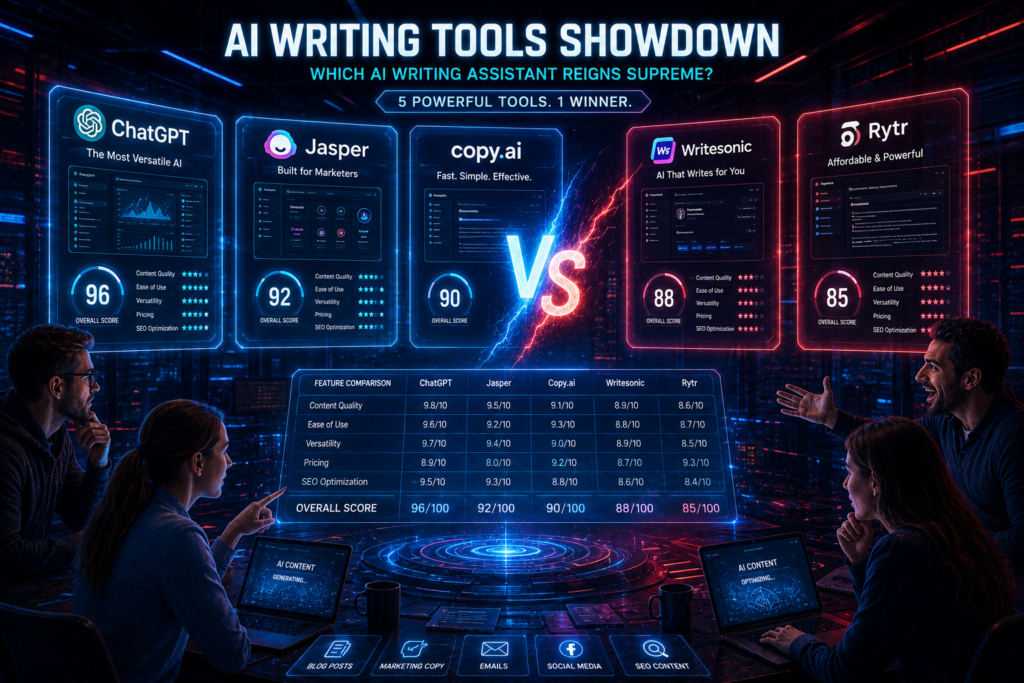
1. 🧠 Jasper AI (Suitable for Marketing Content)
Jasper AI is designed for users who create marketing content regularly and require brand-focused writing workflows.
🔥 Features:
- Brand voice control
- Can assist with blog drafts, marketing copy, and campaign content
- Team collaboration
Jasper AI focuses primarily on marketing and business content creation.
👉 Best For: Bloggers, agencies, marketers Read in Detail
2. 🤖 ChatGPT (Versatile AI Assistant)
ChatGPT is a versatile AI assistant that supports writing, coding, brainstorming, research, and many other productivity tasks.
🔥 Features:
- Can help generate content ideas, outlines, and drafts across different topics.
- Blogs, scripts, coding—everything is possible.
- Custom prompts support
👉 ChatGPT is flexible and can create all types of content.
👉 Best for: Beginners + Advanced users. Read More
3. ✍️ Writesonic (Best for SEO Content)
👉 Suitable for users creating SEO-focused content.
🔥 Features:
- Long-form blog writing
- SEO optimization
- Offers SEO-focused writing features. Available integrations and capabilities may vary depending on the plan.
👉 Writesonic excels at creating structured content
👉 Best For: Bloggers, niche site owners
4. 📊 Anyword (Best for Ads Copy)
Suitable for users creating advertising and marketing copy.
🔥 Features:
- Performance prediction
- Ad copy optimization
- Data-driven writing
Includes features designed to help optimize advertising copy.
👉 Best For: Affiliate marketers, advertisers Best AI Tools in Writing
5. 💡 Rytr (Budget-Friendly Option)
👉Best for those with a low budget
🔥 Features:
- Affordable pricing
- Multiple tones
- Plagiarism checker
👉 Rytr is budget-friendly and offers an easy-to-use interface suitable for users who are new to AI writing tools.
👉 Best For: Students, beginners Official Website
| Tool | Suitable For | Key Strength |
|---|---|---|
| Jasper AI | Marketing teams | Brand-focused content |
| ChatGPT | General productivity | Writing, coding, research |
| Writesonic | SEO content | Blog drafts and optimization |
| Anyword | Advertising | Marketing copy assistance |
| Rytr | Budget-conscious users | Simple writing assistance |
Which Alternative Should You Choose?
- Choose Jasper AI if your primary focus is marketing workflows.
- Choose ChatGPT if you need a versatile AI assistant for multiple tasks.
- Choose Writesonic if SEO content is your priority.
- Choose Anyword if you create advertising copy.
- Choose Rytr if you are looking for an affordable writing assistant.
The right choice depends on your goals, budget, and workflow rather than a single tool being the best for everyone.
Important Note
Features, pricing, and AI capabilities of these tools may change over time. Before choosing a platform, review the latest information on the official website and compare the available plans.
Comparison Table
| Tool | Suitable For | Ease of Use | Free Plan Available | Notes |
|---|---|---|---|---|
| Jasper AI | Marketing content and business copy | Easy | Limited | Designed for marketing-focused workflows |
| ChatGPT | Writing, research, coding, and general productivity | Moderate | Yes | Supports a wide range of use cases |
| Writesonic | SEO-focused content creation | Easy | Limited | Useful for blog drafting and marketing content |
| Anyword | Advertising and marketing copy | Moderate | Limited | Includes features for ad copy optimization |
| Rytr | Budget-conscious users and beginners | Very Easy | Yes | Simple interface for everyday writing tasks |
Note: Features, pricing, and free plan availability may change over time. Before choosing an AI tool, compare the latest plans and capabilities on the official website to determine which option best fits your needs.
Which tool should you choose?
If your primary focus is marketing or advertising content:
➡️ Jasper AI or Anyword
👉 If you are into blogging:
➡️ Writesonic
👉 If you want to earn money:
➡️ Jasper AI / Anyword
| Your Goal | Suggested Tool |
|---|---|
| General writing and learning | ChatGPT |
| Marketing content | Jasper AI |
| SEO blog drafting | Writesonic |
| Advertising copy | Anyword |
| Budget-friendly writing | Rytr |
Pro Tip (SEO Strategy)
Many users combine multiple AI tools to take advantage of each platform’s strengths. For example:
Jasper AI for marketing workflows
👉 Combine them:
ChatGPT for brainstorming and research
Writesonic for SEO-focused drafts
- ChatGPT (ideas)
- Writesonic (SEO content)
- Jasper (quality polish)
Using different AI tools for different tasks can make your workflow more efficient and help you manage content creation more effectively.
Copy.ai is a capable AI writing platform, but other AI tools may be more suitable depending on your requirements. Comparing features, pricing, and available free plans can help you choose the right solution.
But if you want to take things to the next level 😳
👉 These alternatives will:
Depending on your workflow, these tools may help you:
- Create content more efficiently
- Explore different writing styles
- Support marketing and content creation tasks
- Improve productivity through AI-assisted workflows
…can help you get…
Now, tell me in the comments —
Which AI writing tool best matches your workflow? Compare the available features, test the free plans, and choose the platform that fits your content creation needs.
Final Recommendation
If you are new to AI writing tools, start with a free plan and explore the platform before upgrading. As your content requirements grow, compare additional features, usage limits, collaboration options, and pricing to determine whether a paid plan is worthwhile.
Important Note
AI writing tools assist with content creation, but they do not replace human expertise. Always review, fact-check, and personalise AI-generated content before publishing.
How to write a blog using AI (Full Guide)”

Do you want to write a blog, but:
- Can’t come up with ideas? 😩
- Does writing take too much time?
- Don’t understand SEO?
So, here’s the good news 👇
Copy.ai can help generate blog outlines and first drafts more quickly, reducing the time required to start writing. The final article should always be reviewed, edited, and fact-checked before publishing.
In this guide, I’ll show you step-by-step
👉 How to write a blog with Copy AI (Full Guide)
…so you can quickly create …so you can create blog drafts more efficiently and learn how to use AI as part of your writing workflow.
In this guide, you’ll learn how to use Copy.ai to generate blog ideas, create outlines, write first drafts, and improve your content through human editing. You’ll also learn the best practices for creating original, helpful, and SEO-friendly articles.
Important: Copy.ai should be used as a writing assistant rather than a replacement for human expertise. Adding original insights, fact-checking information, and editing the final draft are essential for creating high-quality content.
How to Write a Blog Using Copy.ai
👉Writing a blog with Copy.ai is a straightforward process, but the best results come from combining AI-generated drafts with human editing and original insights.
Step 1: Choose a Topic
Select a topic that matches your audience’s interests and define the main purpose of the article.
Step 2: Write a Clear Prompt
Enter a detailed prompt describing the topic, target audience, preferred tone, important keywords, and desired article structure. Clear prompts generally produce more relevant results.
Step 3: Generate the First Draft
Copy.ai will generate an initial draft based on your prompt. Review the output carefully and regenerate sections if necessary.
Step 4: Edit and Improve the Content
Add original examples, personal insights, updated facts, and reliable references. Check grammar, readability, and ensure the content matches your intended audience.
Step 5: Optimize for SEO
Add a descriptive title, headings, meta description, internal links, image alt text, and naturally include your target keywords where appropriate.
Step 6: Review Before Publishing
Verify important facts, check originality, and proofread the article before publishing.
Tip: AI-generated content should be treated as a first draft. Human editing, fact-checking, and adding original expertise are essential for creating helpful, trustworthy, and search-friendly content.
Following these steps can help you create a well-structured blog draft more efficiently while maintaining quality through careful editing and review.
Step-by-Step Guide (Beginner Friendly)

Step 1: Topic & Keyword Research
Choose a topic that matches your audience’s interests and identify a primary keyword using keyword research tools such as Google Search, Google Keyword Planner, or Ubersuggest. Select a keyword with relevant search intent rather than focusing only on search volume
Step 2: Open Copy AI.
Visit the official Copy.ai website, create an account or sign in, and select the plan that suits your requirements. If a free plan is available, you can explore the platform before upgrading.
Step 3: Select a blog template.
Copy AI offers templates such as:
- Blog intro
- Blog outline
- Long-form content
Select the most appropriate blog-writing template or workflow available in your version of Copy.ai. Available templates and features may vary depending on the selected plan and future platform updates.
Step 4: Write the prompt correctly.
👉 Example prompt:
“Write a SEO optimized blog on Copy AI in Hinglish for beginners”
Write a clear prompt that includes the topic, target audience, preferred tone, important keywords, and desired article structure. Specific prompts generally produce more relevant and useful drafts
Step 5: Generate content.
- Click on the ‘Generate’ button.
- Copy.ai will generate one or more draft versions based on your prompt. Review the generated content carefully and refine your prompt if the first result does not fully meet your expectations.
👉 Try multiple outputs to choose the best one.
🔹 Step 6: Edit & Improve
👉 Don’t publish directly ❌
- Check the grammar.
- Add a human touch.
- Include examples.
Do not publish AI-generated content without reviewing it. Improve the draft by correcting grammar, verifying facts, adding original insights, practical examples, and your own expertise. Human editing is an essential part of creating high-quality content.
Step 7: SEO Optimization
- Optimize the article by using your primary keyword naturally in the title, headings, introduction, and other relevant sections. Add internal links, descriptive image alt text, and a helpful meta description. Focus on readability and user experience instead of repeating keywords unnecessarily.
- Headings (H2, H3)
- Internal links
Step 8: Fact-Check Before Publishing
Review all AI-generated information, verify important facts using reliable sources, and ensure the article reflects your own expertise before publishing. This helps improve accuracy, trustworthiness, and overall content quality.
Common Mistakes to Avoid
- Publishing AI content without editing.
- Using vague prompts.
- Repeating keywords unnaturally.
- Ignoring fact-checking.
- Copying AI-generated text without adding original value.
Pro Tip
If the first draft is too generic, refine the prompt with more details instead of publishing it immediately. Better prompts often produce more useful and relevant content.
These optimization practices can improve the overall quality and search-friendliness of your content, although search rankings depend on many factors.
How to create an SEO blog?
📌 Important Points:
- Write a clear and descriptive title that accurately reflects the content of the article. Include the primary keyword naturally and make the title useful for readers rather than relying on clickbait.
- Write a concise meta description summarising the article in approximately 150–160 characters. Include the primary keyword naturally and encourage users to understand what the page covers without making exaggerated claims.
- Use relevant, high-quality images that support the content and improve the reader’s understanding. Ensure you have the appropriate rights or permission to use any images you publish.
- Add descriptive alt text to every image. Alt text should explain what the image shows in simple language and, where appropriate, include the primary keyword naturally without keyword stuffing.
Example Alt Text:
“Copy.ai dashboard showing the blog writing interface used to create AI-assisted content.”
Additional SEO Best Practices
- Use descriptive H2 and H3 headings.
- Add internal links to related articles.
- Link to trustworthy external sources when appropriate.
- Keep paragraphs short and easy to read.
- Review the article for grammar, spelling, and factual accuracy before publishing.
SEO Reminder
Search engine rankings depend on many factors, including content quality, user experience, website authority, and technical SEO. Following these practices can improve the overall quality of your content, but they do not guarantee higher rankings.
Pro Tips (Game Changer)
👉 1. Use long-tail keywords
👉 2. Add an FAQ section to every blog post
👉 3. Write content that fully answers the user’s question. The length should depend on the topic rather than targeting a fixed word count.
👉 4. Use storytelling
👉 Secret:
Publishing high-quality content consistently can help build authority and improve your long-term content strategy.
Common Mistakes (Avoid)
- ❌ Copy-pasting AI content
- ❌ Ignoring SEO
- ❌ Writing a boring intro
- ❌ Publishing without editing
- ❌ Publishing content without fact-checking AI-generated information.
Ways to Use Copy.ai in Freelancing and Content Creation (2026)
Many freelancers, marketers, and businesses use AI writing tools to support their content creation workflow. AI can help improve productivity, but success depends on the quality of the work, client requirements, and individual skills.
Here are some practical ways to do so:
1. Freelance Writing
Offer services on platforms like:
- Upwork
- Fiverr
- Freelancer
Use Copy AI to:
- Copy.ai can help prepare first drafts, generate ideas, and organise content more efficiently. Final deliverables should always be reviewed and edited manually.
- Generate ideas
- Improve productivity
Important: Always edit content manually.
2. Blogging
Start a niche blog and publish:
- Tutorials
- Reviews
- Guides
- AI tool comparisons
Monetization methods:
Monetization depends on factors such as website traffic, content quality, compliance with platform policies, and audience engagement. AI tools do not guarantee approval or income.
3. Social Media Management
Businesses need:
- Instagram captions
- LinkedIn posts
- Facebook content
Copy AI can assist in creating content calendars faster.
4. Email Marketing Services
Offer email copywriting services to clients.
Examples:
- Welcome emails
- Sales sequences
- Newsletters
5. Affiliate Marketing
Promote AI tools through affiliate programs.
When users sign up using your links, you may If you participate in an affiliate program, you may earn a commission when qualifying purchases or sign-ups are completed through your affiliate links, subject to the program’s terms and conditions.
Always disclose affiliate relationships clearly.
6. SEO Content Agency
Create an agency offering:
- Blog writing
- Website copy
- Product descriptions
AI can assist with drafting and repetitive writing tasks, while human review remains essential for accuracy, originality, and quality.
Important Disclaimer
AI writing tools can improve productivity, but they do not guarantee income, clients, search rankings, or business success. Results depend on your skills, experience, content quality, marketing efforts, and the needs of your audience or clients
Before Offering AI Writing Services
- Review and edit every AI-generated draft.
- Verify facts and statistics.
- Follow copyright and plagiarism guidelines.
- Disclose AI assistance when required by your client or platform.
- Deliver original, high-quality work.
Is it safe to use Copy AI?
Copy.ai is generally considered safe for everyday content creation when used responsibly. As with any online AI platform, users should avoid sharing confidential or sensitive information and review the platform’s privacy policy before uploading important data.
However:
- Avoid sharing sensitive information
- Review generated content carefully
- Follow copyright and platform guidelines
- Verify important facts before publishing AI-generated content.
Responsible usage is important.
The Final Verdict: Is it right to use Copy AI in 2026?
If you are wondering, “What is Copy AI?”, the answer is simple:
Copy.ai is an AI writing assistant designed to help users generate drafts, marketing content, and writing ideas more efficiently. that helps users create content quickly and boost productivity.
For bloggers, marketers, freelancers, and entrepreneurs, It can be a useful productivity tool for bloggers, marketers, freelancers, and businesses, particularly when combined with human editing and subject-matter expertise. when used correctly.
However, AI should complement human creativity—not replace it.
In 2026, the creators who succeed will be those who combine AI’s capabilities with human experience, originality, and expertise.
When used responsibly, Copy.ai can help reduce the time required to prepare content drafts and support different content creation workflows. The results depend on how the tool is used and the quality of the final edited content.
❓ FAQ Section
1. What is Copy AI in simple words?
Copy.ai is an AI writing assistant that helps users generate content drafts and writing ideas more quickly. Human review and editing are still recommended.
2. Is Copy AI free?
Yes. Copy.ai offers a free plan, although available features and usage limits may vary over time.
3. Can you earn money with Copy AI?
Copy.ai can support activities such as blogging, freelancing, and content marketing. Any income depends on factors such as skills, experience, client demand, audience growth, and the quality of your work.
4. Is Copy AI safe?
Copy.ai is generally considered safe for normal content creation when used responsibly. Users should avoid sharing sensitive information and review AI-generated content carefully.
5. Can beginners use it?
Yes. The platform is designed to be beginner-friendly, although learning how to write effective prompts can improve results.
6.Copy AI se blog Kitne time me Likh Sakte Hain?
The time required depends on the complexity of the topic, the quality of your prompt, and the amount of editing needed. AI can speed up the drafting process, but reviewing and improving the content remains important.
7. Kya Copy AI SEO friendly content deta hai?
Copy.ai can assist in creating SEO-focused drafts, but users should optimise headings, keywords, metadata, internal links, and overall content quality before publishing.
🔚 Conclusion 🚀
Copy.ai is a practical AI writing assistant that can support many content creation tasks when used alongside human editing and expertise.
👉 If you:
- You are a blogger
- You are a YouTuber
- You are a freelancer
It may be a useful option for bloggers, marketers, freelancers, and businesses looking to improve their content creation workflow
If you are considering an AI writing tool, exploring the available free plan can help you determine whether Copy.ai meets your workflow and content creation needs before deciding to upgrade.
Try Copy AI and take your content game to the next level.🚀
Disclaimer
The features, pricing, AI models, and plan availability of Copy.ai may change over time. Always refer to the official Copy.ai website for the latest information. AI-generated content should be reviewed, edited, and fact-checked before publication. Success in blogging, freelancing, or other professional activities depends on individual skills, experience, and the quality of the final work rather than the use of any single AI tool.