
Introduction

If you have recently heard about AI tools, the question “What is Claude AI?” has surely crossed your mind.
These days, everyone is using AI—whether for content writing, coding, or business automation. In this landscape, Claude AI is an AI assistant developed to help users with tasks such as writing, coding, summarisation, brainstorming, and document analysis. and is considered a Claude AI is one of several widely used AI assistants available today, alongside other platforms that offer AI-powered writing and productivity features.
Imagine you are a student who needs to write an assignment, or a freelancer creating content for a client—Claude AI can assist users by generating drafts, explaining concepts, analysing information, and supporting different writing and productivity tasks. The time required depends on the complexity of the request and the amount of editing needed.
In this article, we will explain in a simple and practical way:
- 👉 What Claude AI is
- 👉 How it works
- 👉 How to use it
- 👉 We will also discuss practical ways in which some users apply AI tools in freelance work, content creation, and business workflows. Results depend on individual skills, experience, and market demand
Important Note
Claude AI is designed to assist users with different tasks, but AI-generated content should always be reviewed, edited, and fact-checked before it is published or used for important decisions.
What You’ll Learn
In this guide, you’ll learn:
- What Claude AI is
- How Claude AI works
- Key features
- Benefits and limitations
- How to use Claude AI
- Pricing and availability
- Responsible AI usage
Claude AI Kya Hai in Hindi
Claude AI kya hai in Hindi?
Claude AI is an AI assistant and Large Language Model (LLM) developed by Anthropic. It is designed to help users with tasks such as writing, coding, document analysis, summarisation, brainstorming, and answering questions.
It is an AI tool that:
- It is designed to understand and generate natural-language text, allowing users to interact with it through conversational prompts.
- It can write content
- It helps with coding
- It can assist users with problem-solving, explanations, and information analysis, although important outputs should always be reviewed and verified by the user.
👉 In simple terms:
In simple terms, Claude AI is an AI-powered assistant that helps users generate drafts, analyse information, answer questions, and support a variety of writing and productivity tasks.
Claude AI is designed to understand natural language and generate responses based on the prompts and information provided by the user. Read More
It is an intelligent AI assistant capable of conversing like a human, answering questions, writing content, assisting with coding, analyzing documents, and simplifying research tasks.
Anthropic states that Claude AI has been developed with a focus on creating an AI assistant that is helpful, accurate, and designed with safety considerations in mind. Users should still verify important information before relying on AI-generated responses.
What Can Claude AI Do?
Claude AI can assist with tasks such as:
- Writing and editing content
- Summarising long documents
- Answering questions
- Brainstorming ideas
- Coding assistance
- Explaining complex topics
- Analysing text and documents
Important Note
Claude AI is intended to assist users rather than replace human judgement. AI-generated content should always be reviewed, edited, and fact-checked before it is used for publishing, education, business, or important decisions.
What is Anthropic?
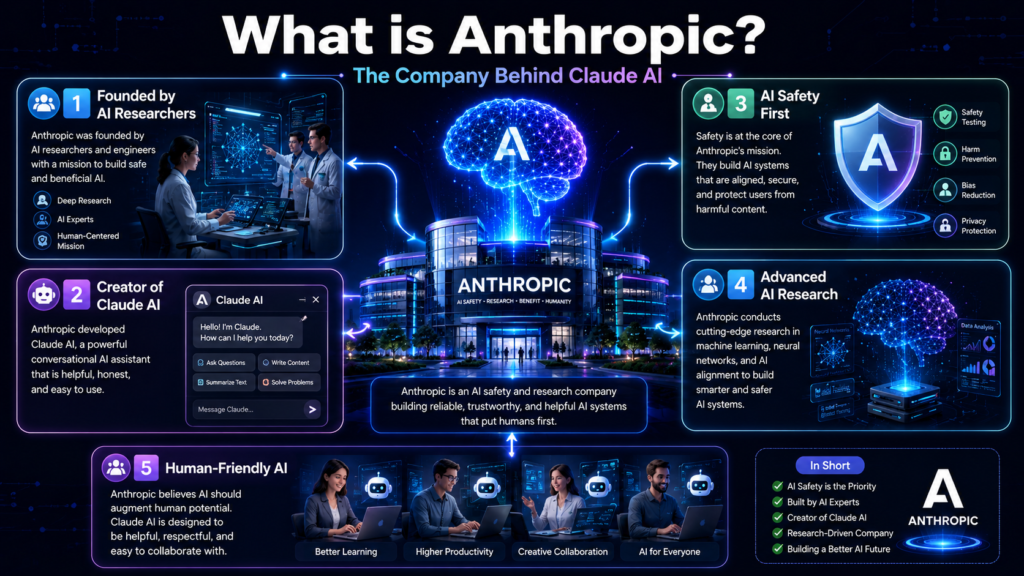
Anthropic is an AI research and technology company founded by former members of the OpenAI team. The company focuses on developing AI systems that are designed to be helpful, reliable, and developed with safety considerations in mind.
The company’s primary goal is to create AI systems that are:
- Safe
- Reliable
- Aligned with human values
- The company aims to improve the reliability of AI-generated responses, although AI systems can still make mistakes. Users should verify important information before relying on AI-generated outputs.
Claude AI was developed as part of Anthropic’s effort to create AI assistants that support tasks such as writing, coding, document analysis, and question answering while placing emphasis on responsible AI development.
Why Does Anthropic Matter?
Understanding the company behind an AI tool helps users evaluate its development approach, product updates, and long-term goals. Knowing who develops an AI assistant can also provide useful context when comparing different AI platforms.
Why Does Anthropic Matter?
Understanding the company behind an AI tool helps users evaluate its development approach, product updates, and long-term goals. Knowing who develops an AI assistant can also provide useful context when comparing different AI platforms.
Why Was Claude AI Developed?
As AI assistants became more widely used, developers and users identified several common challenges associated with large language models, including:
- Producing inaccurate or incomplete responses
- Generating information that requires verification
- Responding inconsistently to complex instructions
- Difficulty handling very long conversations or documents in some situations
- The need for stronger safety and reliability measures
Claude AI was developed by Anthropic with a focus on improving reasoning, document handling, and safety-oriented AI behaviour. Like other AI systems, it can still make mistakes, so important responses should always be reviewed and verified by users.
What Makes Claude AI Different?
Anthropic has stated that Claude AI is designed with an emphasis on helpfulness, safety, and reliability. Different AI assistants have different strengths, and the most suitable tool depends on the user’s specific tasks and workflow.
Important Note
No AI assistant is completely free from errors. Users should verify important information, especially when using AI for education, business, legal, medical, financial, or other high-impact decisions.
Claude AI क्यों Important है

Claude AI kya hai in Hindi In today’s digital world, Artificial Intelligence is increasingly being used across education, business, content creation, customer support, and software development. As AI adoption grows, users are looking for tools that can assist with a wide range of everyday tasks.
Claude AI is important because:
- Anthropic has stated that Claude AI is developed with an emphasis on safety, reliability, and responsible AI behaviour. Like other AI systems, users should still review and verify important outputs.
- It can easily understand long content.
- It can summarize large documents.
- It can assist businesses with writing, document analysis, brainstorming, and other repetitive tasks, which may help improve workflow efficiency depending on how it is used.
Example:
A digital marketer may use Claude AI to:
- Draft blog outlines
- Generate advertising copy
- Brainstorm SEO content ideas
- Summarise research documents
- Refine marketing emails
The final content and strategy should always be reviewed and customised by the user.
Why Do People Use Claude AI?
People commonly use Claude AI for:
- Writing and editing content
- Summarising long documents
- Brainstorming ideas
- Coding assistance
- Research support
- Analysing large amounts of text
The usefulness of the tool depends on the user’s goals, prompts, and workflow.
Important Note
Claude AI is designed to support productivity and content creation, but it should not replace human judgement or expert advice. Users should review AI-generated responses before using them for important decisions or publishing them publicly
Benefits of Claude AI
💡 Top Benefits:
- Can help users prepare outlines, summaries, and draft content more efficiently, depending on the complexity of the task and the amount of editing required.
- Designed to understand conversational context and generate responses based on the information provided in the prompt.
- 📄 Long document analysis
- 💻 Coding support
- 🌍 Multi-language support
- Anthropic states that Claude AI is developed with an emphasis on safety and responsible AI behaviour. However, users should still verify important information and avoid sharing sensitive personal or confidential data.
Claude AI is designed to generate natural-language responses that are easy to read and understand, although the responses should still be reviewed for accuracy and completeness.
Key Benefits of Claude AI
Claude AI may help users with:
- Drafting articles, emails, and reports
- Summarising long documents
- Explaining complex topics in simpler language
- Brainstorming ideas for writing or projects
- Assisting with coding and technical questions
- Supporting multilingual communication
The usefulness of these features depends on the quality of the prompts and the user’s review process.
Important Note
Claude AI is intended to assist users rather than replace human expertise. AI-generated responses should always be reviewed, edited, and fact-checked before being used for publishing, education, business, or other important purposes.
Best For
Claude AI may be useful for:
- Students
- Bloggers
- Content writers
- Developers
- Researchers
- Businesses handling long documents
How Claude AI works

When a user provides a prompt to Claude AI, the AI analyzes the input and generates a response using its training data and reasoning system.
Claude AI can perform the following tasks:
- Content Writing
- Article Generation
- Coding Assistance
- Translation
- Summarization
- Brainstorming
- Research Support
- Data Analysis
- Email Writing
Its objective is not merely to provide answers, but to deliver useful and context-aware responses.
Claude AI is based on a Large Language Model (LLM).
Step-by-step working:
- The user provides input (prompt).
- The AI understands that input.
- The AI processes the prompt and generates a response using the language patterns and knowledge available to the model, together with the context provided in the conversation.
- Generates a natural-language response based on the user’s prompt and the available context.
👉 Example:
You ask: “How do I write a blog post?”
Example
Prompt: “How do I write a blog post?”
Claude AI may generate:
- A suggested outline
- Section headings
- A draft introduction
- Content ideas for each section
The draft should be reviewed, edited, and fact-checked before publication.
Step-by-Step Workflow
- Enter a Prompt – Provide a clear question, topic, or instruction.
- AI Processes the Request – Claude AI analyses the prompt and conversation context.
- Draft Generation – The model generates a response or draft based on the prompt.
- Review and Edit – The user checks the output, verifies important information, and makes any necessary improvements before using or publishing it.
Important Note
Claude AI can generate useful drafts and explanations, but its responses may occasionally contain mistakes or outdated information. Users should verify important facts and avoid relying solely on AI-generated content for critical decisions.
Tips for Better Results
- Write clear and specific prompts.
- Mention the desired tone and target audience.
- Ask one task at a time for more focused responses.
- Review and edit AI-generated content before publishing.
- Verify important facts from reliable sources.
15 Powerful Features of Claude AI
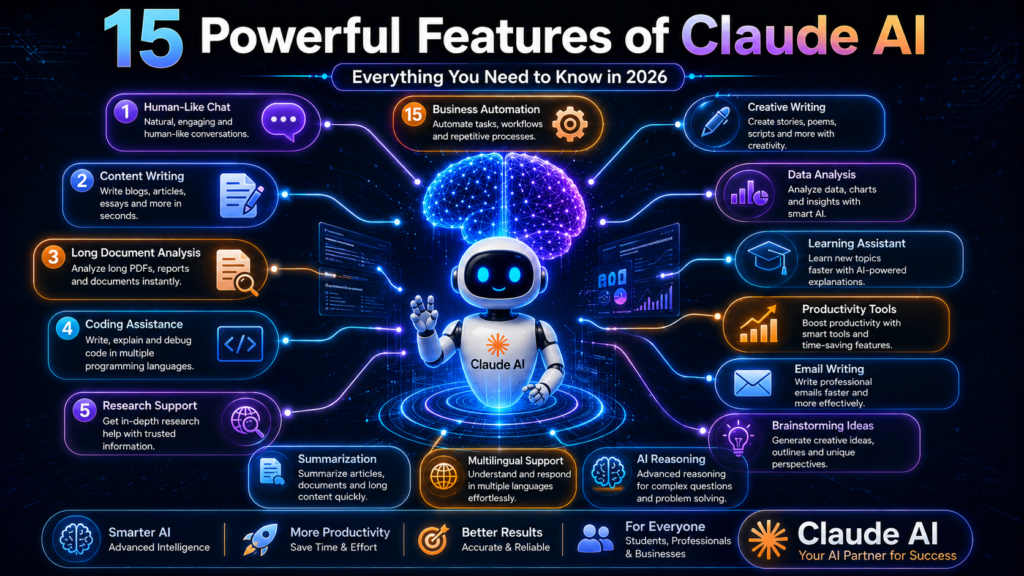
1. Human-Like Conversation
Claude AI is designed to generate natural-language responses that are easy to read and understand based on the user’s prompts and conversation context.
Its responses are more conversational and easy to understand.
Benefits:
- Easy for beginners
- Better user experience
- Natural communication
Note: AI-generated outputs should always be reviewed, edited, and verified before being used for publishing, education, business, or other important purposes.
2.Long Context Window
Claude AI’s greatest strength is its long-context capability.
Claude AI is designed to process longer documents and conversations than many earlier AI systems, depending on the model version and platform limits.
Benefit
- Research work made easier
- Long report analysis
- PDF understanding
3. Content Writing Assistance
Claude AI can assist users in drafting blogs, articles, emails, scripts, and marketing content. AI-generated drafts should always be reviewed and edited before publishing.
Use Cases
- Blogging
- SEO Content
- Marketing Copy
- Website Content
4. Advanced Summarization
Claude AI can help summarise lengthy documents by highlighting key ideas and important points. Users should verify summaries against the original document when accuracy is critical.
Benefit
- Time Saving
- Quick Learning
- Research Support
5. Coding Support
Claude AI can assist with coding tasks such as explaining code, suggesting improvements, debugging, and generating code examples across multiple programming languages.
It can help with:
- Python
- JavaScript
- HTML
- CSS
- SQL
And in many other programming languages.
6. Research Assistance
Claude AI can support research by helping organise information, summarise documents, and explain concepts. Important facts should always be verified using reliable sources.
It:
- Organizes information
- Extracts key points
- Explains concepts
7. Document Analysis
Can assist users in analysing long documents such as reports, research papers, contracts, and business documents.
Examples
- Contracts
- Reports
- Business Documents
- Research Papers
8. Multilingual Support
Claude AI supports multiple languages. The quality and availability of language support may vary depending on the language and model version.
9. Better Reasoning
Claude AI is capable of understanding complex problems step-by-step.
Designed to assist with structured reasoning and step-by-step explanations for many types of tasks.
10. Safer Responses
Claude AI has been developed with a safety-first approach.
Anthropic states that Claude AI is developed with an emphasis on safety and responsible AI behaviour. Like any AI system, users should still review important responses before relying on them.
11. Brainstorming Capability
Cloud AI is very useful in generating new ideas.
Examples
- Startup Ideas
- Blog Topics
- YouTube Content Ideas
- Marketing Campaigns
12. Business Productivity
Businesses may use Claude AI to assist with documentation, customer communication, brainstorming, and content drafting, depending on their workflow.
Applications
- Customer Support
- Documentation
- Team Collaboration
- Content Creation
13. Email Writing
Claude AI can assist in drafting professional emails based on the user’s instructions. The final email should be reviewed and customised before sending.
Useful For
- Freelancers
- Employees
- Business Owners
14. Learning Assistant
Students may use Claude AI to help explain concepts, summarise study material, and generate practice questions. AI-generated explanations should be verified with trusted educational resources when accuracy is important.
It can explain complex concepts in simple language.
15. Creative Writing
Claude AI can assist with creative writing tasks such as drafting stories, scripts, poems, and fictional characters based on user prompts.
Examples
- Story Writing
- Script Writing
- Poetry
- Character Creation
Note: AI-generated outputs should always be reviewed, edited, and verified before being used for publishing, education, business, or other important purposes.
Responsible AI Usage
Claude AI can assist with writing, coding, research, document analysis, and many other tasks. However, it should be used as a productivity tool rather than a replacement for human expertise. Users should verify important information, avoid sharing confidential data, and review AI-generated content before using it in professional or academic work.
How to Access Claude AI (Free Plan or Trial, If Available)

What is Claude AI? If you are a beginner, here is how to get started:
Step 1:
Visit the .Claude AI website
👉 Suggested External Link:
- https://www.anthropic.com (DoFollow)
Step 2: Create an Account
Sign up using one of the available account creation methods shown on the official Claude AI platform. The available sign-in options may change over time.
Step 3:
Open the dashboard.
Step 4:
Example Prompt
“Write a beginner-friendly 1,500-word article about digital marketing in Hindi. Use simple language, include practical examples, clear headings, and an FAQ section.”
Step 5: Review and Edit the Response
Carefully review the AI-generated draft, verify important information, and edit the content by adding your own insights or examples before using or publishing it.
🚀 Best Tips / Strategies
If you want the best output from Claude AI, then:
🔥 Pro Tips:
- Write a clear prompt
- Provide step-by-step instructions
- Give examples
- Provide extensive context
- Mention the target audience and preferred writing tone.
- Specify the desired output format (for example, article, table, checklist, or summary).
- Review and refine the AI-generated draft before final use.
“Write a well-structured article about digital marketing for beginners. Use clear headings, simple language, practical examples, and naturally include the target keyword where appropriate.”
Before You Start
Before using Claude AI:
- Decide your topic.
- Identify your target audience.
- Prepare your main keyword (if writing for SEO).
- Clearly define the purpose of the content.
Providing detailed prompts generally results in more relevant draft content.
Important Note
The availability of free access, plans, features, and usage limits may change over time. Always review the latest information on the official Claude AI website before creating an account or choosing a subscription.
Responsible AI Usage
AI-generated content should not be copied and published without review. Always verify important information, edit the draft, and add your own expertise, examples, or experience before using the content publicly.
❌ Common Mistakes
Many people make these mistakes:
- Using vague or incomplete prompts, which may lead to less relevant AI-generated responses.
- Publishing AI-generated content without reviewing, editing, or adding original insights.
- Not verifying important facts, statistics, or references before using AI-generated information.
- Ignoring content structure, readability, and appropriate keyword placement when creating SEO-focused articles.
👉 Solution:
Use AI as a writing assistant rather than a final authority. Provide clear instructions, review the generated output, verify important information, and add your own knowledge or experience before publishing.
Additional Mistakes to Avoid
- Sharing confidential or sensitive personal information with AI tools.
- Relying entirely on AI without human review.
- Using outdated prompts without updating them for the current topic.
- Ignoring grammar, formatting, and readability before publishing.
Best Practice
The most effective workflow is: Plan → Write Prompt → Generate Draft → Review → Fact-check → Edit → Publish. This helps improve content quality and supports responsible AI usage.
Expert Tips (Pro Insights)
Expert Tips (Pro Insights)
To get better results from Claude AI, consider these best practices:
- Experiment with different prompts – Small changes in wording can produce different results, so compare multiple outputs when needed.
- Learn prompt engineering – Clear and detailed prompts generally produce more relevant responses.
- Combine AI with human editing – Treat AI-generated content as a draft and improve it with your own knowledge, examples, and fact-checking.
- Create niche-focused content – Writing for a specific audience often results in more useful and targeted content.
- Review important information – Always verify facts, statistics, and references before publishing.
Pro Tip
Instead of asking Claude AI to complete an entire project at once, break the task into smaller steps such as creating an outline, drafting each section, and then reviewing the final content. This usually makes the editing process easier and helps maintain consistency.
Advanced Strategies for Better Results
To get more value from Claude AI, try these advanced strategies:
1. Learn Prompt Engineering
Write clear, specific prompts that include your goal, target audience, preferred tone, and output format. Well-structured prompts generally produce more relevant draft content.
2. Combine AI with Human Editing
Use Claude AI to generate outlines and first drafts, then improve the content with your own research, examples, expertise, and fact-checking. This helps create more original and reliable content.
3. Create Niche-Focused Content
Instead of writing about broad topics, focus on a specific niche or audience. Niche content is often more useful for readers and can better address their specific needs.
4. Experiment with Different Prompts
Try multiple prompt variations and compare the outputs. Small changes in wording can produce different responses and help you choose the most suitable draft.
5. Review Before Publishing
Always verify important facts, edit the language for clarity, and ensure the content aligns with your goals before publishing or sharing it.
Pro Tip: AI tools work best when they are used as writing assistants. Your own expertise, editing, and original insights remain essential for creating high-quality and trustworthy content.
Real-Life Use Cases of Claude AI
Claude AI can assist users across different industries and everyday tasks. Here are some practical examples:
💼 1. Freelancers
Freelancers may use Claude AI to:
- Draft blog articles
- Create marketing copy
- Prepare client content
- Brainstorm project ideas
Example: A freelance writer can use Claude AI to create an article outline and first draft, then edit and personalise it before delivering it to the client.
🎓 2. Students
Students can use Claude AI for:
- Summarising notes
- Understanding difficult concepts
- Brainstorming assignment ideas
- Creating study plans
Example: A college student can ask Claude AI to explain a complex science topic in simple language before preparing their own notes.
📈 3. Businesses
Businesses may use Claude AI to assist with:
- Drafting emails
- Preparing reports
- Summarising documents
- Brainstorming marketing ideas
Example: A small business owner can use Claude AI to draft customer emails and organise meeting notes, then review them before sending.
📱 4. Social Media Creators
Content creators can use Claude AI to:
- Generate Instagram caption ideas
- Create YouTube video outlines
- Brainstorm content calendars
- Draft social media posts
Example: A creator can ask Claude AI for multiple caption ideas and then choose and customise the one that best matches their audience.
✍️ 5. Bloggers
Bloggers may use Claude AI for:
- Blog outlines
- Article drafts
- Topic brainstorming
- FAQ generation
Example: A blogger can prepare an article structure with Claude AI and then add original research, personal experience, and fact-checked information before publishing.
💻 6. Developers
Developers can use Claude AI to:
- Explain code
- Debug common issues
- Generate sample code
- Learn programming concepts
Example: A beginner programmer can ask Claude AI to explain a Python function step by step and then test the suggested code in their own development environment.
⚠️ Important Reminder
Claude AI can help generate ideas, drafts, and explanations, but AI-generated content should always be reviewed, edited, and fact-checked before it is used for academic, professional, or business purposes.
Future of Claude AI

Artificial Intelligence continues to evolve, and many organizations are investing in AI research and development across different industries.
Claude AI in the near future:
- Future versions of Claude AI may introduce new capabilities, improved performance, and additional features, depending on Anthropic’s development roadmap.
- AI models are expected to improve their ability to understand and respond to user prompts, but they will still require human oversight and verification for important tasks.
- AI tools are expected to continue supporting automation in areas such as writing, document analysis, customer support, and software development
- AI is likely to change how many professionals perform routine tasks by assisting with repetitive work, while human expertise, creativity, and decision-making will continue to play an important role.
AI adoption has expanded across sectors such as education, healthcare, software development, finance, marketing, and customer support. The pace and extent of future adoption will vary depending on technological developments, regulations, and organizational needs.
Future of Claude AI
Artificial Intelligence is evolving rapidly, and AI assistants such as Claude AI are expected to continue improving over time.
Possible future developments may include:
- Improved document analysis and summarisation
- Better support for writing and coding tasks
- Enhanced collaboration features
- More workflow automation for routine tasks
- Wider integration with business and productivity tools
As AI technology develops, human expertise, critical thinking, and fact-checking will continue to be essential. AI should be viewed as a productivity assistant rather than a replacement for human judgement.
Note: Future features, capabilities, and availability depend on Anthropic’s product roadmap and may change over time.
The long-term impact of AI will depend not only on technological progress but also on how responsibly individuals and organizations choose to use these tools.
ChatGPT vs Claude AI (2026): Features, Differences, and Which One May Suit Your Needs?
ChatGPT vs Claude AI (2026): What’s the Difference?
ChatGPT is developed by OpenAI, while Claude AI is developed by Anthropic.
Both are AI assistants designed to help users with tasks such as:
- Writing and editing content
- Coding assistance
- Brainstorming ideas
- Document summarisation
- Research support
- Natural-language conversations
Although both tools offer similar capabilities, they differ in their features, workflows, available plans, and strengths. The most suitable option depends on your specific use case, preferences, and budget.
Both tools are designed for similar AI-assisted tasks, but they differ in features, workflows, model behaviour, and the way users may choose to apply them depending on their requirements.
| Feature | ChatGPT | Claude AI |
|---|---|---|
| Developer | OpenAI | Anthropic |
| Primary Use | General-purpose AI assistant | General-purpose AI assistant |
| Writing Assistance | Yes | Yes |
| Coding Support | Yes | Yes |
| Document Analysis | Available | Available |
| Brainstorming | Yes | Yes |
| Research Support | Yes | Yes |
| Free Plan | Available (features may vary) | Availability may vary by region and time |
| Paid Plans | Available | Available |
Note: Features, pricing, and availability may change over time.
Who Should Choose Which Tool?
ChatGPT may suit users who:
- Need a versatile AI assistant
- Want help with writing, coding, brainstorming, and learning
- Use AI for a wide variety of everyday tasks
Claude AI may suit users who:
- Frequently work with long documents
- Need writing, summarisation, or document analysis assistance
- Prefer Anthropic’s AI ecosystem
The better choice depends on your workflow rather than a universally “best” AI tool.
Important Note
Both ChatGPT and Claude AI can generate inaccurate or incomplete information in some situations. Users should review, edit, and verify important responses before relying on them for academic, business, legal, medical, or financial purposes.
⚡ Key Differences (Simple Table)
| Feature | ChatGPT | Claude AI |
|---|---|---|
| Developer | OpenAI | Anthropic |
| Primary Purpose | General-purpose AI assistant | General-purpose AI assistant |
| Writing Assistance | Yes | Yes |
| Coding Support | Yes | Yes |
| Document Analysis | Available | Available |
| Long Document Handling | Available (depends on model and plan) | Designed to support longer documents and conversations (depends on model and platform limits) |
| Response Style | Flexible and conversational | Structured and context-aware |
| Common Use Cases | Writing, coding, brainstorming, learning | Writing, summarisation, document analysis, brainstorming |
| Human Review Needed | Yes | Yes |
Note: Features, model capabilities, and availability may change over time. Always review important AI-generated information before using it for academic, business, legal, medical, or financial purposes.
| If You Need… | Consider |
|---|---|
| General AI assistance | ChatGPT |
| Long document summaries | Claude AI |
| Coding help | Both |
| Writing drafts | Both |
| Brainstorming | Both |
| Research assistance | Both (verify important information) |
Both ChatGPT and Claude AI are capable AI assistants with overlapping features. The most suitable choice depends on your workflow, preferred features, budget, and the type of tasks you perform most often.
Performance Comparison
✍️ Content Writing
Both ChatGPT and Claude AI can assist with writing tasks such as blog posts, articles, scripts, emails, and brainstorming.
- ChatGPT is commonly used for a wide variety of writing tasks, including creative writing, coding assistance, and idea generation.
- Claude AI is often used for drafting longer documents, summarisation, and document analysis.
The most suitable tool depends on the type of content you want to create and your preferred workflow.
For longer articles, some users may prefer Claude AI’s writing style, while others may prefer ChatGPT. The preferred output often depends on the prompt, editing process, and personal writing preferences
💻 Coding and Technical Tasks
Both ChatGPT and Claude AI can assist with:
- Explaining code
- Debugging
- Writing sample code
- Learning programming concepts
The available features and coding capabilities may vary depending on the model version, subscription plan, and platform.
Anthropic states that Claude AI is developed with an emphasis on responsible AI behaviour. Regardless of the tool used, developers should always review and test AI-generated code before using it in production environments
📄 Long Document Handling
Both ChatGPT and Claude AI support document analysis and summarisation.
Claude AI is designed to work with longer documents and conversations, depending on the model version and platform limits.
- Both tools can assist with summarising long content. The quality of the summary may vary depending on the prompt, document type, and model version.
- Users should evaluate both tools based on their own workflow and the type of documents they typically work with.
| Task | ChatGPT | Claude AI |
|---|---|---|
| Writing Assistance | Yes | Yes |
| Creative Writing | Supported | Supported |
| Long Document Analysis | Available | Available (depending on model and platform limits) |
| Coding Assistance | Yes | Yes |
| Brainstorming | Yes | Yes |
| Human Review Required | Yes | Yes |
| Your Need | Tool to Consider |
|---|---|
| Everyday AI assistance | ChatGPT or Claude AI |
| Long document analysis | Claude AI |
| Coding help | ChatGPT or Claude AI |
| Brainstorming ideas | ChatGPT or Claude AI |
| Writing drafts | ChatGPT or Claude AI |
The best choice depends on your workflow, prompt quality, and personal preference rather than a single universally “better” AI tool.
Important Note
The capabilities of ChatGPT and Claude AI continue to evolve. Performance may vary depending on the model version, subscription plan, prompt quality, and the specific task being performed. Users should review AI-generated outputs before relying on them.
Which Tool Should You Try?
If possible, try both tools using the same prompt and compare the results for your own workflow. The most suitable option depends on your writing style, document type, coding needs, and personal preferences.
Which Tool Should You Choose?
The right AI tool depends on your workflow and the type of tasks you perform most often.
- If you are a beginner: ChatGPT may be a good starting point because it supports a wide range of everyday tasks.
- If you regularly write long articles or analyse lengthy documents: Claude AI may suit your workflow.
- If you are a freelancer or content creator: Trying both tools and choosing the one that best fits each project can be a practical approach.
Common Mistake
Many users rely entirely on a single AI tool for every task.
A practical approach is to evaluate different AI assistants and use the one that best matches the specific task, such as writing, coding, brainstorming, or document analysis.
Final Verdict
Both ChatGPT and Claude AI are capable AI assistants with many overlapping features.
- ChatGPT is commonly used for general-purpose writing, brainstorming, coding, learning, and productivity tasks.
- Claude AI is commonly used for writing assistance, document analysis, summarisation, and research-related workflows.
The most suitable tool depends on your goals, preferred workflow, budget, and the type of tasks you perform.
Claude AI – Pros
- Can assist with writing, editing, and brainstorming.
- Supports document analysis and summarisation.
- Designed to understand conversational context.
- Can assist with coding and technical explanations.
- Supports multiple languages.
- Suitable for research and productivity workflows.
✅ Multilingual support
Cons
- May sometimes provide incorrect information
- Limitations on internet access
- Advanced features may be restricted in certain plans
- Human verification is necessary for important decisions
- AI-generated responses may require editing and fact-checking before use.
- Availability of features may vary by plan, model version, or region.
Important Note
Both ChatGPT and Claude AI are AI assistants designed to support users with writing, coding, research, and productivity tasks. Neither tool should be treated as a replacement for human judgement. Always review, edit, and verify important AI-generated information before using it for academic, professional, business, legal, medical, or financial purposes.
| Your Need | Consider |
|---|---|
| General AI assistance | ChatGPT |
| Long document analysis | Claude AI |
| Writing drafts | ChatGPT or Claude AI |
| Coding support | ChatGPT or Claude AI |
| Brainstorming | ChatGPT or Claude AI |
| Research support | ChatGPT or Claude AI (verify important information) |
The features, pricing, and capabilities of ChatGPT and Claude AI continue to evolve. Before choosing a paid plan, compare the latest features on the official websites and consider trying any available free access or trial to determine which tool best fits your workflow.
Important Tips for Using Claude AI
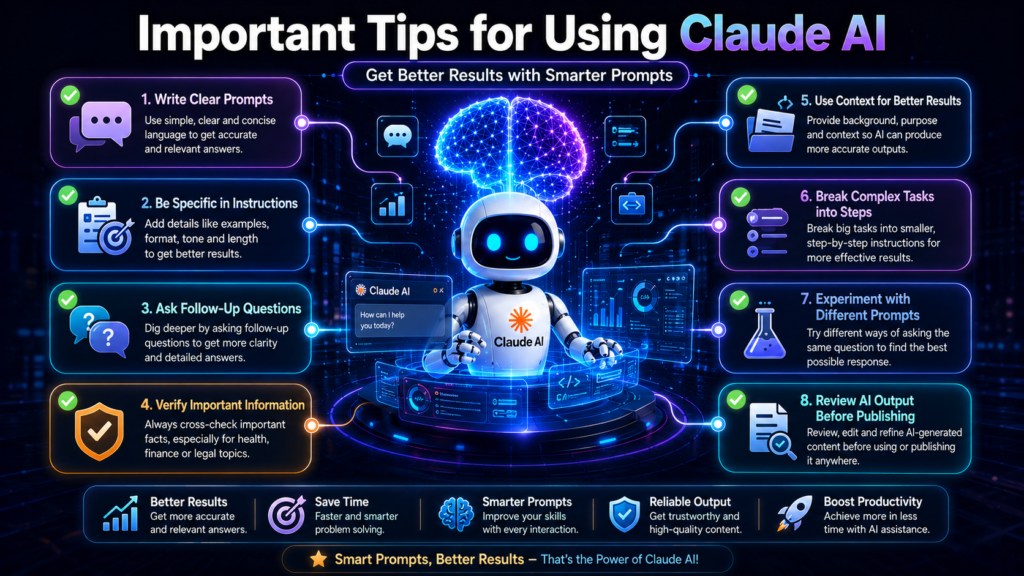
To get more useful responses from Claude AI:
1. Write Clear Prompts
Clearly describe your topic, goal, target audience, preferred tone, and output format. Specific prompts generally produce more relevant draft content.
2. Ask Follow-Up Questions
If the first response is incomplete, ask follow-up questions or request revisions to improve the output.
3. Verify Important Information
Always fact-check important facts, statistics, and references before using AI-generated content for academic, business, or professional purposes.
4. Provide Detailed Instructions
Mention word count, writing style, language, headings, examples, and any other requirements to help the AI generate a more relevant draft.
5. Review Before Publishing
Edit the AI-generated draft, add your own expertise or examples, and proofread the final content before sharing or publishing it.
Conclusion
You should now have a clear understanding of what Claude AI is, how it works, its key features, benefits, limitations, and practical use cases.
Claude AI is an AI assistant that can support tasks such as writing, document analysis, brainstorming, coding assistance, and summarisation. When combined with human expertise, editing, and fact-checking, it can become a useful productivity tool for students, freelancers, businesses, and content creators.
The most effective approach is to use AI responsibly—treat it as an assistant rather than a replacement for human knowledge or decision-making.
Final Note: AI tools continue to evolve. Features, pricing, and capabilities may change over time, so always refer to the official Claude AI website for the latest information.
AI-generated content should always be reviewed, edited, and verified before being used for publishing, education, business, legal, medical, financial, or other important purposes. Avoid sharing sensitive or confidential information with AI tools.
❓ FAQ (Schema Ready)
1. What is Cloud AI?
Claude AI is an AI assistant and Large Language Model (LLM) developed by Anthropic. It can assist users with writing, coding, document analysis, summarization, brainstorming, and general productivity tasks. It is important to review and verify AI-generated responses before using them.
2. Is Claude AI free?
Claude AI may offer free access or a limited plan to some users. The availability, features, and usage limits of free and paid plans are subject to change over time, so it is advisable to check the official Claude AI website for the latest details.
3. Who can handle it?
Students, bloggers, freelancers, developers, researchers, and businesses can use Claude AI for writing, document analysis, coding assistance, brainstorming, and productivity tasks.
4. What is the difference between Cloudflare and Chat-GPT?
Both AI assistants help with writing, coding, brainstorming, and productivity tasks. However, the features, workflows, and capabilities of Claude AI and ChatGPT may differ. Which tool is more suitable depends on the user’s requirements, workflow, and preferred features.
5. Can you earn money from Claude?
Some users utilize Claude AI to boost productivity in areas such as freelancing, blogging, content creation, and business workflows. Income or results depend on individual skills, experience, client demand, and the quality of work.
6. Does Cloud-A support Hindi?
Claude AI supports multiple languages. The quality of language support and available features may vary depending on the model version and platform.
7. Should content be published directly from Cloudways?
No. It is recommended to edit, fact-check, and add your own original insights to AI-generated content before publishing it.
8. Does Claude help with coding?
Yes, Claude AI can help explain code, provide debugging suggestions, and explain programming concepts. The generated code should be tested and reviewed before being used in production.