
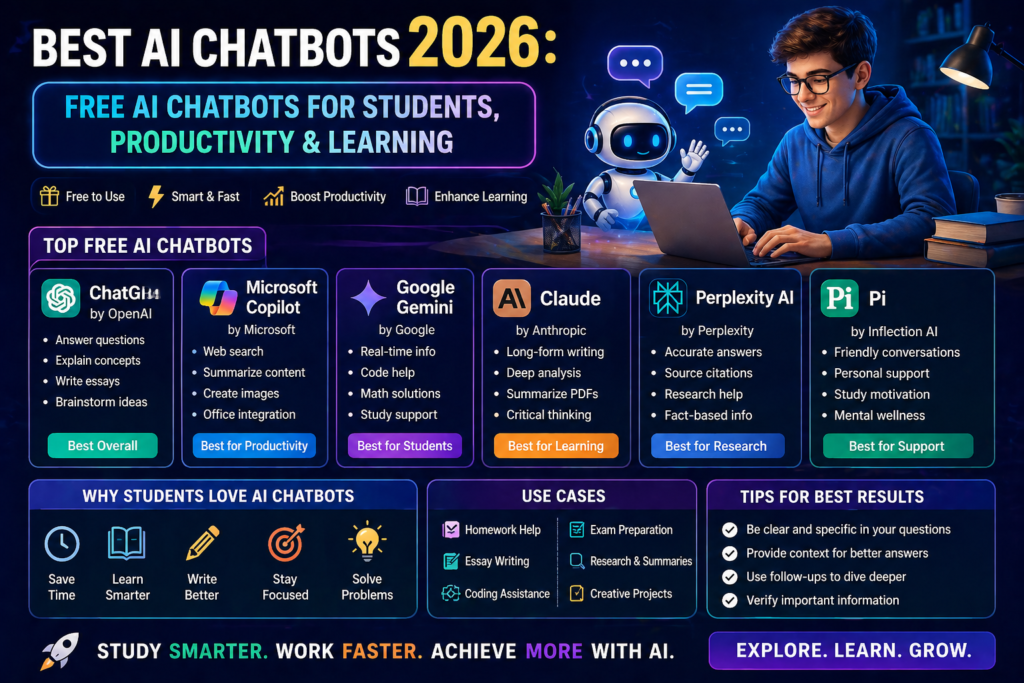
Best AI Chatbots 2026
AI chatbots have become an important part of how people learn, work, research, and create content in 2026. Instead of searching through multiple websites for every question, users can now interact with AI assistants to get explanations, brainstorm ideas, summarize information, write content, and get help with coding.
Whether you are a student, blogger, YouTuber, freelancer, developer, or working professional, the right AI chatbot can help with a variety of everyday tasks and potentially reduce the time spent on repetitive work.
The good news is that you do not always need to pay for an AI chatbot. Several popular platforms offer free plans or limited free access with features for learning, writing, research, coding, and everyday productivity.
For example, students can use AI chatbots to:
- Understand difficult topics in simple language
- Create and organize study notes
- Get help with coding and programming concepts
- Research topics and identify potentially useful sources
- Brainstorm ideas for assignments and projects
- Improve writing, grammar, and communication skills
However, choosing the right chatbot can be confusing. ChatGPT, Google Gemini, Claude, Perplexity, Microsoft Copilot, Grok, and other AI assistants offer different features and may be better suited to different types of tasks and users.
That is why this guide will help you understand the best AI chatbots in 2026, compare their key features and available free options, explore their ideal use cases, and learn how to choose the right AI chatbot for your needs.
What You’ll Learn in This Guide
In this guide, we will cover:
- Best AI Chatbots 2026
- Free AI Chatbots for Students
- Best AI Chatbots for Different Users
- ChatGPT Alternatives
- AI Chatbots for Writing, Coding, and Research
- How to Choose the Right AI Chatbot
- Practical Tips for Getting Better AI Responses
By the end of this guide, you will have a clearer understanding of what different AI chatbots can do and which type of tool may be suitable for your specific needs.
Best AI Chatbots 2026: Free AI Chatbots for Students
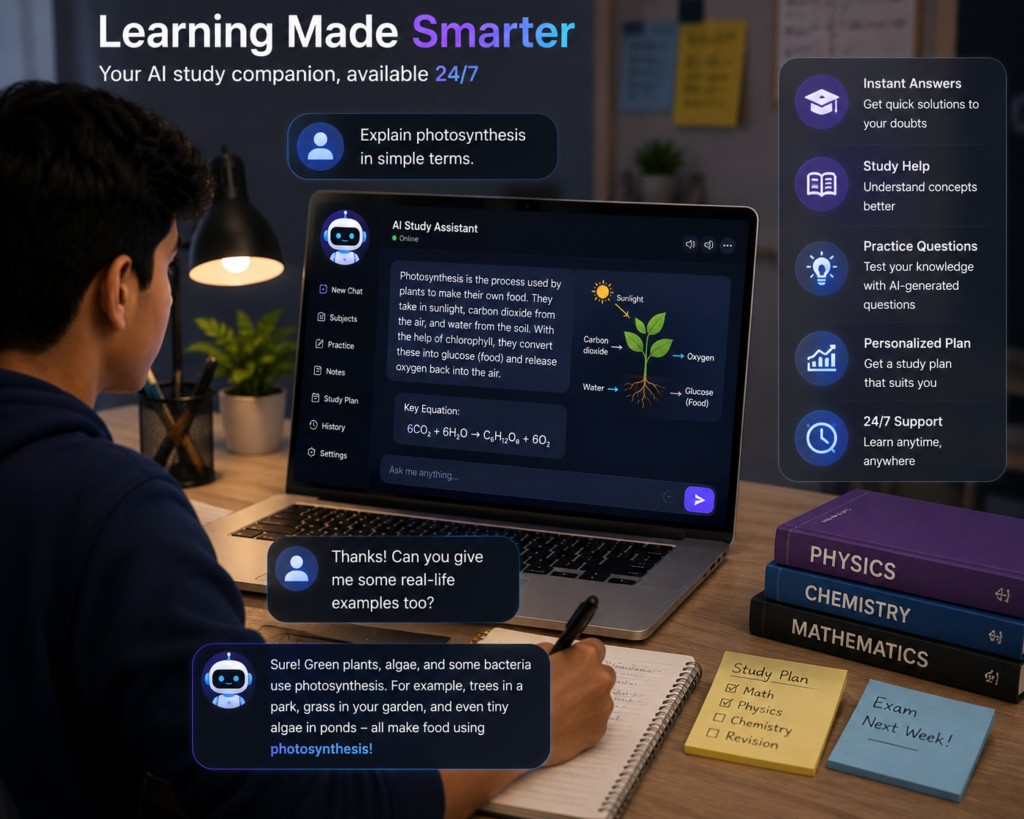
Best AI Chatbots 2026: Free AI Chatbots for Students
Artificial intelligence is becoming increasingly integrated into everyday digital tools and workflows. AI chatbots have evolved significantly in recent years, moving beyond simple conversational experiments toward tools that can assist with writing, research, coding, learning, and other everyday tasks.
From writing and research to coding and learning, modern AI chatbots can assist with tasks such as:
- Writing and improving content
- Understanding difficult academic concepts
- Learning coding and programming
- Summarizing lengthy notes or documents
- Drafting emails and professional messages
- Translating and improving text
- Exploring topics and organizing research questions
- Brainstorming new ideas
- Organizing information
- Potentially saving time on repetitive tasks
One of the biggest advantages for beginners and students is that several popular AI chatbot platforms offer free plans or limited free access. However, available features, usage limits, and free-plan terms can vary between providers.
For example, a student can use an AI chatbot to understand a difficult topic, turn lengthy study material into a simpler summary, practice questions, or get guidance while learning a programming concept. The goal should be to use AI as a learning assistant rather than simply copying its answers. Students should also verify important information and use their own understanding when completing academic work.
Choosing the Right AI Chatbot Can Be Difficult
There is one major challenge: there are now many AI chatbot and AI assistant tools available online.
With so many options, it is not always easy to determine which chatbot is actually suitable for your needs.
Some tools may:
- Offer only basic features on their free plans
- Produce inaccurate or incomplete answers
- Have a learning curve for beginners
- Limit important features behind paid subscriptions
- Provide different results depending on the type of task
This is where a well-organized comparison becomes useful.
In this guide, we will explore the best AI chatbots of 2026 and look at what each tool is good at, who should consider using it, what free options are available, and how these chatbots compare for tasks such as studying, writing, coding, research, and productivity.
Instead of choosing a chatbot simply because it is popular, you can compare tools based on your specific needs, available features, free-plan limits, and the type of tasks you want to perform. This can help you make a more informed choice rather than selecting a tool based only on popularity.
Why Are AI Chatbots Becoming So Popular?
Students manage assignments and exams, professionals deal with emails and deadlines, and creators regularly produce content for websites and social media. AI chatbots can assist with some of these tasks by providing writing, research, brainstorming, and problem-solving support.
AI chatbots can help manage parts of this workload by acting as digital assistants. Instead of manually searching for information for every small task, users can ask an AI chatbot for explanations, summaries, ideas, or step-by-step assistance. For factual or important information, however, the response should still be checked against reliable sources.
Modern AI chatbots can assist with tasks such as:
- Understanding conversational context
- Explaining complex topics
- Generating natural-language responses
- Assisting with brainstorming
- Supporting repetitive tasks and workflows
As a result, AI chatbots are being used or explored across areas such as:
- Education
- Business
- Marketing
- Content Creation
- Customer Support
- Programming
- Research
- Daily Productivity
What Is an AI Chatbot?
An AI chatbot is a software application that uses artificial intelligence to process user input and generate responses in natural language.
Unlike traditional chat systems, modern AI chatbots can assist with tasks such as:
- Using the available context of a conversation
- Explaining complex topics
- Generating and rewriting content
- Answering questions in natural language
- Assisting with learning and problem-solving
Many modern AI chatbots are powered by large language models trained on large and diverse datasets. The exact training methods, data sources, and capabilities vary between providers.
These models can generate responses quickly, although accuracy and response quality can vary depending on the model, the prompt, and the type of task. For important or factual information, users should verify the response using reliable sources.
Comparison Table – Best AI Chatbots 2026
| AI Chatbot | Best For | Free Access | Key Strength | Main Use Case | Paid Option |
|---|---|---|---|---|---|
| ChatGPT | General-purpose AI | Yes, with usage limits | Broad range of AI tools | Writing, coding, research, analysis | Yes |
| Google Gemini | Google ecosystem and general AI tasks | Yes, with limits | Integration with Google’s AI ecosystem | Writing, learning, research, productivity | Yes |
| Claude | Long-form writing and analysis | Yes, with usage limits | Writing, analysis, and coding assistance | Writing, research, coding | Yes |
| Microsoft Copilot | Microsoft ecosystem and web-based tasks | Yes | Web answers, writing, and Microsoft integration | Writing, brainstorming, research, productivity | Yes |
| Perplexity | Web research and cited answers | Yes, with limits | Search-focused answers with citations | Research, fact-finding, topic exploration | Yes |
Note: Free-plan features, usage limits, and paid options can change over time and may vary by region. Check each provider’s current pricing and plan details before subscribing.
Top AI Chatbots Comparison 2026
| AI Chatbot | Best For | Key Strength | Web / Research | Coding | Image & Voice Features | Free Access | Paid Option |
|---|---|---|---|---|---|---|---|
| ChatGPT | General use, writing, coding | Broad range of AI tools and workflows | Yes | Yes | Yes | Yes, with limits | Yes |
| Google Gemini | Google ecosystem, research, and productivity | Integration with Google’s ecosystem | Yes | Yes | Yes | Yes, with limits | Yes |
| Claude | Long-form writing, analysis, and coding | Writing and reasoning workflows | Yes, where available | Yes | Varies by feature/plan | Yes, with limits | Yes |
| Microsoft Copilot | Microsoft ecosystem and web-based tasks | Microsoft integration and web assistance | Yes | Yes | Yes | Yes | Yes |
| Perplexity | Web research and cited answers | Search-focused answers with citations | Yes | Yes | Available features vary | Yes, with limits | Yes |
| Grok | Real-time information and X-related workflows | Web and X search, multimodal capabilities | Yes | Yes | Yes | Yes, with limits | Yes |
Note: AI chatbot features, free-plan limits, model availability, and paid options can change over time and may vary by region. Check the provider’s official pricing and feature pages before subscribing.
Quick Recommendations
🏆 Best Overall
- OpenAI ChatGPT — A strong general-purpose option for writing, coding, study assistance, and productivity.
✍️ Best for Writers
- Anthropic Claude — A strong option for long-form writing, editing, and structured analysis.
🔎 Best for Research
- Perplexity AI — A strong option for web research and citation-based answers.
📚 Best for Students
- Google Gemini — A useful option for students who already use Google’s ecosystem, including services such as Docs and Gmail.
💼 Best for Office Work
- Microsoft Copilot — A useful option for users working across Microsoft’s ecosystem and supported productivity applications.
📈 Best for Trending Topics
- xAI Grok — A useful option for web and X-related searches involving current or trending topics.
Key 2026 Trends
AI chatbot technology is evolving rapidly, with leading platforms expanding beyond simple text conversations into broader AI assistant workflows.
Key trends include:
- Multimodal AI — Leading platforms increasingly support combinations of text, images, audio, and other inputs or outputs.
- Web-connected AI — Many AI assistants now offer web search or other tools that can help users work with more current information.
- Voice-based interaction — Voice conversations are becoming an increasingly common way to interact with AI assistants.
- Workflow assistance — AI platforms are expanding into tasks such as research, writing, coding, analysis, and other productivity workflows.
- Increasing competition — ChatGPT, Gemini, Claude, Perplexity, Copilot, Grok, and other platforms are competing across different use cases rather than offering identical experiences.
- ChatGPT’s strong market position — According to StatCounter’s June 2026 worldwide AI chatbot traffic data, ChatGPT held the largest share among the platforms tracked. Market-share figures can vary significantly depending on the measurement method and dataset.
- Greater specialization — Different platforms are increasingly associated with different strengths, such as general-purpose assistance, research, long-form writing, coding, or ecosystem integration.
Important Note
AI chatbots are becoming more capable, but they can still produce inaccurate, incomplete, or biased responses. Users should not assume that every AI-generated answer is correct.
Fact-checking is especially important when using AI for news, medical, legal, financial, academic, or other high-stakes topics. For important information, verify claims using reliable and authoritative sources before making decisions or publishing the content.
Best AI Chatbots 2026: What Can They Do?
AI chatbots can assist users with a wide range of tasks by processing natural-language instructions and generating responses based on the capabilities of the underlying AI model.
For example, you can ask an AI chatbot:
“Explain AI in simple words.”
The chatbot can then provide an explanation in a conversational format. Depending on the platform and available features, AI chatbots can also assist with:
- Natural-language conversations
- Content writing and rewriting
- Coding and programming assistance
- Research and information gathering
- Learning and concept explanations
- Brainstorming and idea generation
Popular AI chatbot platforms include:
- ChatGPT
- Google Gemini
- Claude
- Perplexity
- Microsoft Copilot
Different platforms offer different capabilities, so the most suitable option depends on the user’s specific needs. Students, professionals, writers, developers, researchers, and content creators may use AI chatbots for different types of tasks.
Step-by-Step Guide: How to Effectively Use AI Chatbots
Step 1: Choose the Right Chatbot
Different AI chatbots may be better suited to different tasks.
Examples:
- General writing and brainstorming → ChatGPT
- Web research → Perplexity
- Microsoft ecosystem tasks → Microsoft Copilot
- Long-form analysis and learning support → Claude
The right choice depends on the specific task, available features, and your preferred workflow.
Step 2: Ask Clear Questions
The quality and usefulness of an AI response can depend significantly on how clearly you describe the task, context, and expected output.
Less specific prompt:
“Explain science.”
Better prompt:
“Explain photosynthesis in simple English for a beginner, using a real-world example in 150 words.”
A clear prompt can include the topic, target audience, language, format, length, and any specific requirements.
Step 3: Verify Important Information
AI chatbots can sometimes produce inaccurate, incomplete, or outdated information.
Always verify important information, especially:
- Statistics
- Medical information
- Financial information or advice
- Legal information
- Academic details
Use reliable and authoritative sources when accuracy is important.
Step 4: Use Follow-Up Questions
Many modern chatbots can use the available conversation context to handle follow-up questions.
For example:
“Can you simplify that explanation?”
You can also ask the chatbot to provide examples, compare concepts, change the format, or explain a topic at a different difficulty level.
Step 5: Combine AI with Human Thinking
AI should assist your work rather than completely replace critical thinking.
For many tasks, combining AI assistance with human creativity, judgment, and experience can produce more useful results.
A practical workflow is:
- Human creativity → Define the idea and goal
- AI assistance → Generate, organize, or refine information
- Human judgment → Review, verify, edit, and finalize the result
Benefits of AI Chatbots
| Benefit | Description |
|---|---|
| Saves Time | AI chatbots can reduce time spent on repetitive tasks, drafting, summarizing, and initial information gathering. |
| Supports Student Learning | Students can use AI to explain difficult topics, summarize study material, practice questions, learn coding concepts, and improve writing. |
| Supports Productivity | Professionals can use AI for emails, reports, brainstorming, research assistance, and meeting summaries. |
| Easy to Get Started | Many popular chatbots use conversational interfaces, although available features and complexity vary between platforms. |
| Available When Needed | AI chatbots can generally be accessed whenever the service is available, making them useful for on-demand assistance. |
Why AI Chatbots Matter in 2026
AI chatbots are more than convenience tools; they can support learning, productivity, research, and content creation across a wide range of tasks.
Here are some reasons they have become useful to many users:
1. Quick Assistance
Users can ask questions and receive explanations, summaries, ideas, or step-by-step guidance through a conversational interface.
2. On-Demand Assistance
AI chatbots can generally be accessed whenever the service is available, making them useful when users need help with a task.
3. Learning Support
AI can explain concepts at different levels, provide examples, and help users explore follow-up questions while learning.
4. Productivity Support
AI chatbots can assist with drafting, summarizing, brainstorming, coding, research, and other repetitive tasks.
5. Multiple Use Cases
Many AI chatbots can support writing, research, coding, analysis, learning, and content creation within a single interface.
For users who choose to incorporate AI into their workflows, chatbots can be useful tools for learning, productivity, research, and content creation in 2026. Their usefulness ultimately depends on the specific tool, task, and way it is used.
Benefits of Free AI Chatbots for Students
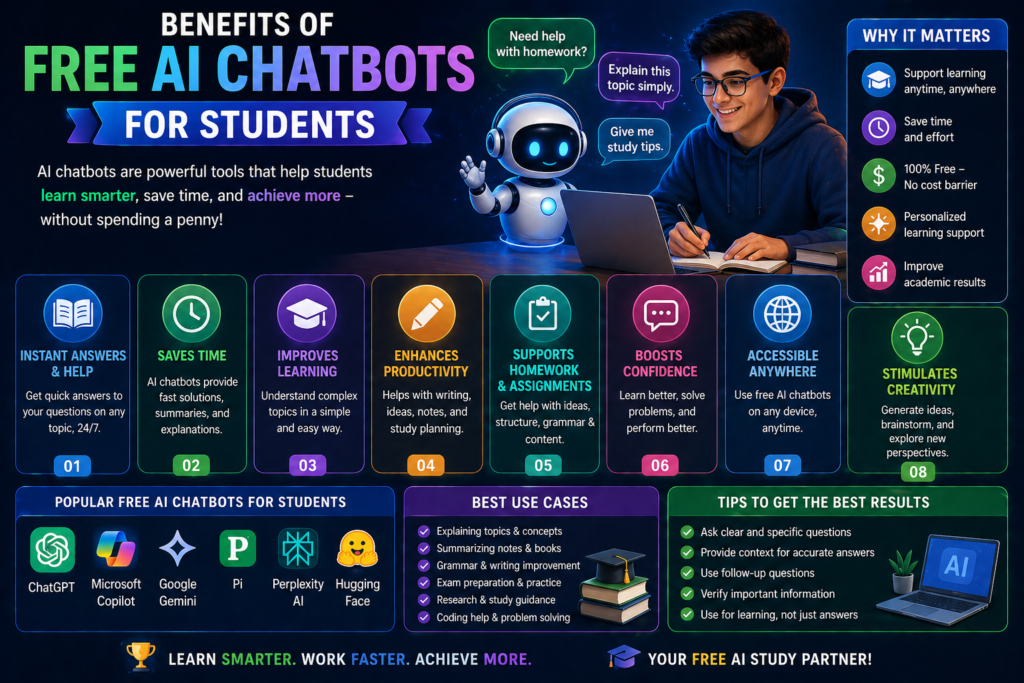
AI chatbots can be useful learning assistants for students. Free or limited-access chatbot plans can help students with studying, writing, coding, research, and other academic tasks.
1. Homework and Concept Support
AI can explain questions and difficult concepts in subjects such as mathematics, science, and English. Students can also ask follow-up questions when they need a simpler explanation.
2. Notes and Summaries
AI can summarize lengthy study material and help organize notes into simpler, more structured formats.
3. Exam Preparation
Students can use AI to create practice questions, quizzes, revision summaries, and explanations of important concepts.
4. Concept Explanation
AI can explain complex topics in simpler language and provide examples to make difficult subjects easier to understand.
5. Assignment Support
AI can help students brainstorm ideas, create outlines, explain concepts, and improve drafts. Students should review and personalize their work rather than submitting AI-generated content without understanding or editing it.
6. Coding Help
AI chatbots can explain programming concepts, provide coding examples, help identify errors, and guide students through debugging.
7. Potential Time Savings
AI can reduce time spent on repetitive tasks such as summarizing, drafting, organizing information, and creating practice material, allowing students to focus more on understanding and reviewing their work.
Important: Students should use AI as a learning assistant rather than simply copying its answers. Academic rules regarding AI use can vary between schools, colleges, and institutions, so students should follow the applicable guidelines.
How AI Chatbots Work in 2026
The basic process behind an AI chatbot can be explained in a few simple steps:
Step 1: User Input
The user enters a question, instruction, or prompt into the chatbot.
Step 2: Input and Context Processing
The AI system processes the user’s prompt and, where applicable, the available conversation context.
Step 3: AI Model Processing
The underlying AI model processes the input and generates a response based on learned patterns and the capabilities available to the chatbot.
Step 4: Response Generation
The model generates a response in natural language based on the user’s request.
Step 5: Response Delivery
The generated response is presented to the user through the chatbot interface.
Advanced AI Chatbot Features
Depending on the platform and plan, advanced AI chatbots may offer features such as:
- Voice conversations
- File uploads and document analysis
- Image generation
- Code generation and assistance
- Web search or research features
- Multimodal interactions
These features can support learning, research, content creation, and productivity, depending on how they are used.
However, advanced features and availability can vary between AI chatbot platforms and subscription plans.
Best AI Chatbots 2026 (Top Tools)
The AI chatbot market includes several platforms with different strengths and use cases. The following tools are among the major options to consider in 2026.
1. ChatGPT
ChatGPT is a general-purpose AI chatbot that can assist with writing, coding, research, analysis, brainstorming, and everyday tasks.
Key Features:
- Natural-language conversations
- Content writing and rewriting
- Coding and programming assistance
- Web-based research and information gathering
- File and image-related capabilities on supported plans
Best For:
- Students
- Content creators
- Writers
- Developers
- Professionals
Why Consider It:
Its broad range of capabilities makes it suitable for users who want one AI assistant for multiple types of tasks.
2. Google Gemini
Google Gemini is Google’s AI assistant and is particularly useful for users who already work within Google’s ecosystem.
Key Features:
- Natural-language conversations
- Google ecosystem integration
- Writing and brainstorming assistance
- Research and information support
- Multimodal capabilities on supported versions
Best For:
- Students
- Researchers
- Google Workspace users
- General productivity
Why Consider It:
Gemini can be useful for people who regularly use Google’s services and want AI assistance within that ecosystem.
3. Claude AI
Claude is an AI assistant from Anthropic that is well suited to long-form writing, analysis, coding, and tasks involving lengthy context.
Key Features:
- Long-form writing assistance
- Document and text analysis
- Coding assistance
- Research and reasoning support
- Natural-language editing and rewriting
Best For:
- Writers
- Students
- Researchers
- Developers
- Professionals
Why Consider It:
Claude can be particularly useful when a task requires detailed analysis, structured writing, or working with large amounts of text.
4. Perplexity AI
Perplexity is a search-focused AI platform designed to help users explore topics and find information through web-based answers and cited sources.
Key Features:
- Source-backed answers
- Web research
- Follow-up questions
- Topic exploration
- Research-focused workflows
Best For:
- Researchers
- Students
- Journalists
- Content creators
- Users who want source-supported information
Why Consider It:
Its research-oriented interface can make it useful when users want to explore a topic and review the sources behind an answer.
5. Microsoft Copilot
Microsoft Copilot is an AI assistant designed to support general tasks and, where supported, workflows across Microsoft’s ecosystem.
Key Features:
- Writing and rewriting assistance
- Brainstorming
- Web-based answers
- Microsoft ecosystem integration
- Productivity assistance on supported plans
Best For:
- Professionals
- Business users
- Microsoft 365 users
- Students
Why Consider It:
Copilot can be useful for users who already rely on Microsoft products and want AI assistance within supported Microsoft workflows.
Best Free AI Chatbots for Students
Students can choose from several AI chatbot platforms that offer free access or limited free plans. These tools can assist with learning, writing, research, coding, and study-related tasks.
1. ChatGPT Free
Best for: General study assistance, explanations, writing, and coding help.
Students can use ChatGPT to understand difficult concepts, create study summaries, practice questions, brainstorm ideas, and get programming assistance.
2. Google Gemini
Best for: Learning, research, and Google ecosystem users.
Gemini can help students explain concepts, brainstorm ideas, summarize information, and work with supported Google services.
3. Perplexity AI
Best for: Research and source-supported information.
Perplexity can help students explore topics, find web-based information, and review sources associated with answers.
4. Microsoft Copilot
Best for: General assistance and Microsoft ecosystem users.
Copilot can help with writing, brainstorming, explanations, and other productivity-related tasks, depending on the available features.
5. Poe
Best for: Exploring different AI models and conversational tools.
Poe provides access to different AI-powered experiences, although available models, features, and usage limits can vary.
Important Note
Free access does not necessarily mean unlimited access. AI chatbot features, message limits, available models, and free-plan terms can change over time. Students should check the provider’s current plan details before relying on a specific feature.
Best Tips for Using AI Chatbots
Using an AI chatbot effectively is not just about asking questions. Clear instructions, useful context, and follow-up questions can help you get more relevant responses.
1. Ask Clear Questions
Clearly explain what you want the chatbot to do. A well-defined question can make it easier for the AI to understand your task and provide a useful response.
2. Ask Follow-Up Questions
If the first response is too complex or incomplete, ask follow-up questions. You can request simpler explanations, additional examples, comparisons, or more details.
3. Use Specific Prompts
Include important details such as the topic, audience, language, format, length, and desired outcome.
For example:
“Explain photosynthesis in simple English for a Class 8 student in 150 words.”
A specific prompt can produce a more relevant response than a vague instruction.
4. Ask for Examples
Examples can make difficult concepts easier to understand. You can ask the chatbot to explain a topic using a real-world example, analogy, or step-by-step demonstration.
5. Provide Enough Context
Short prompts are not always better. For complex tasks, provide enough context and clearly describe your requirements.
For example:
“Write a 1,000-word beginner-friendly article about AI chatbots in 2026. Use simple English, include H2 and H3 headings, explain the benefits and limitations, and add a short FAQ section.”
The goal is not to write the longest prompt possible, but to provide the information the AI needs to understand the task.
Common Mistakes to Avoid
Using AI chatbots effectively also means understanding their limitations. Avoid these common mistakes:
1. Blindly Trusting AI
AI chatbots can produce inaccurate, incomplete, or outdated information. Important facts, statistics, and high-stakes information should be verified using reliable sources.
2. Asking Vague Questions
A vague prompt can lead to a less useful response. Clearly explain your task, provide relevant context, and mention the format or outcome you want.
3. Becoming Overly Dependent on AI
AI should support learning and productivity rather than replace independent thinking. Develop your own knowledge, judgment, creativity, and problem-solving skills alongside AI tools.
4. Publishing AI Output Without Editing
AI-generated content should be reviewed before it is used or published. Check facts, improve the writing, remove unnecessary information, and add your own expertise or experience where appropriate.
Expert Tips for AI Chatbots
Tip 1: Use AI for Learning
Do not use AI only to get answers. Ask it to explain concepts, provide examples, create practice questions, and guide you through problems so you can develop your own understanding.
Tip 2: Use Different AI Tools for Different Tasks
You do not always need multiple chatbots for the same task. Instead, choose tools based on their strengths. For example, one platform may be useful for general writing, while another may be better suited to web research or a specific productivity workflow.
Tip 3: Build AI Into Useful Workflows
Instead of using AI simply because it is available, identify repetitive tasks where it can genuinely help. AI can assist with drafting, summarizing, brainstorming, organizing information, and other routine work.
Tip 4: Use AI as a Research Assistant
AI can help you explore topics, organize research questions, summarize information, and identify potentially useful sources. Always verify important facts using reliable and authoritative sources before using them in academic, professional, or published content.
Future of AI Chatbots
AI chatbot technology is expected to continue evolving as models, tools, and integrations improve. Future developments may focus on making AI assistants more capable, personalized, and useful across everyday workflows.
Some potential trends include:
- Voice-First AI Assistants — More natural voice conversations and hands-free interactions.
- Personalized AI Assistants — AI tools may become better at adapting to individual preferences, workflows, and recurring tasks.
- Workflow Automation — Chatbots may increasingly connect with apps and tools to assist with multi-step tasks and repetitive workflows.
- Real-Time Information and Tool Integration — More AI assistants may combine conversational capabilities with web search, files, applications, and other external tools.
- Multimodal Interaction — Text, voice, images, files, and other forms of input may become more seamlessly integrated into a single AI experience.
AI chatbots may increasingly function as personal digital assistants rather than simple question-and-answer tools. However, the exact capabilities and availability will depend on how individual platforms and AI technologies evolve.
The Final Verdict
AI chatbots are no longer limited to simple conversational experiments. In 2026, they have become practical AI assistants that can support students, creators, professionals, researchers, and businesses across a wide range of tasks.
The best AI chatbot for you depends on your specific needs, preferred workflow, available features, and budget.
If you want a broad range of capabilities for writing, coding, research, analysis, and productivity, ChatGPT is a strong general-purpose option.
For research-focused workflows, Perplexity AI can be useful for exploring topics and reviewing web-based answers with cited sources.
For users working within Microsoft’s ecosystem, Microsoft Copilot can provide AI assistance across supported productivity workflows.
The most practical approach is to use AI chatbots as assistants rather than replacements for human judgment and critical thinking.
When used appropriately, AI chatbots can help with tasks such as drafting, summarizing, brainstorming, research assistance, coding, and learning. However, users should review AI-generated information and verify important facts before relying on it.
Conclusion
The best AI chatbots of 2026 offer different capabilities for different types of users. Students can use them for learning support, writers can use them for drafting and editing, developers can use them for coding assistance, and professionals can use them for productivity and research tasks.
Free AI chatbots also provide an accessible way to explore these technologies, although free features and usage limits vary between platforms.
If you are considering using an AI chatbot, start by identifying the tasks you actually need help with. Then compare tools based on their features, limitations, free access, and suitability for your workflow.
AI works best when it complements human creativity, knowledge, and judgment rather than replacing them.
FAQ Section
What is the best AI chatbot in 2026?
There is no single best AI chatbot for everyone. ChatGPT, Google Gemini, Claude, Perplexity, Microsoft Copilot, and Grok each have different strengths. The right choice depends on whether you need writing, coding, research, learning, productivity, or another specific capability.
Are AI chatbots free?
Many popular AI chatbots offer free plans or limited free access. However, free plans may have usage limits, fewer features, or restricted access to certain models. Paid plans are available for users who need additional capabilities.
Can students use AI chatbots?
Yes. Students can use AI chatbots for learning support, concept explanations, study summaries, practice questions, brainstorming, writing assistance, and coding guidance. Students should follow their school’s or institution’s AI-use policies and avoid submitting AI-generated work without understanding and reviewing it.
Which AI chatbot is best for students?
ChatGPT and Google Gemini can be useful options for students, but the best choice depends on the student’s needs. Perplexity can be useful for research, while other chatbots may be better suited to writing, coding, or specific productivity workflows.
Are AI chatbots safe?
AI chatbots can be useful, but they are not completely risk-free. They may produce inaccurate information, and users should avoid sharing sensitive personal information unless they understand how the service handles their data. Important medical, legal, financial, academic, or other high-stakes information should be verified using reliable sources.