
Runway is an AI-powered creative platform that allows users to create and work with visual content using generative AI. It can be used for creative workflows such as text-to-video, image-to-video, and AI-assisted video creation and editing.
If you are interested in learning AI video creation, Runway can be a useful platform to explore. With text-to-video, you can describe a scene and the type of movement you want to see. With image-to-video, you can start with an existing image and describe how the subject, environment, or camera should move.
For example, you might upload an image of a person standing on a street and use a prompt to describe the movement of the person, surrounding environment, or camera.
Like other generative AI tools, the first result may not always match your expectations. You may need to adjust your prompt and generate additional versions to achieve a result that better fits your creative idea.
In this complete guide, you will learn:
- What is Runway?
- How does Runway work?
- Runway features
- How to use Runway step by step
- How text-to-video and image-to-video generation work
- Runway pricing and free plan
- Advantages and limitations
- Best Runway alternatives
What Is Runway?
Runway is a generative AI platform designed for creating and working with visual content. It provides different ways to generate, edit, and organize creative projects.
The platform currently includes several main modes:
- Tools: Provides more direct control over prompts, inputs, and generation settings.
- Apps: Offers task-specific creative workflows for particular use cases.
- Agent: A conversational AI assistant that can help plan and create creative projects.
- Workflows: Allows users to build reusable and automated creative processes.
For beginners, the most relevant features are often text-to-video and image-to-video generation.
Text-to-Video
With text-to-video, you describe the scene you want to create. A useful prompt can include visual details as well as the movement or action you want to see.
For example:
“A cinematic aerial view of a futuristic city at sunset, with flying vehicles moving between tall buildings and the camera slowly moving forward.”
In this prompt:
- Scene: Futuristic city
- Lighting: Sunset
- Action: Flying vehicles moving
- Camera movement: Slowly moving forward
The AI uses these instructions to generate a video based on the description.
Image-to-Video
With image-to-video, you start by uploading an image and then describe how you want the scene to move.
Because the image already provides information about the subject, composition, lighting, and visual style, the prompt can focus mainly on motion.
For example:
“The subject slowly walks forward while the camera moves closer. The vehicles in the background continue moving naturally.”
This approach can help you focus your instructions on:
- Subject movement
- Environmental movement
- Camera movement
- Speed and style of motion
You may need to test different prompts and generate multiple versions to achieve a result that better matches your creative idea.
How Does Runway Work?
The basic process of creating AI-generated video with Runway is relatively straightforward. Depending on the feature or model you choose, you can start with a text description, an image, or another supported creative workflow.
Here is a simple overview of how the process works.
Step 1: Create or Log In to Your Runway Account
First, create a Runway account or log in to your existing account.
After logging in, you can access different creative modes and tools. These may include options for direct generation, task-specific apps, AI-assisted creation, and customizable workflows.
Step 2: Choose Your Creation Method
For AI video generation, two common approaches are:
- Text-to-Video: Create a video by describing the scene with a text prompt.
- Image-to-Video: Upload an image and describe how you want the scene to move.
The available models and features may change over time, so the options you see can depend on your Runway plan and the current version of the platform.
Step 3: Write a Clear Prompt
Your prompt tells the AI what you want to create.
For Text-to-Video, describe both the visual scene and the movement.
For example:
“A woman walks through a busy market at sunset while the camera slowly follows her.”
This prompt describes:
- The subject
- The environment
- The action
- The camera movement
For Image-to-Video, the uploaded image already provides the starting visual information. Therefore, your prompt can focus mainly on the movement you want to create.
For example:
“The subject slowly turns toward the camera while the background lights flicker and the camera moves closer.”
Step 4: Adjust the Available Settings
Depending on the model you select, you may be able to choose settings such as:
- Video model
- Aspect ratio
- Video duration
- Other available generation options
The available settings can vary depending on the model and your account plan.
Step 5: Generate the Video
Once your prompt and settings are ready, start the generation process.
The processing time can vary depending on the selected model, generation settings, and current platform demand.
Step 6: Review and Improve the Output
The first result may not always match your original idea.
If necessary, you can:
- Simplify or improve the prompt
- Add clearer movement instructions
- Change the camera movement
- Adjust the visual description
- Try another generation
AI video creation is often an iterative process. Testing different prompts and refining your instructions can help you get a result that better matches your creative goal.
Key Runway Features
Runway offers a range of generative AI tools for creating and working with visual content. Its available features, models, and generation options can change over time, so the exact tools available to you may depend on the current platform version and your account access.
Here are some of the main Runway capabilities.
1. Text-to-Video Generation
Text-to-video allows you to describe a scene using a written prompt and generate a video based on that description.
For example, you can describe:
- A subject
- A location
- An action
- Camera movement
- The overall visual style
This can be useful for creators who want to turn an idea into a video concept without recording every scene manually.
2. Image-to-Video Generation
With image-to-video, you can use an existing image as the starting point for a video.
You can then describe how you want elements in the image to move.
For example:
- A person starts walking
- Clouds move across the sky
- A vehicle begins moving
- The camera slowly moves closer
This can be useful for adding motion to static images.
3. AI Image Generation
Depending on the available models and features, Runway can also support AI-generated images.
These images can potentially be used as creative assets or starting points for other visual workflows.
4. AI-Assisted Creative Tools
Runway provides different AI-powered tools and apps designed for specific creative tasks.
Depending on the tool available, these workflows can help users generate, modify, or experiment with visual content.
5. Video Transformation and Modification
Some Runway workflows can be used to change or transform existing visual content.
The available options may vary depending on the model or creative tool being used.
6. Creative Apps
Runway includes task-specific apps designed to simplify certain creative workflows.
These apps can be useful for users who prefer a more focused workflow instead of manually configuring every generation setting.
7. Runway Agent
Runway also includes an AI-based Agent designed to assist with creative projects.
Depending on the models and features currently available, the Agent may help users work with different types of creative assets, such as:
- Images
- Video
- Audio
- Music
- Voice-related content
The exact capabilities available may change as Runway updates its platform.
8. Multi-Shot Creative Projects
For larger creative ideas, users can work with multiple generated shots or assets as part of a broader project.
This can be useful when creating content that requires more than a single short AI-generated clip.
9. Timeline and Project Organization
Runway also provides ways to organize creative assets and projects.
This can help creators manage different clips, generated content, and creative elements within a project workflow.
10. Prompt-Based Iteration
AI-generated results may not always match your idea on the first attempt.
Runway allows creators to experiment by changing their prompts, inputs, or available settings and generating new versions.
For better results, you may need to:
- Make the prompt more specific
- Improve the motion description
- Change the visual instructions
- Test different creative approaches
The available features, models, generation limits, and account access may change over time. Before starting a project, it is a good idea to check the current features available in your Runway account.
Runway’s AI Video Models
Runway regularly updates its AI video models and creative workflows. The models available on the platform can change over time as new technology is introduced and older workflows are updated or retired.
At the time of writing, Gen-4.5 is one of Runway’s AI video models and supports both Text to Video and Image to Video generation.
With Text to Video, you can describe a scene, subject, action, and movement using a written prompt. The AI then uses those instructions to generate a video.
With Image to Video, you start with an existing image and describe how you want the scene to move. This can be useful when you already have a visual concept, artwork, or reference image and want to add motion to it.
Depending on the available model and generation settings, you may also be able to select different video durations and aspect ratios. At the time of writing, Gen-4.5 supports multiple aspect ratios and video durations ranging from 2 to 10 seconds.
For longer videos or projects involving multiple scenes, creators may need to generate individual clips and combine them during the editing process.
Older Runway models and workflows may still appear in existing projects or older documentation. However, their availability can change as Runway introduces newer models and updates its platform.
Note: Runway regularly updates its models, features, video durations, aspect ratios, and account access. Before starting a project, check the latest options available in your Runway account or on the official Runway website.
How to Use Runway: Step-by-Step Guide
If you are new to AI video generation, Runway can seem confusing at first. However, the basic workflow is relatively simple: choose a generation method, provide your input, describe the result you want, and then refine the output if necessary.
Here is a step-by-step guide.
Step 1: Open Runway
First, create a Runway account or log in to your existing account.
Once you access the dashboard, you can explore the available creative modes, tools, apps, and other features available in your account.
The exact interface and options may change as Runway updates its platform.
Step 2: Choose Text-to-Video or Image-to-Video
Choose the generation method that best matches your project.
Text-to-Video: Use this option when you want to create a scene primarily from a written description.
Image-to-Video: Use this option when you already have an image and want to add movement or animation to it.
Step 3: Write a Clear Prompt
Your prompt should clearly describe what you want the AI to create.
For example:
“A young astronaut slowly walks through a futuristic city at night. The camera moves forward smoothly while neon lights reflect on the wet streets.”
A useful text-to-video prompt may include:
- The main subject
- The environment or location
- The action or movement
- Camera movement
- Lighting
- The desired visual style
Try to keep your instructions clear and relevant to the result you want to create.
Step 4: Select the Available Settings
Depending on the model you choose, you may see different generation settings.
These can include options such as:
- Generation model
- Aspect ratio
- Video duration
- Other model-specific options
The settings available to you can vary depending on the selected model, platform updates, and your account plan.
Step 5: Generate and Review the Video
After entering your prompt and selecting the available settings, start the generation process.
Wait for Runway to process your request and generate the video.
Once the result is ready, review it carefully.
Check whether:
- The subject looks correct
- The movement matches your prompt
- The camera motion feels appropriate
- The visual style matches your idea
Step 6: Improve the Result
The first generation may not always match your expectations.
If you are not satisfied with the result, try making changes such as:
- Simplifying the prompt
- Making the movement more specific
- Changing the camera instructions
- Using a different input image
- Trying another available model or setting
Then generate another version.
AI video creation often involves experimentation. Testing different prompts and refining your instructions can help you achieve a result that better matches your creative goal.
Step 7: Continue Editing or Export the Final Result
Once you are satisfied with the generated video, you can continue working with the available Runway tools or export the result, depending on the options available in your account.
Note: Runway regularly updates its models, interface, and available generation settings. The exact options you see may be different depending on the current version of the platform and your account access. ectations, modify the prompt and try again. Iteration is often an important part of AI video creation.
Runway Free Plan
Runway offers a free plan for users who want to explore the platform and experiment with its AI-powered creative tools before deciding whether a paid subscription is necessary.
At the time of writing, Runway’s free plan includes:
- A one-time allocation of 125 credits
- Limited access to selected generative AI tools
- 5 GB of asset storage
The free credits do not automatically refresh after they have been used.
The number of generations you can create may vary because different models and generation settings can use different amounts of credits.
Depending on the current plan conditions, selected tools, or export options, videos created using the free plan may also include a Runway watermark.
Who Should Use the Runway Free Plan?
The free plan can be a good option for:
- Beginners learning how AI video generation works
- Content creators testing different prompts
- Users exploring Runway’s interface and available tools
- Small creative experiments
However, the free plan may be limiting for users who need to generate a large number of videos or use AI video tools regularly for professional projects.
If you are planning to use Runway frequently, compare the available paid plans and their current generation limits before upgrading.
Note: Runway can update its pricing, credits, storage limits, available models, features, and plan conditions at any time. Always check the latest pricing information on the official Runway website before choosing a plan.
Runway Pricing
Runway offers multiple subscription options designed for different types of users, from beginners who want to experiment with AI video generation to creators and organizations with higher production requirements.
At the time of writing, Runway offers plan categories such as:
- Free
- Standard
- Pro
- Max
- Enterprise
The features, generation credits, usage limits, export options, storage, and available models can vary between plans.
Higher-tier plans generally provide greater generation capacity and access to additional features. The exact benefits available with each subscription can change as Runway updates its pricing structure and platform.
Which Runway Plan May Be Suitable for You?
Free Plan
The free plan may be suitable for beginners who want to explore Runway, test AI video generation, and learn how different tools and prompts work.
Standard Plan
A standard subscription may be suitable for individual creators who need more generation capacity than the free plan provides.
Pro Plan
The Pro plan may be a better option for users who create AI-generated content more regularly and require additional credits or features.
Max Plan
The Max plan is generally intended for creators with higher-volume generation requirements. Runway has also been transitioning its previous Unlimited plan toward the newer Max plan structure.
Enterprise Plan
The Enterprise option may be suitable for businesses, teams, or organizations that require additional workspace, collaboration, administration, or production capabilities.
The best plan depends on how frequently you use AI video generation and which Runway features are important for your workflow.
Before purchasing a subscription, compare the current plans carefully and consider:
- Available generation credits
- Supported models
- Usage limits
- Export options
- Storage and workspace features
- Monthly or annual billing options
Note: Runway can change its subscription plans, pricing, credits, features, and usage limits over time. Always check the latest information on the official Runway pricing page before purchasing or upgrading a subscription.
Advantages of Runway
Runway can be useful for creators who want to experiment with generative AI for video and other visual projects. Its main advantages depend on the models and features currently available in the platform.
1. Text-to-Video Generation
Runway supports text-to-video workflows, allowing users to describe a scene and generate a video based on written instructions.
This can be useful when you have an idea for a scene but do not have recorded footage.
2. Image-to-Video Workflows
Users can also use an existing image as a starting point and add movement to the scene.
This can be helpful for turning artwork, concept images, or other static visuals into short animated clips.
3. AI-Assisted Creative Tools
Runway provides different AI-powered tools and creative workflows that can help users experiment with generated visual content.
The exact tools available may depend on the current platform version and account access.
4. Different Creative Modes and Apps
The platform includes different modes, tools, and apps designed for specific creative tasks.
This gives users multiple ways to approach a project instead of relying on a single generation method.
5. Prompt-Based Experimentation
Creators can generate multiple versions and adjust their prompts or inputs to improve the results.
This can be useful because AI-generated videos do not always match the intended result on the first attempt.
6. Useful for Short Creative Projects
Runway can be useful for creating short visual clips, creative experiments, concept videos, and social media content.
For larger projects, multiple generated clips may need to be combined and edited together.
7. Free Option for Testing
Runway offers a free option that allows users to explore selected features and experiment with AI generation before deciding whether a paid plan is necessary.
The available credits, tools, and limits can change over time.
Limitations of Runway
Like other AI video generation platforms, Runway also has some limitations that users should consider before starting a project.
1. Multiple Attempts May Be Required
AI-generated videos may not always produce the desired result on the first attempt.
You may need to adjust the prompt, change the movement instructions, modify the input image, or generate multiple versions.
2. Limited Free Credits and Features
The free plan has limits on available credits and access to certain features.
Users who generate videos frequently may eventually need additional credits or a paid subscription, depending on their workflow.
3. Some Advanced Features May Require a Paid Plan
Access to certain models, higher generation capacity, or additional features may depend on the selected subscription plan.
It is a good idea to check the current plan details before starting a larger project.
4. Complex Instructions May Not Always Be Followed Perfectly
AI video models can sometimes misunderstand or partially follow complex prompts.
For better results, try keeping the main action clear and avoid combining too many unrelated instructions in a single generation.
5. Larger Projects May Require Additional Editing
AI-generated clips are often created as individual scenes.
For longer videos or projects involving multiple scenes, you may need to combine the clips and use additional editing tools to create the final video.
6. Features and Pricing Can Change
Runway regularly updates its models, tools, plans, and generation options.
Because of this, available features, credit requirements, and pricing may change over time.
Final Note: Runway can be a useful tool for experimenting with AI video generation, but the results may require testing and refinement. Before choosing a paid plan or starting a large project, check the latest models, features, generation limits, and pricing available on the official Runway platform.
Who Should Use Runway?
Runway may be useful for people who want to experiment with AI-assisted video generation and creative visual workflows. Whether it is the right tool for you depends on the type of content you create and the features available in your account.
YouTubers
YouTubers may use Runway to create short AI-generated scenes, visual concepts, experimental clips, or additional footage for videos.
For longer videos, multiple clips may need to be generated and edited together.
Content Creators
Content creators can use Runway to experiment with text-to-video and image-to-video generation.
It may be useful for turning creative ideas into short visual content without filming every scene manually.
Social Media Creators
Social media creators may use AI-generated clips for short-form content, creative experiments, and visual storytelling.
However, the final content should still be reviewed and edited to make sure it fits the intended platform and audience.
Designers
Designers may find Runway useful for experimenting with motion, animated visuals, and AI-assisted creative concepts.
An existing image or visual concept can potentially be used as a starting point for an image-to-video workflow.
Marketers
Marketers may use AI-generated visuals to experiment with creative concepts and create draft video ideas.
For commercial campaigns, it is important to review the final output and make sure it matches the brand’s requirements and applicable usage rights.
Filmmakers and Video Creators
Filmmakers and video creators may use Runway for concept development, visual experimentation, pre-production ideas, or generating individual creative shots.
For larger productions, AI-generated clips may need to be combined with traditional footage and additional editing.
Creative Professionals
Creative professionals can use Runway as part of an experimental workflow for generating and testing visual ideas.
The platform may be useful for quickly exploring different concepts before deciding which creative direction to develop further.
Beginners Learning AI Video Generation
Beginners can use Runway to understand how AI video generation works.
A good starting approach is to experiment with simple prompts, test text-to-video and image-to-video workflows, and gradually learn how different instructions affect the generated result.
Who May Find Runway Less Suitable?
Runway may be less suitable for users who need complete control over every detail of a video or expect perfect results from a single prompt.
AI-generated video often requires experimentation, multiple generations, and additional editing to achieve the desired result.
Tip: If you are new to AI video generation, start with a simple project and test the available features before using Runway for a larger or time-sensitive project.
Best Runway Alternatives
Runway is not the only AI video platform available. The best Runway alternative depends on the type of video you want to create, your budget, the level of creative control you need, and whether you require features such as AI avatars, video editing, or text-to-video generation.
Here are some alternatives that may be worth exploring.
Kling AI
Kling AI may be useful for creators who want to experiment with AI-generated scenes, image-to-video workflows, and motion-focused video generation.
It can be worth considering if you want to compare different AI video models and generation results.
Pika
Pika is designed for creating short AI-generated videos and creative visual effects.
It may be useful for:
- Social media content
- Short-form videos
- Image-to-video experiments
- Creative visual effects
Luma
Luma offers AI-powered video generation tools and can be useful for creators experimenting with cinematic scenes and AI-generated visuals.
It may be worth exploring if your main goal is creative video generation and visual experimentation.
Google Veo
Google Veo is another AI video generation option that can be considered for text-based video creation and other generative video workflows.
Available features and access may depend on Google’s current products, plans, and supported regions.
Synthesia and HeyGen
Synthesia and HeyGen focus on a different type of AI video workflow.
Instead of generating cinematic scenes, these platforms are primarily used for creating avatar-based videos with AI presenters.
They may be useful for:
- Training videos
- Business presentations
- Product demonstrations
- Educational content
- Marketing videos
How to Choose the Right Runway Alternative
Before choosing an alternative, consider the type of content you want to create.
Compare factors such as:
- Text-to-video and image-to-video capabilities
- Video quality and consistency
- Generation speed
- Available AI models
- Free credits or free plan availability
- Watermark policy
- Commercial-use terms
- Editing features
- Export options
- Pricing and generation limits
For example, an AI avatar platform may be more suitable for a business presentation, while a text-to-video generator may be a better choice for creating cinematic scenes or creative social media clips.
The best approach is to test the available free options, where available, and compare the results based on your own workflow.
Note: AI video platforms update their models, features, pricing, free credits, and commercial-use policies regularly. Before using any tool for an important or commercial project, check its current terms, pricing, and available features on the official website.
Final Thoughts
Runway can be worth exploring if you want to learn about modern AI video creation and experiment with generative video tools.
The platform supports workflows such as text-to-video and image-to-video, along with other AI-powered creative tools. It can help creators quickly experiment with visual ideas, but AI-generated videos do not always produce the perfect result on the first attempt.
Getting better results often requires experimentation.
You may need to:
- Write clearer prompts
- Describe movement more specifically
- Test different input images
- Try multiple generations
- Adjust your creative approach based on the results
For beginners, a practical approach is to start with the available free access and experiment with a few simple projects. This can help you understand how the platform works, how generation credits are used, and which features are relevant to your workflow.
Runway may be particularly useful for content creators, YouTubers, designers, filmmakers, and other users who want to experiment with AI-assisted video generation. However, users who need complete control over every frame or expect perfect results from a single prompt may need additional editing tools and a more traditional video production workflow.
The best way to decide whether Runway is suitable for you is to test its available tools with a small project and evaluate the results based on your own creative needs.
Important: Runway regularly updates its AI models, features, generation limits, free credits, pricing, and subscription plans. Before purchasing a plan or using generated content for a commercial project, always review the latest information, terms, and usage policies on the official Runway website.
Runway Kya Hai? Complete Beginner Guide 2026
AI tools have changed the way many people create visual content. In the past, creating or editing certain types of video content often required traditional editing software, suitable hardware, and time to learn different creative techniques.
Today, generative AI tools offer another way to experiment with video creation.
One platform in this area is Runway, an AI-powered creative platform that provides tools for generating and working with visual content.
Whether you are a YouTuber, social media creator, designer, filmmaker, or simply someone interested in AI tools, Runway may be worth exploring.
But before using the platform, you may have several questions:
- What is Runway?
- How does Runway work?
- Can beginners use it?
- Does Runway offer free access?
- What can you create with Runway?
In this beginner-friendly guide, we will explain how Runway works, its main features, AI video generation workflows, free and paid options, limitations, and some alternatives.
Simple Definition: What Is Runway?
Runway is an AI-powered creative platform that allows users to experiment with generative tools for visual content creation.
Depending on the models and features currently available, Runway can support workflows such as:
- Text-to-video generation
- Image-to-video generation
- AI-generated images
- AI-assisted creative workflows
- Video transformation and visual experimentation
- Project and asset organization
The exact features available can change over time as Runway updates its platform.
Instead of replacing traditional video editing completely, AI tools such as Runway can help creators experiment with ideas, generate individual visual clips, and explore creative concepts using text prompts or image inputs.
For example, you can describe a scene using text or provide an image and give instructions about how you want the scene to move.
The AI then generates a result based on your input.
However, AI-generated videos are not always perfect on the first attempt. Getting a better result may require clear prompts, experimentation, multiple generations, and additional editing.
In the following sections, we will look at how Runway works and how beginners can start using its available AI video generation tools.
Why Is Runway Becoming Popular?
Video content has become an important part of online communication. Creators use videos for platforms such as YouTube, Instagram, marketing campaigns, education, entertainment, and other digital projects.
However, creating visual content can involve several steps, including planning, filming, editing, and adding creative effects. Not every creator has advanced video editing experience or access to a traditional production setup.
This is one reason why AI-powered creative platforms such as Runway have attracted attention.
Runway allows users to experiment with generative video workflows using text prompts and image inputs. Depending on the available models and features, creators can use AI to generate visual clips and explore different creative ideas.
For example, a creator can:
- Describe a scene using a text prompt
- Use an existing image as the starting point for a video
- Experiment with different types of motion
- Generate multiple versions of a creative idea
- Explore AI-assisted visual workflows
For beginners, this can provide a way to experiment with AI video generation without needing to create every visual element from scratch.
However, AI video generation is not completely automatic. The quality of the result can depend on factors such as the selected model, the input image, prompt clarity, available settings, and the number of attempts.
Creators may still need to review, refine, edit, and combine generated clips to achieve their intended result.
As generative AI technology continues to develop, tools such as Runway provide creators with another option for exploring video ideas and experimenting with AI-assisted visual content.
How Runway Helps Solve Common Video Creation Challenges
Traditional video editing software such as:
- Adobe Premiere Pro
- Adobe After Effects
- DaVinci Resolve
can provide extensive creative and editing capabilities. However, learning these tools may require time and practice, especially for beginners.
Some common challenges include:
- Complex user interfaces
- Steep learning curves
- The need to learn multiple editing techniques
- Time-consuming manual workflows
- Hardware requirements for certain projects
This is where AI-powered creative platforms such as Runway can offer a different approach.
Instead of manually creating every visual element, users can experiment with generative workflows by describing an idea with text or using an image as a starting point.
For example, a user may be able to:
- Describe a video scene using a text prompt
- Upload an image and generate motion from it
- Experiment with different visual concepts
- Generate multiple versions of a scene
- Explore AI-assisted creative workflows
This can make it easier for beginners to experiment with certain types of visual content without first learning every aspect of traditional video production.
However, Runway is not necessarily a replacement for professional video editing software.
Traditional editing tools can provide more precise control over areas such as timelines, cuts, audio, color, and detailed post-production. AI-generated video tools serve a different purpose by helping users generate and experiment with visual content using AI.
For many creators, these approaches can also be used together: AI-generated clips can be combined with traditional editing tools to create a final video.
Runway ML Kya Hai Aur Kaise Kaam Karta Hai?
Runway, commonly searched as Runway ML, is an AI-powered creative platform that helps users generate and work with visual content using artificial intelligence.
The platform can support creative workflows such as:
- Text-to-video generation
- Image-to-video generation
- AI image generation
- AI-assisted video editing and transformation
- Creative apps for specific tasks
- AI-assisted project and workflow creation
Runway allows users to start with a simple idea and use text prompts, images, or other inputs to generate visual content.
For example, with Text-to-Video, you can describe the scene, subject, action, and movement you want to create.
With Image-to-Video, you can upload an image and describe how you want the subject, environment, or camera to move.
Runway includes different ways of working, such as Tools, Apps, Agent, and Workflows. These options are designed for different creative tasks, ranging from direct content generation to task-specific apps and more complex creative projects.
How Does Runway Work?
The basic process is relatively simple:
- Create or log in to your Runway account.
- Choose the type of creative workflow you want to use.
- Select an available AI model or app.
- Enter a text prompt or upload an image, depending on the generation method.
- Generate the result.
- Review the output and adjust your prompt or settings if needed.
For AI models that support both Text-to-Video and Image-to-Video, the workflow can vary slightly depending on the selected model.
When using Text-to-Video, your prompt can describe:
- The subject
- The environment
- The action
- The movement
- The camera motion
- The visual style
When using Image-to-Video, the input image provides the starting visual composition. Your prompt can then focus more on the movement, action, animation, or changes you want to see in the scene.
AI-generated videos may not always match your expectations on the first attempt. Clear prompts, suitable input images, and multiple attempts can help improve the final result.
In simple words, Runway gives creators a way to experiment with AI-generated visual content without having to create every scene manually from scratch.
Note: Runway regularly updates its models, tools, features, and workflows. The features available to you may depend on the selected model, subscription plan, and current platform availability. Always check the latest details on the official Runway website before starting an important or commercial project.
How Does Runway Work?
Runway uses AI models and creative tools to help users generate and experiment with visual content. The exact workflow may vary depending on the feature, model, or app you choose.
However, the basic process is relatively simple.
Step 1: Create or Log In to Your Runway Account
First, create a Runway account or log in to your existing account.
Once you access the platform, you can explore the available tools, apps, AI models, and creative workflows.
Step 2: Choose the Type of Workflow
Next, choose what you want to create.
Depending on the features available in your account, you may be able to work with options such as:
- Text-to-Video
- Image-to-Video
- AI-generated images
- AI-assisted creative tools
- Task-specific creative apps
Choose the workflow based on the type of visual content you want to create.
Step 3: Enter a Prompt or Upload an Image
For Text-to-Video generation, write a clear description of the scene you want to create.
Your prompt can include details such as:
- Subject
- Environment
- Action
- Movement
- Camera motion
- Lighting
- Visual style
For Image-to-Video generation, upload an image that will act as the starting visual reference.
You can then describe the movement, animation, or changes you want to see in the generated video.
Step 4: Select the Available Settings
Depending on the selected model or workflow, you may have access to settings such as:
- Aspect ratio
- Video duration
- Generation model
- Other generation options
The available settings may vary depending on the model, feature, and subscription plan.
Step 5: Generate the Video
After entering your prompt and selecting the available settings, start the generation process.
The AI will process your input and generate a video based on the prompt, image, and selected workflow.
The processing time and available generation options may vary depending on the selected feature and current platform conditions.
Step 6: Review and Improve the Result
AI-generated videos may not always match your expectations on the first attempt.
Review the generated result and consider adjusting:
- Your prompt
- The description of movement
- The input image
- Available settings
- The overall creative approach
You can then generate another version and compare the results.
Text-to-Video vs Image-to-Video
The two workflows generally start from different types of input.
With Text-to-Video, you describe the visual scene you want the AI to generate. A clear prompt can explain what should appear in the scene and how the subject or camera should move.
With Image-to-Video, you start with an existing image. The image provides the initial visual composition, while your prompt can focus more on the desired movement, action, animation, or transformation.
In simple terms:
- Text-to-Video: Start with an idea and describe the scene using text.
- Image-to-Video: Start with an image and describe how you want it to move or change.
The quality of the final result can depend on several factors, including the selected AI model, prompt clarity, input quality, available settings, and the complexity of the scene.
Important Things to Remember
Runway can make it easier to experiment with AI-generated visual content, but it does not guarantee perfect results from a single prompt.
For better results, it is often helpful to:
- Start with a simple idea
- Write clear and specific prompts
- Use suitable input images
- Test different creative approaches
- Generate multiple versions when necessary
- Review the final output before publishing or using it commercially
Note: Runway regularly updates its AI models, tools, features, generation limits, and subscription plans. The features available to you may depend on your selected model, account type, subscription plan, and current platform availability. Before starting an important or commercial project, check the latest information, pricing, and usage terms on the official Runway website.
How Runway Helps Simplify Video Creation
Traditional video editing software such as:
- Adobe Premiere Pro
- Adobe After Effects
- DaVinci Resolve
can provide powerful tools for professional video production. However, beginners may need time to learn their interfaces, editing techniques, and different creative workflows.
Some common challenges include:
- Complex interfaces
- A long learning process
- The need to understand multiple editing techniques
- Time-consuming manual workflows
- Hardware requirements for certain projects
This is where AI-powered creative platforms such as Runway can offer a different approach.
Instead of manually creating every visual element, users can experiment with AI-powered workflows by using text prompts, images, and other available inputs.
Depending on the tools and features currently available, users may be able to:
- Generate AI video clips from text prompts
- Animate or add motion to an image
- Experiment with AI-assisted visual transformations
- Create and test different visual concepts
- Explore creative tools directly through a web-based platform
This can make certain creative workflows easier to explore, especially for beginners who do not yet have advanced experience with traditional video editing software.
One useful aspect of Runway is that many of its tools can be accessed through a web browser. This means users can access the platform without installing a full traditional video editing application.
However, AI video generation does not completely replace traditional video editing.
Professional editing software can provide more detailed control over areas such as:
- Video timelines
- Precise cuts and transitions
- Audio editing
- Color correction
- Visual effects
- Final post-production
For some creators, Runway can work alongside traditional editing software. AI-generated clips can be used as part of a larger video project and then refined using other editing tools.
In simple terms, Runway can help creators experiment with AI-generated visual content more easily, while traditional editing software may still be useful when detailed manual control is required.
Top Features of Runway
Runway offers a range of AI-powered tools and creative workflows. The exact features available may change over time depending on the platform, selected model, and subscription plan.
Here are some of the main types of creative features users may explore.
1. Text-to-Video Generation
Text-to-Video allows users to describe a visual idea using a written prompt.
For example:
“A cinematic sunset over a futuristic city, with flying vehicles moving between tall buildings.”
The AI can use the description to generate a video based on the scene, subject, action, and movement described in the prompt.
For better results, prompts can include details such as:
- Subject
- Environment
- Action
- Camera movement
- Lighting
- Visual style
This type of workflow can be useful for experimenting with creative ideas, generating short visual clips, and exploring concepts before creating a final video.
2. Image-to-Video Generation
With Image-to-Video, you can start with an existing image and use AI to generate movement or animation.
The image acts as the starting visual reference, while your instructions can focus on how you want the scene to move or change.
For example, you might upload an image of a person standing in a city and describe:
“The camera slowly moves forward while the person turns toward the camera and the lights in the background begin to flicker.”
This workflow can be useful for turning static images into short animated video clips.
3. AI-Assisted Video Editing and Transformation
Runway also provides AI-powered creative tools that can assist with different types of video editing and visual transformation.
Depending on the tools currently available, these workflows may help users experiment with:
- Background changes
- Visual transformations
- Object or scene modifications
- AI-generated effects
- Other creative editing tasks
The quality of the result can depend on the input video, selected tool, and complexity of the requested changes.
4. Motion and Camera Control
AI video generation can involve describing how a subject, object, environment, or camera should move.
For example, prompts may include instructions such as:
- The camera slowly moves forward
- The subject turns toward the camera
- The object moves from left to right
- The camera performs a wide aerial shot
Clear movement instructions can help guide the AI toward the intended visual result.
5. Image Generation and Visual Creation
Depending on the available tools and workflows, Runway can also support AI-assisted image generation and visual creation.
Users can experiment with text prompts to create visual concepts that may later be used as creative references or starting points for other workflows.
This can be useful for:
- Concept development
- Storyboarding
- Visual experimentation
- Creative projects
- Image-to-video workflows
6. Creative Apps and Workflows
Runway also provides different tools and apps designed for specific creative tasks.
These workflows can allow users to explore different AI-powered approaches instead of relying on a single video generation method.
The available apps, models, and creative features may change as the platform continues to develop.
Important Things to Remember
AI-powered features do not always produce perfect results on the first attempt.
For better results, it is helpful to:
- Use clear prompts
- Start with suitable input images or videos
- Describe movement and actions clearly
- Test different approaches
- Generate multiple versions when necessary
- Review and edit the final result
Note: Runway regularly updates its models, tools, and creative workflows. Some features may be changed, replaced, limited, or available only with specific models or subscription plans. Always check the latest information on the official Runway website before relying on a particular feature for an important project.
Why Runway Can Be Beginner-Friendly
For beginners, learning new AI tools can sometimes feel confusing, especially when a platform includes multiple models, settings, and creative workflows.
Runway can be a useful option for users who want to explore AI-powered video creation without starting with traditional professional video editing software.
One reason is that many Runway tools are available through a web-based platform. Users can access the available features through a browser and experiment with different AI-powered creative workflows.
Depending on the feature you choose, the basic process can involve:
- Writing a text prompt
- Uploading an image or other supported input
- Selecting the available generation options
- Generating the result
- Reviewing and improving the output
This approach can make it easier for beginners to start experimenting with AI-generated visual content.
Runway may be particularly useful for:
- New YouTubers
- Instagram and Reels creators
- Content creators
- Freelance video editors
- Designers exploring AI tools
- Beginners learning AI video generation
However, being beginner-friendly does not mean that every feature can be mastered instantly. Some AI models, creative workflows, and advanced settings may require practice and experimentation.
The best way to get started is to begin with a simple project, learn how prompts affect the results, and gradually explore more advanced tools as you become familiar with the platform.
In short, Runway can be a beginner-friendly option for creators who want to experiment with AI-generated video and visual content, especially if they are willing to spend some time learning how different prompts and workflows work.
Who Can Use Runway?
Runway can be useful for different types of creators and professionals who want to experiment with AI-powered video and visual content.
The usefulness of the platform may depend on your specific workflow, the features available, and the type of content you want to create.
YouTubers
YouTubers can explore Runway for creating or experimenting with visual content for their videos.
Possible use cases include:
- Generating AI video clips
- Creating visual concepts
- Producing additional B-roll-style footage
- Experimenting with AI-powered effects and transformations
- Creating short visual sequences
AI-generated clips can also be combined with footage created using traditional cameras and editing software.
Instagram and Reels Creators
Short-form content creators may use AI-generated visuals to experiment with different creative ideas.
Possible use cases include:
- Creating short AI-generated video clips
- Animating images
- Experimenting with visual styles
- Creating creative transitions or transformations
- Testing different concepts for short-form content
The final result may require additional editing depending on the creator’s requirements.
Filmmakers
Filmmakers and independent creators can use AI tools during different stages of the creative process.
Possible uses include:
- Concept development
- Pre-visualization
- Creating visual references
- Experimenting with scenes and camera ideas
- Generating short concept videos
AI-generated content can be useful during the planning and experimentation stage, although traditional filmmaking and post-production tools may still be needed for complete projects.
Digital Marketers
Digital marketers can explore AI-generated visual content for creative and promotional projects.
Possible use cases include:
- Advertisement concepts
- Product visuals
- Social media content
- Promotional video ideas
- Creative campaign experiments
Before publishing commercial content, users should review the platform’s current usage terms and ensure that the generated content is suitable for their intended purpose.
Freelancers
Freelance video editors, designers, and content creators can experiment with AI-powered workflows as part of their existing creative process.
Runway may help with tasks such as:
- Generating visual concepts
- Testing creative ideas
- Creating AI-generated clips
- Experimenting with different visual styles
- Supporting selected parts of a content production workflow
However, AI tools do not guarantee faster delivery or increased project volume. The actual benefits can depend on the freelancer’s skills, workflow, project requirements, and experience with the available tools.
In Simple Words
Runway may be useful for YouTubers, short-form creators, filmmakers, marketers, designers, and freelancers who want to explore AI-generated video and visual content.
Beginners can start with simple projects and gradually experiment with more advanced workflows as they become familiar with the platform.
Real-World Use Cases of Runway ML
Runway can be used in different creative workflows where AI-generated video and visual content may be useful. The results and benefits can depend on the selected tools, project requirements, and the user’s experience.
YouTube Content Creation
YouTubers and faceless content creators can experiment with Runway to create AI-generated visuals and short video clips.
Possible use cases include:
- Creating AI-generated visual sequences
- Generating B-roll-style clips
- Animating static images
- Experimenting with visual styles
- Creating short scenes for videos
These AI-generated clips can also be combined with voiceovers, stock footage, screen recordings, or traditionally recorded video.
AI-Generated Short Films and Creative Projects
Creators can use AI video tools during the concept development and experimentation stages of short films and other creative projects.
Runway may be useful for creating or testing:
- Cinematic visual concepts
- Fantasy-inspired scenes
- Science-fiction environments
- Experimental video sequences
- Story and scene ideas
The generated clips can serve as creative experiments, visual references, or parts of a larger video project. More complex projects may still require additional editing and post-production.
Social Media and Marketing Content
Businesses, marketers, and content creators can experiment with AI-generated visuals for promotional and social media projects.
Possible use cases include:
- Advertisement concepts
- Product-related visuals
- Social media video ideas
- Promotional clips
- Creative campaign experiments
AI tools may help simplify certain parts of the creative process, although the actual time and cost involved will depend on the project and workflow.
Educational Videos
Teachers, educators, and online course creators can use AI-generated visuals to support educational content.
Possible applications include:
- Animated visual examples
- Concept demonstrations
- Short explanatory videos
- Visual storytelling
- Educational content experiments
AI-generated visuals can help make some topics easier to demonstrate, but important educational information should always be reviewed for accuracy before publishing.
In Simple Words
Runway can be used for YouTube content, creative projects, marketing videos, social media content, and educational visuals.
The best use case depends on what you want to create. Beginners can start with simple experiments and gradually explore more advanced AI video workflows as they become familiar with the platform.
Why Should You Use Runway ML?
Runway ML can be useful for creators and professionals who want to explore AI-powered video generation and creative workflows.
It may be particularly useful for:
- YouTubers
- Content creators
- Video editors
- Social media creators
- Filmmakers
- Digital marketers
- Designers exploring AI-generated visuals
If you create YouTube videos, Runway ML may help you experiment with AI-generated clips, visual concepts, image-to-video animations, and other creative workflows.
For example, creators may use AI-generated visuals as part of:
- B-roll or supporting footage
- Short video sequences
- Creative visual concepts
- Social media content
- Experimental scenes
However, Runway may not be the right tool for every project. The usefulness of the platform depends on the type of content you create, the features available, your workflow, and the level of control you need.
In simple words, Runway can be a useful option for creators who want to experiment with AI-generated video and visual content without creating every element manually from scratch..
Runway ML Features
Runway offers different AI-powered tools and creative workflows for generating and working with visual content. The exact features available may change depending on the selected model, tool, and subscription plan.
Some of the main capabilities include:
- Text-to-Video
- Image-to-Video
- AI-assisted video creation
- Visual transformations
- AI-generated images and creative workflows
1. Text-to-Video
Text-to-Video allows you to describe a scene using a written prompt.
For example:
“A futuristic city at sunset with cinematic lighting and flying vehicles moving between tall buildings.”
The AI uses your description to generate a video based on the scene, subject, action, and movement described in the prompt.
For better results, you can include details such as:
- Subject
- Environment
- Action
- Camera movement
- Lighting
- Visual style
2. Image-to-Video
Image-to-Video allows you to start with an existing image and generate movement from it.
You can upload an image and describe how you want the scene to move or change.
For example, you might describe:
“The camera slowly moves forward while the person turns toward the camera.”
The input image provides the starting visual composition, while the prompt helps guide the movement or animation.
3. AI-Assisted Video Creation
Runway provides AI-powered creative workflows that can help users experiment with video generation and visual transformations.
Depending on the available tools, users may be able to explore tasks such as:
- Generating AI video clips
- Modifying visual elements
- Transforming the appearance of scenes
- Experimenting with different creative styles
- Creating visual concepts
The available tools and results can vary depending on the selected workflow.
4. Background and Visual Transformations
Some AI-powered workflows can help creators modify backgrounds or change visual elements within a scene.
These types of tools may be useful for experimenting with:
- Background changes
- Scene transformations
- Visual effects
- Creative modifications
The quality of the final result can depend on the original input, the selected tool, and the complexity of the scene.
5. AI Image Generation and Animation
Runway can also support AI-powered image generation and visual creation workflows.
Generated images may be used as creative concepts, visual references, or starting points for Image-to-Video projects.
This can be useful for:
- Creating visual concepts
- Storyboarding
- Designing scenes
- Experimenting with creative styles
- Preparing images for animation
Note: Runway regularly updates its AI models, tools, and creative workflows. Features such as video generation, editing tools, background modifications, and other capabilities may change over time. Always check the current features available in your Runway account before planning an important project.
Runway ML Kaise Use Kare? Step-by-Step Guide
Runway ka exact interface aur available options time ke saath change ho sakte hain. However, AI video generation ka basic process generally similar hota hai.
Step 1: Visit the Runway Website
Open the official Runway website and access the platform.
Step 2: Create an Account or Log In
If you are a new user, create an account. Existing users can simply log in.
Step 3: Choose a Tool or Workflow
After opening the dashboard, explore the available tools, apps, or AI generation workflows.
Depending on the features currently available, choose the workflow you want to use, such as:
- Text-to-Video
- Image-to-Video
- Other AI-powered creative tools
Step 4: Select the Available AI Model
Choose an available AI model or generation option based on the type of content you want to create.
The available models and options may vary depending on your account and the current Runway platform.
Step 5: Write a Clear Prompt
For Text-to-Video, describe the scene you want to generate.
For example:
“A futuristic city at sunset with cinematic lighting, flying vehicles moving between tall buildings, and a slow camera movement.”
Try to include useful details such as:
- Subject
- Environment
- Action
- Movement
- Camera angle or motion
- Lighting
- Visual style
Step 6: Adjust the Available Settings
Depending on the selected model, you may have options to adjust settings such as:
- Aspect ratio
- Video duration
- Generation model
- Other available generation options
Step 7: Generate the Video
Once your prompt and settings are ready, click the available Generate option.
Runway will process your input and create a video based on the selected workflow.
Step 8: Review and Improve the Result
AI-generated videos may not always produce the desired result on the first attempt.
Review your video and, if necessary:
- Improve the prompt
- Change the movement description
- Try a different input image
- Adjust the available settings
- Generate another version
Simple Tip for Beginners
Start with a simple idea instead of writing a very complicated prompt.
Once you understand how the AI responds to your instructions, gradually add more details and experiment with different creative approaches.
Note: Runway regularly updates its interface, AI models, tools, and workflows. The exact steps and options available in your account may differ from those described above. Always check the current Runway interface before starting a project.
Runway ML Dashboard
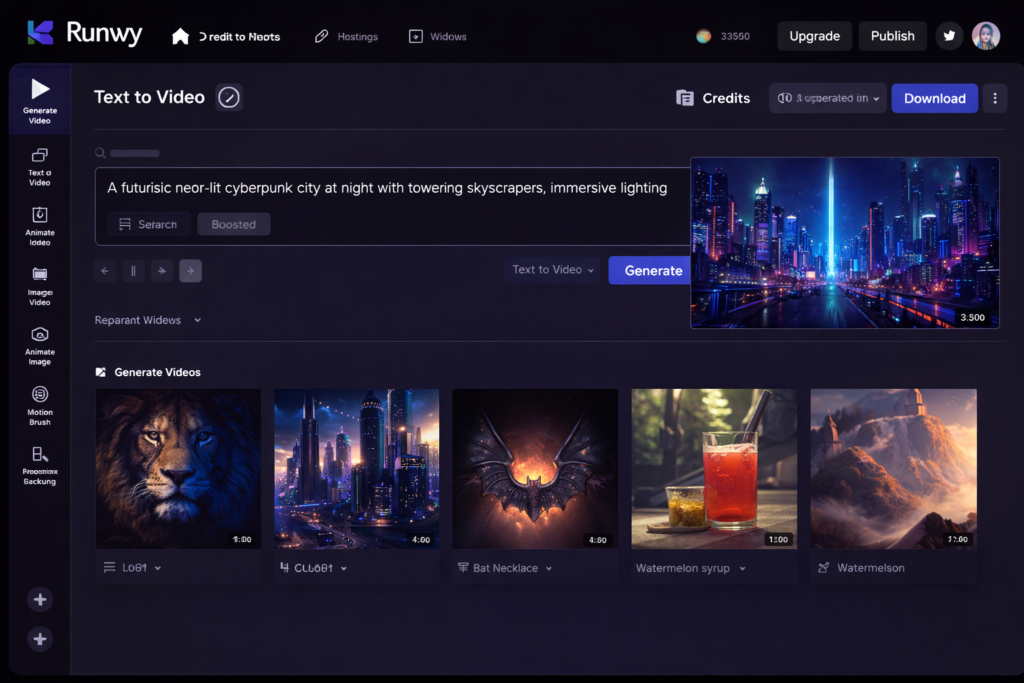
Runway ML Dashboard: Text-to-Video Example
Once you open the Runway dashboard, you can explore the available AI tools and video generation workflows.
For a Text-to-Video project, you can enter a prompt describing the scene you want to create.
Example Prompt
“A cinematic drone shot flying over mountains at sunrise, soft golden light, realistic landscape, slow camera movement.”
The AI will use the prompt to generate a video based on your description.
For better results, try to include details about:
- The subject or location
- The action or movement
- Camera angle or camera movement
- Lighting
- Visual style
For example, instead of writing only:
“Mountains at sunrise”
You can provide a more detailed prompt:
“A cinematic aerial drone shot slowly flying over snow-covered mountains at sunrise, golden sunlight, soft clouds moving through the valley, realistic landscape, smooth camera movement.”
A clearer prompt can give the AI more information about the type of scene you want to generate.
After generation, review the result and adjust your prompt if necessary. You may need to create multiple versions before finding an output that matches your creative idea.
Note: The available models, settings, video quality, and generation options may vary depending on your Runway account and the features currently available on the platform.

Runway ML Pricing
Runway offers both free and paid subscription options. The exact plans, pricing, credits, features, and generation limits may change over time.
Free Plan
The free option allows new users to explore selected Runway tools and AI-powered creative workflows.
Depending on the current plan structure, the free version may include:
- A limited number of credits
- Access to selected AI tools and models
- Limited generation capacity
- Limited storage or other platform resources
The free plan can be useful for beginners who want to test the platform before deciding whether a paid subscription is necessary.
Paid Plans
Runway also offers paid subscription plans for users who need additional access and generation capacity.
Depending on the selected plan, paid subscriptions may provide:
- More credits or generation capacity
- Access to additional AI models or features
- Higher usage limits
- Additional workspace or project features
- Other benefits based on the selected subscription
The features included in each plan can vary.
Should Beginners Start With the Free Plan?
For most beginners, starting with the free version can be a practical option.
You can use it to:
- Understand how the platform works
- Test Text-to-Video or Image-to-Video workflows
- Practice writing prompts
- Explore the available tools
- Decide whether the platform fits your creative workflow
If you later need more generation capacity or access to additional features, you can compare the available paid plans.
Important: Runway regularly updates its pricing, credits, subscription plans, and available features. Before purchasing a plan, always check the latest information on the official Runway pricing page.
Runway ML Benefits
Runway can offer several potential benefits for creators who want to explore AI-powered video generation and creative workflows.
1. AI-Assisted Video Creation
Runway allows users to experiment with AI-generated visual content using text prompts, images, and other available creative workflows.
This can reduce the amount of manual work required for certain visual experiments.
2. Accessible for Beginners
Many Runway tools are available through a web-based platform, which can make it easier for beginners to start experimenting without installing traditional professional video editing software.
However, getting better results may still require practice and an understanding of how prompts and different workflows work.
3. Faster Creative Experimentation
AI-powered generation can help creators quickly test visual ideas, scenes, camera movements, and creative concepts.
For example, instead of manually creating every visual element from scratch, users can generate different versions and compare the results.
The actual generation time may vary depending on the selected model, platform demand, and project complexity.
4. Multiple Creative Workflows
Runway can support different types of creative workflows, such as:
- Text-to-Video
- Image-to-Video
- AI-generated visual content
- Creative transformations
- Other AI-assisted tools
The exact features available may depend on the selected model and subscription plan.
5. Useful for Creative Experimentation
Runway can be useful for testing new ideas before creating a complete project.
Creators may use it for:
- Visual concepts
- Short video clips
- Creative experiments
- Storyboarding
- Social media content ideas
6. Potentially High-Quality Results
The quality of AI-generated videos can depend on several factors, including:
- The selected AI model
- Prompt clarity
- Input image or video quality
- Available settings
- Scene complexity
Clear prompts and multiple iterations may help improve the final result.
In Simple Words
Runway can help creators experiment with AI-generated video and visual content without manually creating every element from scratch. It may be useful for beginners as well as experienced creators, depending on their workflow and creative requirements.
Note: Runway regularly updates its models, features, and creative workflows. The results and features available may vary depending on your account, selected model, subscription plan, and current platform availability.
Runway ML Use Cases
Runway can be used for different types of AI-powered video and visual content. The best use case depends on the type of project, available features, and your creative workflow.
1. YouTube Videos
YouTubers can use Runway to experiment with AI-generated visuals and short video clips.
Possible use cases include:
- Creating supporting visual clips
- Generating B-roll-style footage
- Animating images
- Testing creative scene ideas
- Creating short visual sequences
These AI-generated clips can also be combined with voiceovers, recorded footage, screen recordings, or traditional video editing.
2. Instagram Reels and Short-Form Content
Social media creators can use Runway to experiment with short AI-generated visuals.
For example:
- Animated images
- Creative visual transformations
- Short AI-generated scenes
- Experimental video concepts
- Visual content for Reels and Shorts
The generated clips can be further edited before publishing on social media platforms.
3. Short Creative Videos
Runway can be useful for creating and testing short visual ideas.
Creators may use it for:
- Cinematic scenes
- Fantasy or science-fiction concepts
- Visual storytelling
- Experimental videos
- Creative projects
The results can vary depending on the selected AI model, prompt quality, and complexity of the requested scene.
4. Marketing and Promotional Content
Marketers and businesses can explore AI-generated visuals for creative and promotional projects.
Possible applications include:
- Advertisement concepts
- Product-related visuals
- Social media campaigns
- Promotional video ideas
- Creative demonstrations
Before using AI-generated content commercially, users should review the platform’s current terms, licensing options, and usage policies.
In Simple Words
Runway can be useful for YouTubers, social media creators, marketers, filmmakers, designers, and other creative professionals who want to experiment with AI-generated video and visual content.
It can support different stages of the creative process, from developing an idea to generating short visual clips. However, the final results may still require review, editing, and additional post-production depending on the project.
Runway ML vs Pika AI
Both Runway and Pika are AI-powered platforms that can be used for generating and experimenting with video content. However, the better choice can depend on your creative needs, preferred workflow, and the features currently available on each platform.
| Feature | Runway | Pika |
|---|---|---|
| Main Use | AI video and creative workflows | AI video generation and creative video tools |
| Text-to-Video | Available depending on the selected model | Available features may vary |
| Image-to-Video | Available depending on the selected model | Available features may vary |
| Creative Workflows | Multiple tools and workflows | Focused AI video creation workflows |
| Beginner Experience | May require time to explore different tools | Can be easier for users who prefer a simpler workflow |
| Advanced Creative Projects | Can be useful for more complex creative experimentation | Can be useful for generating and experimenting with short video content |
Which One Should You Choose?
Choose Runway if you want to explore a broader range of AI-powered creative workflows and experiment with different tools for video and visual content.
Choose Pika if you prefer a more focused AI video creation experience and want to experiment with generating short AI video clips.
There is no single tool that is automatically better for every creator. The best choice depends on your project requirements, preferred workflow, budget, and the features currently available on each platform.
Note: AI tools change frequently. Features, models, free plans, pricing, and generation limits may change over time, so always check the latest information on the official Runway and Pika websites before choosing a tool.
Runway ML Alternatives
If Runway does not match your workflow, budget, or creative requirements, you can also explore several other AI-powered video platforms.
The best alternative depends on the type of videos you want to create and the features currently available on each platform.
1. Pika
Pika is an AI video platform that can be used to experiment with AI-generated video content.
It may be suitable for creators interested in:
- Text-to-video generation
- Image-to-video generation
- Short AI video clips
- Creative visual effects
It can be a useful option for creators who want to explore AI video generation through a focused workflow.
2. Kaiber
Kaiber focuses on AI-powered visual creation and animation.
It can be explored for:
- Image animation
- Music-related visuals
- Stylized video creation
- Creative visual transformations
Kaiber may be useful for creators who want to experiment with artistic and stylized video content.
3. Synthesia
Synthesia focuses on AI avatar-based video creation.
It can be useful for projects such as:
- Training videos
- Educational content
- Business presentations
- Product demonstrations
- Corporate communication
Unlike Runway, which focuses more broadly on generative visual and creative workflows, Synthesia is commonly used for creating videos featuring AI presenters or avatars.
4. Luma AI
Luma AI offers AI-powered tools for generating and working with visual content.
Depending on the currently available features, it can be useful for:
- AI-generated video
- Image-based visual creation
- Creative scene generation
- Experimental visual projects
It may be worth exploring if you want to compare different AI models and approaches to video generation.
How to Choose the Right Alternative
Before choosing an AI video tool, compare:
- Text-to-video capabilities
- Image-to-video features
- Video quality
- Generation speed
- Available free access
- Watermark policies
- Commercial usage terms
- Pricing
- Editing and creative controls
Quick Summary
- Runway: AI video generation and broader creative workflows
- Pika: AI-generated short video content
- Kaiber: Stylized visuals and animation
- Synthesia: AI avatar and presentation-style videos
- Luma AI: AI-generated visual and video experimentation
Note: AI video platforms change frequently. Features, models, free plans, pricing, and commercial-use policies may change over time. Always check the latest information on the official website of each tool before choosing one for an important or commercial project.
The Future of Runway and AI Video Generation
AI video generation technology continues to develop, and platforms such as Runway regularly update their models, tools, and creative workflows.
In the future, AI video technology may continue to improve in areas such as:
- Video quality and visual consistency
- Generation speed and efficiency
- Control over camera movement and scene composition
- Image-to-video and text-to-video capabilities
- Character and object consistency
- Additional AI-powered creative tools
- Integration with broader creative workflows
As AI video technology develops, creators may gain more options for experimenting with visual ideas and generating content.
However, the exact direction of future development will depend on ongoing research, product updates, and the features introduced by platforms such as Runway.
AI-generated video is also unlikely to completely replace traditional filmmaking or professional video editing in every situation. Instead, AI tools may increasingly become part of the overall creative workflow, helping creators experiment with ideas, generate visual assets, and support selected stages of video production.
For creators, the most practical approach is to learn the fundamentals of AI video generation, including prompt writing, image-to-video workflows, and basic video editing.
Note: Future features and improvements cannot be guaranteed. Always check official Runway announcements and documentation for the latest information about new models, tools, and platform updates.
Frequently Asked Questions About Runway ML
Runway ML Kya Hai?
Runway, commonly known as Runway ML, is an AI-powered creative platform that helps users generate and work with visual content. Depending on the available tools and models, users can explore workflows such as Text-to-Video, Image-to-Video, AI-assisted video creation, and other creative visual tasks.
Kya Runway ML Free Hai?
Haan, Runway free access or a free plan option provide karta hai, jisse new users selected features aur AI-powered creative workflows ko explore kar sakte hain.
However, free access me credits, generation limits, available models, storage, aur other features limited ho sakte hain. Plan details time ke saath change bhi ho sakti hain.
Kya Runway ML Beginners Ke Liye Hai?
Haan, beginners bhi Runway use kar sakte hain. Basic AI video workflows me generally text prompt likhna ya image upload karna aur available generation options select karna shamil hota hai.
However, better results ke liye prompt writing aur different AI workflows ko samajhne ke liye thodi practice ki zarurat ho sakti hai.
Runway ML Kis Kaam Aata Hai?
Runway ka use AI-powered video aur visual content creation ke liye kiya ja sakta hai.
Possible use cases include:
- Text-to-Video generation
- Image-to-Video generation
- AI-generated visual clips
- Creative video experiments
- Visual transformations
- Short-form content creation
- Creative concepts and story ideas
Kya Runway ML Se YouTube Videos Banaye Ja Sakte Hain?
Haan, YouTube creators Runway ka use AI-generated clips, visual concepts, short scenes, aur supporting visuals create karne ke liye kar sakte hain.
Generated content ko voiceover, recorded footage, screen recordings, ya traditional video editing ke saath combine kiya ja sakta hai.
Kya Runway ML Commercial Projects Ke Liye Use Kiya Ja Sakta Hai?
Commercial use ke rules aapke selected plan, current terms, aur generated content ke type par depend kar sakte hain. Important commercial project shuru karne se pehle Runway ki latest terms, licensing information, aur usage policies check karni chahiye.
Note: Runway regularly updates its models, features, pricing, credits, and subscription plans. Always check the latest information on the official Runway website before making an important purchasing or commercial decision.
Conclusion
Runway, commonly known as Runway ML, is an AI-powered creative platform that can be useful for creators who want to explore modern AI video generation and visual workflows.
Throughout this guide, we explored how Runway can support workflows such as:
- Text-to-Video generation
- Image-to-Video generation
- AI-assisted visual creation
- Creative video experiments
- Short-form visual content
For beginners, a practical approach is to start with the available free access, explore the tools, and experiment with simple prompts before moving on to more advanced workflows.
AI-generated videos may not always produce the perfect result on the first attempt. Learning how to write clear prompts, choose suitable input images, and review multiple generations can help improve the final output.
Runway may be a useful option for YouTubers, content creators, marketers, designers, filmmakers, and other creative professionals. However, whether it is the right tool for you depends on your creative requirements, budget, preferred workflow, and the features currently available on the platform.
AI is already becoming part of modern content creation. Instead of viewing AI tools as a complete replacement for creativity or traditional editing, creators can use them as tools for experimenting with ideas and supporting different parts of the creative process.
Start with a simple project, test different workflows, and decide whether Runway fits your own content creation needs.
Important: Runway regularly updates its AI models, tools, features, pricing, and subscription plans. Always check the latest information on the official Runway website before making a purchasing decision or using generated content for an important commercial project.