

Introduction
Imagine this…
You have a brilliant video idea in mind—whether for YouTube, Instagram, or a business. But the moment you set out to create it, real-world hurdles pop up:
👉 “I don’t have a camera…”
👉 “I don’t know how to edit…”
👉 “Who’s going to do the voiceover?”
👉 “Who has the time for all this?”
This is exactly where today’s AI video tools have made video creation more accessible by automating many time-consuming tasks.
Now, Many AI video tools can generate video drafts from text prompts, helping creators produce content more efficiently. Additional editing may still be useful depending on the project—no camera or editing skills required.
Yes, literally…In many cases, AI tools can automatically generate visuals, voiceovers, subtitles, and video drafts from a script, reducing the amount of manual work required.
Many creators now combine AI tools with traditional editing workflows to save time and improve productivity.
👉 In this article, you’ll find:
- Best AI Video Tools (Free + Paid)
- Step-by-step guide (beginner friendly)
- Real-life use cases
- Pro-level strategies
- Pros & Limitations of each AI video tool.
Who Should Read This Guide?
Example:
- Content creators
- YouTubers
- Small businesses
- Freelancers
- Digital marketers
- Students
- Educators
And most importantly—how you can create fast, smart, and scalable content using AI.
AI-generated videos often require:
- Human review
- Fact-checking
- Copyright compliance
- Brand customization
Best AI Video Tools in 2026: Complete Guide
Video content is everywhere.
From YouTube tutorials and Instagram Reels to online courses and business advertisements, Video has become one of the most effective ways to communicate online. However, creating professional-quality videos is often expensive, time-consuming, and technically challenging.
This is where AI video tools are making video creation faster and more accessible for many creators and businesses.
Today, artificial intelligence can help creators generate videos from text, automatically edit clips, create AI avatars, produce voiceovers, add subtitles, and even transform blog posts into videos—all in a matter of minutes. The available features depend on the platform and subscription plan.
Whether you are a new creator, marketer, business owner, or educator, AI video software can help many users improve productivity and reduce the time required for video production, depending on their workflow and chosen tools.
The tools in this guide are compared based on ease of use, AI features, pricing, output quality, integrations, and overall value for different use cases.
In this detailed guide, you will learn:
- What AI video tools are
- Why they are gaining popularity
- The best free and paid AI video tools for 2026
- Key features and benefits
- Real-world use cases
- How to choose the right AI video generator
Let’s explore the AI video tools that can help simplify and speed up your video creation workflow.
Who This Guide Is For
- Content creators
- YouTubers
- Businesses
- Educators
- Students
- Freelancers
- Digital marketers
While AI can automate many tasks, human review is still important for accuracy, branding, creativity, and quality control.
What Are AI Video Tools?
AI video tools are software platforms that use artificial intelligence to automate various tasks involved in creating and editing videos.
Instead of performing every step manually, AI video tools can automate or simplify many tasks involved in video creation, helping users save time and improve productivity.
AI video software can do the following:
- Generate videos from text prompts
- Create AI avatars and presenters
- Automatically add subtitles
- Remove background noise
- Edit videos using AI
- Generate voiceovers
- Translate videos into multiple languages
- Convert blog posts into videos
- Generate B-roll and visuals Automatically create captions Resize videos for different social media platforms Create highlight clips from long videos
Most AI video tools use machine learning, natural language processing (NLP), and generative AI to understand text prompts, generate visuals, synthesize voiceovers, and automate editing tasks. The exact capabilities vary by platform.
Simply put, AI video tools help creators produce videos more efficiently by automating repetitive tasks, allowing them to focus on creativity, storytelling, and content quality.
Disclaimer
While AI can automate many aspects of video production, human review and editing may still be necessary to ensure accuracy, branding, and overall quality.
Who Should Use AI Video Tools?
This guide isn’t just for beginners—it’s for anyone who wants to grow in content creation.
👨🎓 Students
- Presentation videos
- Educational explainers
- Project submissions
- Study summaries and learning videos
✍️ Bloggers
- Repurpose blog posts into videos to reach audiences across multiple platforms.
- Reach audiences through both search engines and video platforms.
🎥 YouTubers
- Create faceless educational or informational videos.
- Speed up repetitive parts of the video creation workflow.
🧑💼 Business Owners
- Product videos
- Ads & marketing content
- Reduce manual work and simplify content production, depending on your workflow and business needs.
Quick Answer
AI video tools are software applications that automatically create videos using text, image, or voice input.
You simply provide a script, and the Many AI video tools can assist with generating visuals, voiceovers, subtitles, animations, and editing, depending on the platform and available features. Many tools are designed to be beginner-friendly, although some advanced features may still require basic editing knowledge
Whether you’re creating educational content, marketing videos, social media posts, or business presentations, AI video tools can help simplify different stages of the video production process. The most useful features depend on the platform you choose and your specific goals.
Disclaimer
Human review is still recommended to ensure accuracy, branding, copyright compliance, and overall content quality.
Why Are AI Video Tools Becoming So Popular?
The growth of short-form content, social media platforms, and digital marketing has increased the demand for video content across many industries.
However, traditional video production often requires:
- Professional video editing software
- Video editing knowledge and experience
- Cameras, microphones, or other recording equipment
- Significant time for planning, editing, and publishing
AI video tools help reduce many of these challenges by automating repetitive tasks and simplifying parts of the video creation process.
Why More People Are Using AI Video Tools
- Faster video creation
- Lower production costs
- Beginner-friendly interfaces
- AI voiceovers and subtitles
- Content repurposing for multiple platforms
- Support for multiple languages
- Scalable content production for businesses and creators
These advantages have made AI video tools increasingly popular among creators, businesses, educators, and marketers. In the next section, we’ll explore the key benefits in more detail.
Why Are AI Video Tools Becoming More Popular?
1. Faster Content Creation
Many AI video tools can significantly reduce the time required to create video drafts by automating tasks such as editing, subtitles, and voiceovers. The actual time savings depend on the project and the tool being used
2. Lower Costs
AI video tools can reduce production costs for many projects by automating parts of the video creation workflow, potentially reducing the need for extensive equipment or large production teams.
3. Beginner-Friendly
Many AI video platforms provide user-friendly interfaces, templates, and guided workflows that make video creation easier for beginners.
4. Better Productivity
Businesses and creators can often produce more video content by automating repetitive tasks, helping improve productivity depending on their workflow.
5. Multilingual Support
Some AI video platforms offer multilingual subtitles, translation, and AI dubbing features, making it easier to reach audiences in different languages.
6. Content Repurposing
AI tools can convert blog posts, podcasts, presentations, or long videos into shorter video formats for different platforms.
7. Social Media Optimization
Many platforms provide templates and export options optimized for YouTube, Instagram, TikTok, LinkedIn, and other social media channels.
The available features vary by platform and subscription plan. Users should compare tools based on their specific requirements before making a decision.
Challenges Faced by Content Creators
While content creation offers many opportunities, it also involves several challenges that can affect productivity, consistency, and overall content quality.
Time-Consuming Editing
Editing can be one of the most time-consuming parts of video production, especially for projects that require multiple revisions, effects, subtitles, or animations.
High Production Costs
These costs can be especially challenging for freelancers, small businesses, and new creators with limited budgets.
Consistency Problems
Long production timelines can make it challenging to maintain a consistent publishing schedule across multiple platforms.
Creative Burnout
Maintaining a steady flow of original ideas while managing publishing schedules and audience expectations can contribute to creative fatigue over time.
Limited Technical Skills
Many beginners may not have experience with professional editing software, motion graphics, or audio production.
These challenges have encouraged many creators and businesses to explore AI video tools as a way to simplify parts of the video creation process and improve workflow efficiency.
Content Repurposing
Repurposing a blog post, webinar, podcast, or long-form video into shorter videos for platforms like YouTube, Instagram, TikTok, or LinkedIn often requires additional editing, resizing, and formatting.
In the next section, we’ll look at how AI video tools help solve many of these challenges.
How AI video tools work
AI video generators combine several artificial intelligence technologies to understand user input, automate editing tasks, generate visuals, and produce complete videos. The exact technologies and capabilities vary by platform.
AI video generators rely on technologies like:
- Machine Learning
- Computer Vision
- Natural Language Processing (NLP)
- Generative AI
- Speech Synthesis
Step-by-Step Workflow
Step 1: Enter Your Content
Provide:
- Text prompts
- Scripts
- Images
- Blog posts
- Audio files
- PDFs or presentation slides (if supported)
Step 2: Choose a Template or Style
Select:
- Social media format
- Business presentation
- Marketing ad
- Educational video
- Brand-specific templates (where available)
Step 3: Customize Elements
Edit:
- Voiceovers
- Transitions
- Captions
- Visual effects
- AI avatars
- Background music
- Brand colors and logos
- Video aspect ratio (16:9, 9:16, 1:1)
Step 4: Generate Video
The AI processes your inputs and generates a video draft by combining visuals, animations, voiceovers, captions, and other selected elements. Depending on the tool and project, additional editing or review may be helpful before publishing.
Step 5: Export and Publish
Download in formats like:
Export options such as MP4, HD, or higher resolutions are available depending on the platform and subscription plan.
Step 6: Review and Publish
Before publishing:
- Check AI-generated visuals.
- Verify facts and captions.
- Ensure branding is consistent.
- Review pronunciation in voiceovers.
- Make final edits if needed.
Flow Diagram
Content
↓
Choose Template
↓
Customize
↓
AI Generates Draft
↓
Review & Edit
↓
Export
↓
Publish
How to Choose the Right AI Video Tool for Your Needs
The best AI video tool depends on your content type, workflow, budget, required features, and level of editing experience.
For YouTubers
Look for:
- Auto captions
- AI voiceovers
- Video templates
Recommended:
- InVideo AI
- Pictory
- VEED.IO
These tools are commonly used for features such as automatic captions, AI voiceovers, and ready-made video templates. Available features may vary by plan.
For Businesses
Prioritize:
- Brand customization
- Team collaboration
- AI avatars (if required)
- Multilingual support
Recommended:
- Synthesia
- HeyGen
For Professional Editing
Choose:
- Advanced AI editing
- Motion tools
- Effects
Recommended:
- Runway
- Adobe Premiere Pro (AI features)
- DaVinci Resolve (AI-assisted features)
For Bloggers
Focus on:
- Blog-to-video conversion
- Social sharing
Recommended:
- Pictory
- InVideo AI (if it supports blog-based workflows)
- Lumen5 (यदि article में शामिल हो)
Before Choosing an AI Video Tool, Consider:
- Budget and pricing
- Free plan availability
- Supported languages
- Export quality
- Watermark limitations
- Team collaboration
- Commercial usage rights
- Integrations
- Customer support
The recommendations above are based on commonly available features at the time of writing. Features, pricing, and availability may change, so it’s a good idea to review the latest information on each platform before making a decision.
What Are AI Video Tools?
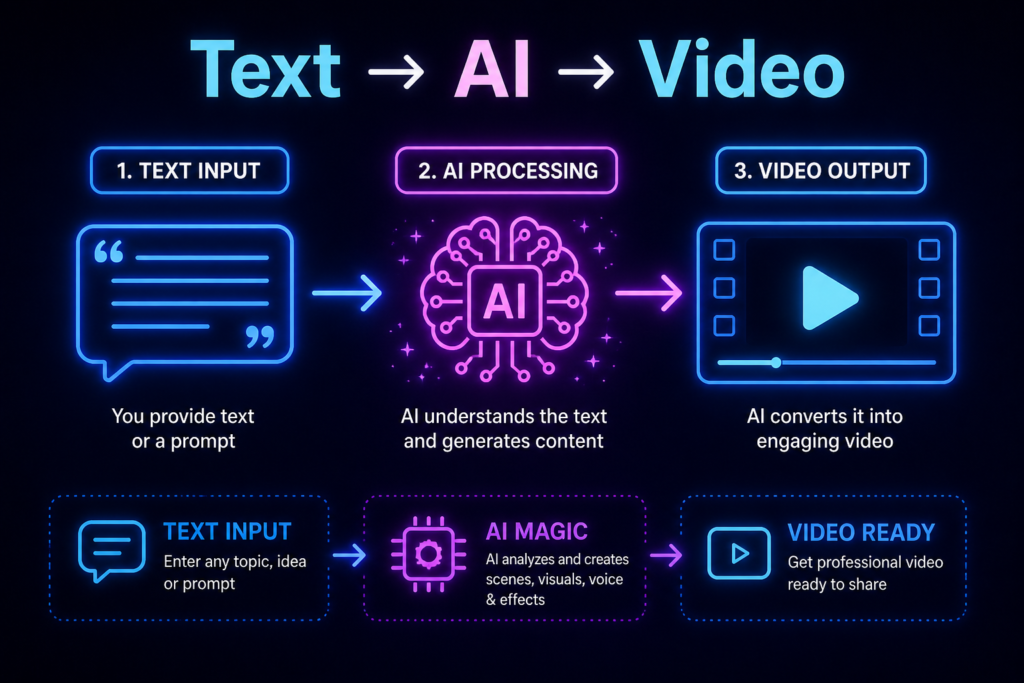
To put it simply:
AI Video Tools = Smart software that turns your ideas into videos.AI video tools assist or automate parts of the video creation process :
- scripting
- editing
- captions
- voiceovers
- visuals
These tools use:
- Artificial Intelligence
- Machine Learning
- Automation
Traditional method:
Plan
↓
Record
↓
Edit
↓
Add Captions
↓
Export
↓
Publish
👉 AI method:
Input Content
↓
Choose Template
↓
Customize
↓
Generate Draft
↓
Review
↓
Export
↓
Publish
In other words, AI can automate many repetitive tasks involved in video creation, helping reduce production time depending on the complexity of the project and the platform being used. Read More
AI Video Tools Can Help With
- Script generation
- Video editing
- AI voiceovers
- Captions
- Translation
- Background music
- Image generation
- AI avatars
- Social media resizing
Disclaimer
The exact features vary by platform, and some projects may still require manual editing before publishing.
Best AI Video Tools
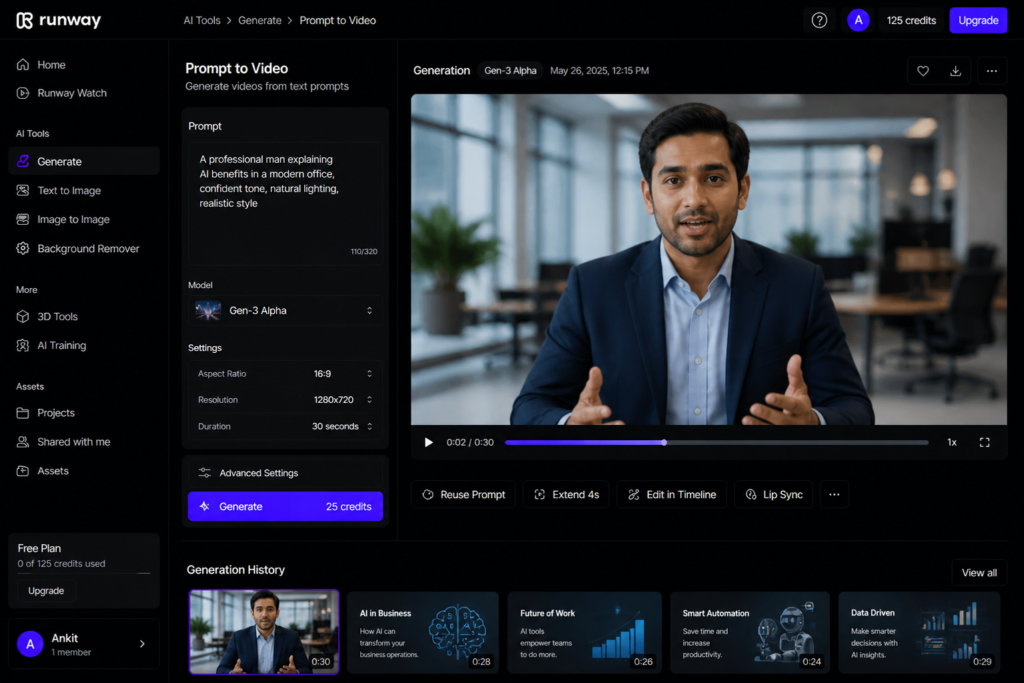
🎬 Runway ML
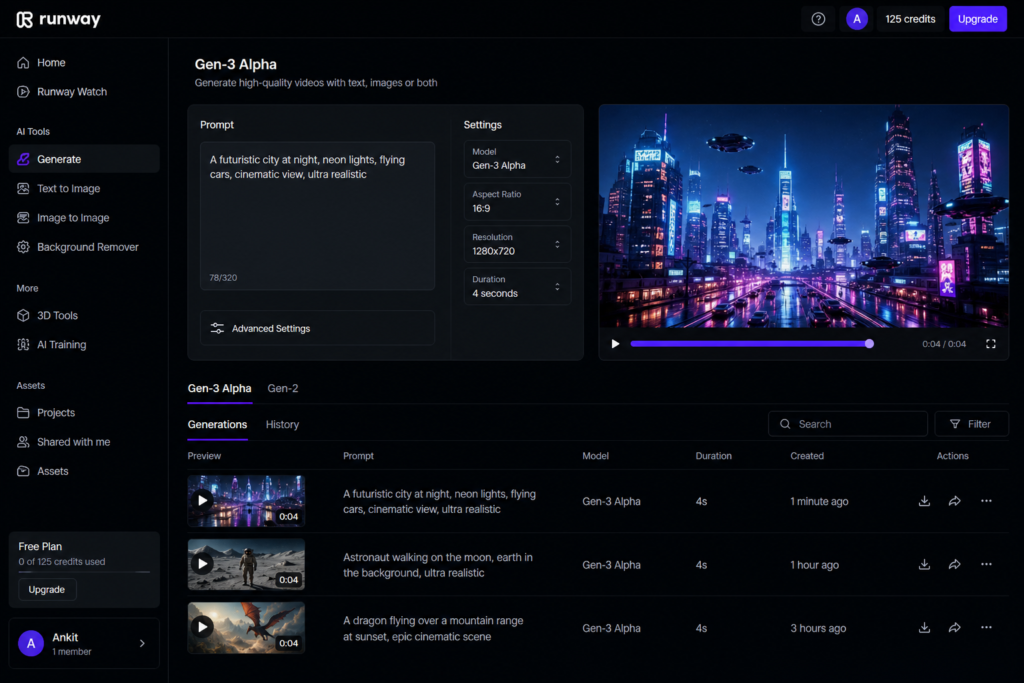
📌 What is it
Runway ML एक powerful AI video generator है जो cinematic videos बनाने के लिए use होता है।
✨ Features
Maintain consistency in the feature list. For example:
- Text-to-video generation
- Image-to-video generation
- Background removal
- Motion tracking
- AI-powered video editing (if verified in the article)
✅ Pros should be more specific, like:
- Suitable for creative video generation
- Supports multiple AI-powered editing workflows
- Useful for creators who need greater editing flexibility
❌ Cons
If applicable, add:
- Some advanced features require a paid subscription.
- Processing times may vary depending on project complexity.
💡 Real-Life Use Case
Explain the use case in one sentence:
- Faceless YouTube channels
- Short-form social media videos
- marketing creatives
- Product demonstrations
- creative storytelling projects
💰 Pricing
Offers both free and paid subscription plans. Features, usage limits, and pricing may vary over time, so check the official website for the latest details. Read More
Best For
- YouTube creators
- Filmmakers
- Marketing teams
- Creative professionals
Pika Labs
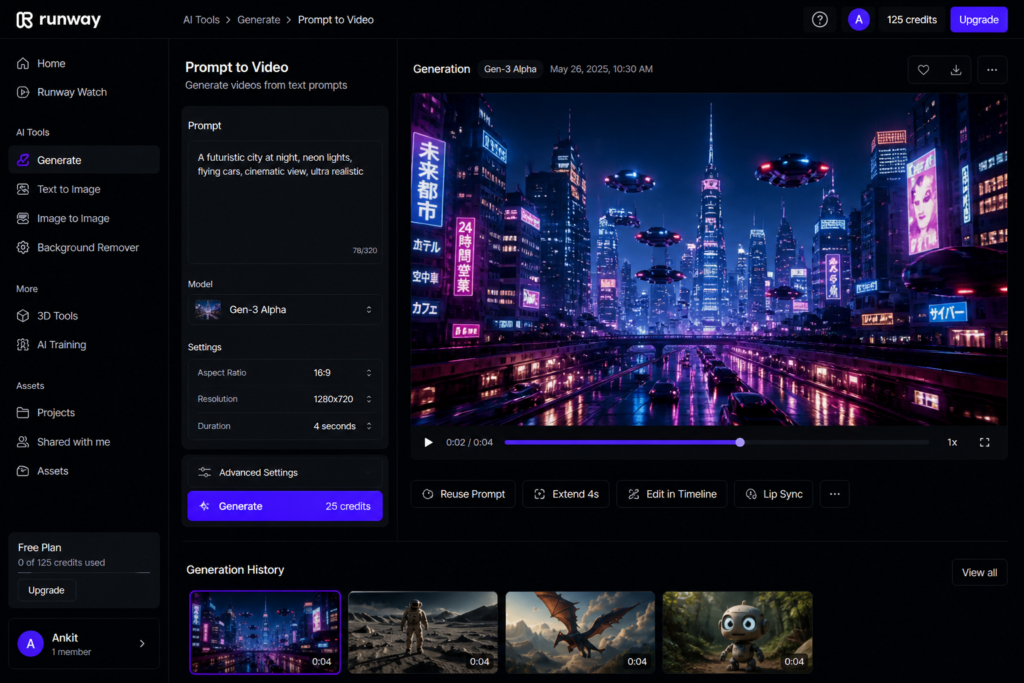
📌 What is it
Pika Labs is an AI-powered video creation tool that allows users to generate videos from text prompts.
✨ Features
- Text-to-video generation
- Animation styles
- Fast video generation
✅ Pros
- Easy to use
- Suitable for creating creative AI-generated videos
❌ Cons
- Some features are still under active development.
💡 Use Case
Short-form videos, social media reels, and creative storytelling projects
💰 Pricing
Free plan available (with usage limitations).
Synthesia
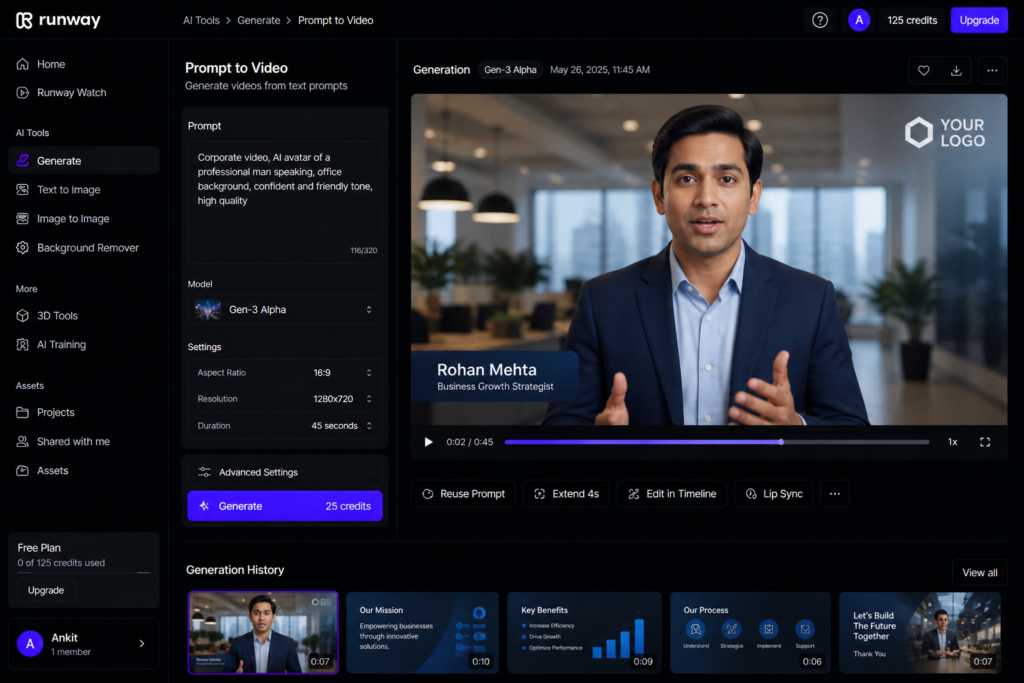
📌 What is it
An AI-powered video creation platform that enables users to create videos using AI avatars and text-based scripts.
✨ Features
- 140+ AI avatars (only if this number is still accurate)
- Support for 120+ languages (only if currently accurate)
- AI text-to-speech voice generation
✅ Pros
- Suitable for creating business and training videos
- No on-camera recording is required for AI avatar videos
❌ Cons
- Many advanced features require a paid subscription.
💡 Use Case
Corporate training, employee onboarding, online courses, and business presentations Read More
Best For
- Corporate training
- HR and onboarding
- Educational content
- Business presentations
Offers paid subscription plans. Pricing and available features may change over time. Check the official website for the latest details.
HeyGen
📌 What is it
An AI-powered video creation platform that supports AI avatars, voice cloning, and multilingual video generation.
✨ Features
- AI-generated avatars
- AI voice cloning
- AI lip-sync technology
✅ Pros
- Suitable for creating avatar-based business and marketing videos
- Supports branded video creation with customizable avatars and voices (only if supported by the platform)
❌ Cons
- Some advanced features require a paid subscription.
💡 Use Case
Personal branding, marketing videos, product demonstrations, and promotional content Read More
Best For
- Personal brands
- Marketing teams
- Business presentations
- Product demos
- Sales and promotional videos
Offers free and paid plans. Features, usage limits, and pricing may change over time, so check the official website for the latest information.
📊 6. Comparison Table
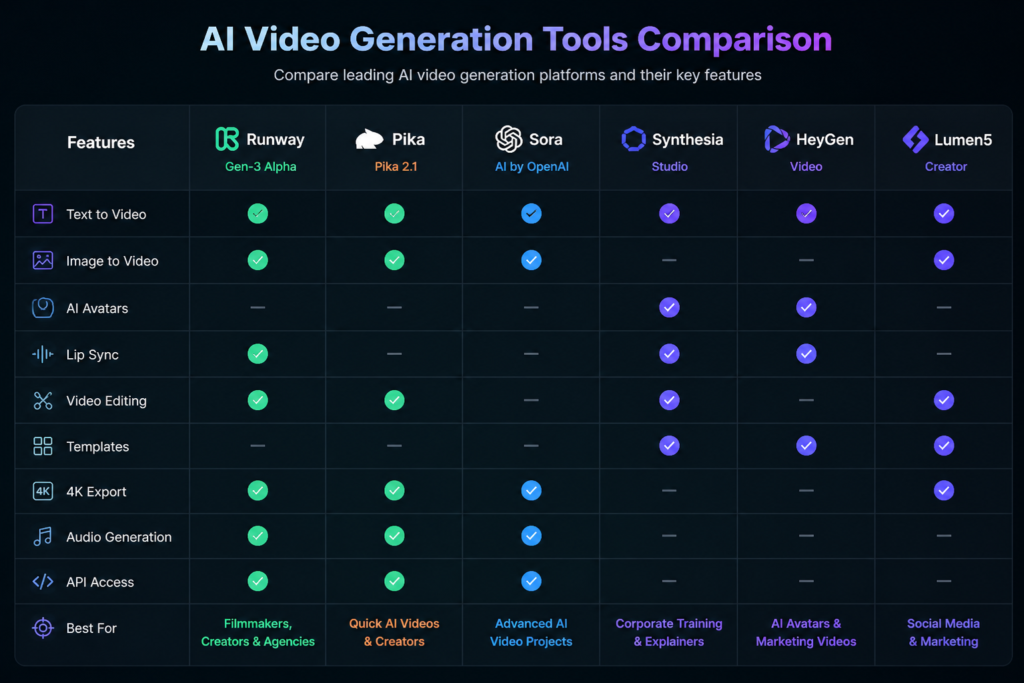
| Tool | Best For | Free Plan | Ease | Quality |
|---|---|---|---|---|
| Runway ML | Creative video production | Yes | Medium | High |
| Pika Labs | Short content | Yes | Easy | Very Good |
| Synthesia | Business | Paid plans only (if accurate at the time of publishing) | Easy | High |
| HeyGen | Marketing and brand videos | Limited free plan | Easy | High |
| Tool | Pricing |
|---|---|
| Runway | Free + Paid |
| Pika | Free + Paid |
| Synthesia | Paid |
| HeyGen | Free + Paid |
AI Features
Example:
- Text-to-Video
- AI Avatars
- Voice Cloning
- Image-to-Video
Features, pricing, and free plan availability may change over time. Check each platform’s official website for the latest information.
7. Step-by-Step Guide (How to Create a Video Using AI Tools)
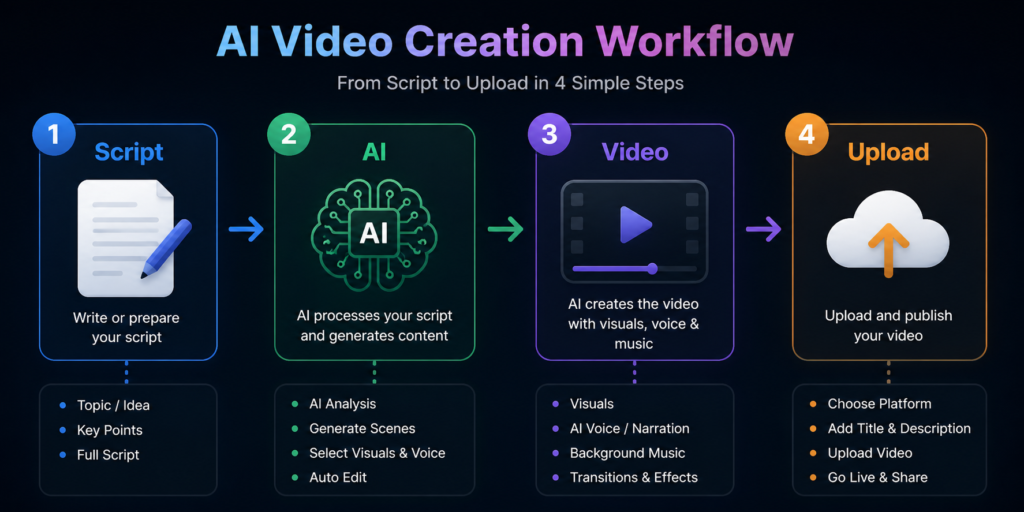
🔹 Step 1: Choose an AI Video Tool
Beginners: Choose an easy-to-use tool such as Pika
Advanced users: Consider tools such as Runway for more editing and creative control.
🔹 Step 2: Write Your Script
Example:
Example Prompt: “Create a 60-second educational video explaining the history of Ancient India.”
🔹 Step 3:Upload or Enter Your Content
- Text prompt
- Script
- Images
- Video clips (if supported)
- Audio files (if supported)
🔹 Step 4: Choose a Style or Template
- Cinematic
- Realistic
- Animated
- Social Media
- Business Presentation (if supported)
🔹 Step 5: Generate the Video
Click → Generate : Review the generated video and make adjustments if needed before exporting.
🔹 Step 6: Export and Publish
Export the video in your preferred format and publish it on platforms such as YouTube, Instagram, TikTok, LinkedIn, or your website.
Step 7: Review Before Publishing
- Check captions
- Verify AI-generated visuals
- Review voice pronunciation
- Ensure branding is consistent
- Correct any factual errors
Key Benefits of AI Video Tools
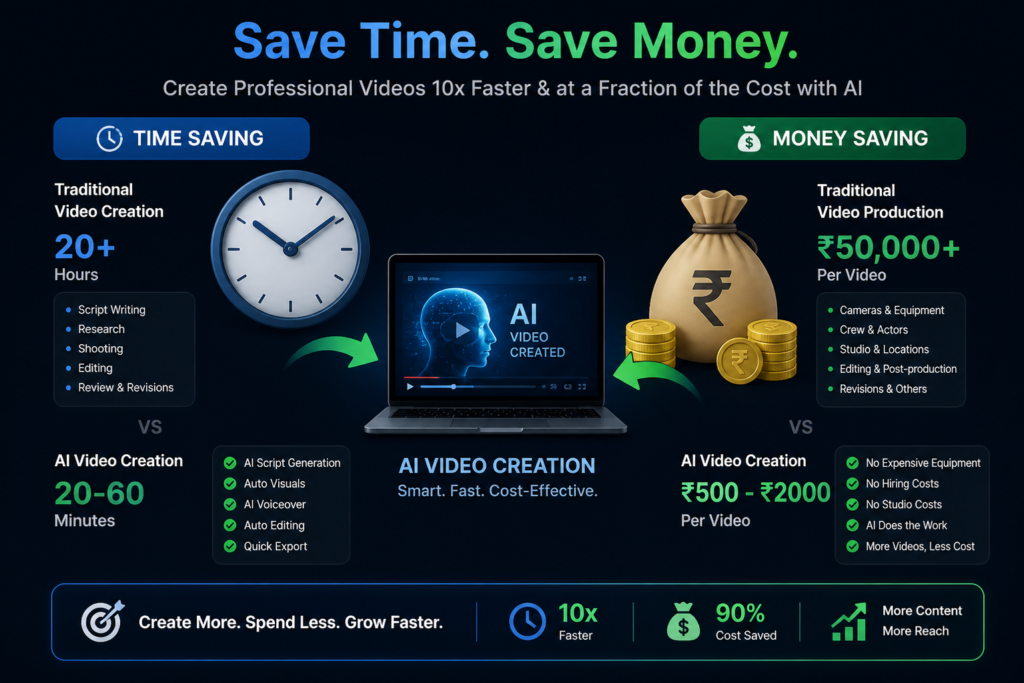
⏳ Time Saving
AI can significantly reduce the time required for video creation by automating tasks such as editing, captions, and voiceovers.
💸 Cost Saving
AI tools can reduce the need for extensive recording equipment or manual editing for many types of video projects.
📈 Scale Content
AI tools can help creators produce content more efficiently, making it easier to maintain a consistent publishing schedule.
🎯 Beginner Friendly
Many AI video tools are designed with beginner-friendly interfaces, although basic editing knowledge can still be helpful.
Multilingual Content Creation
AI-powered translation, subtitles, and voice generation can help creators reach audiences in multiple languages, depending on the platform.
Content Repurposing
AI tools can help transform blog posts, podcasts, presentations, or long-form videos into shorter content for different platforms.
The available features and level of automation vary between AI video platforms, so results may differ depending on the tool and project complexity.
Common Mistakes
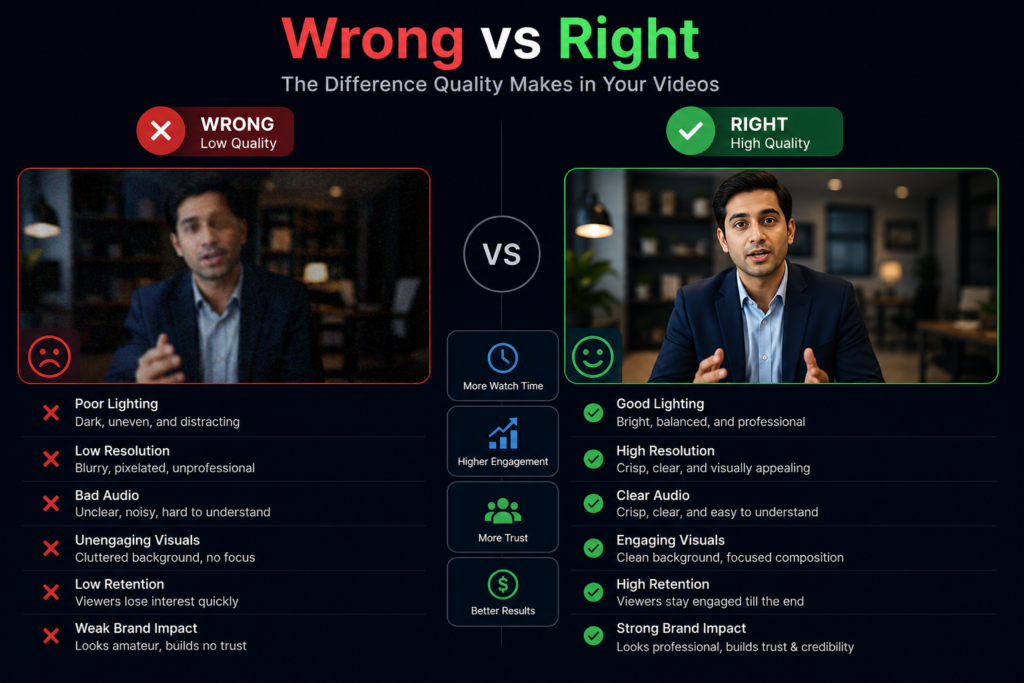
❌ Poor Prompt
Provide clear and detailed prompts with enough context
❌ No Storytelling
Start with a strong hook and include a clear story or message to keep viewers engaged.
❌ Over AI Voice
Review AI-generated voiceovers and make manual adjustments when needed for a more natural result.
🧠 10. Pro Tips
- Combining storytelling with AI tools can help create more engaging videos.
- Short-form videos often perform well on many social media platforms, depending on the audience and content quality.
- Consistency is key
- Combining AI-generated content with manual editing can improve the overall quality of your videos.
📊 11. Feature Table
| Feature | Runway | Pika | Synthesia | HeyGen |
|---|---|---|---|---|
| Text to Video | ✅ | ✅ | ❌ | ❌ |
| AI Avatars | ❌ | ❌ | ✅ | ✅ |
| Limited Free Plan | ✅ | ✅ | ❌ | Limited |
Feature availability, pricing, and free plans may change over time. Refer to each platform’s official website for the latest information.
How to Create Daily Videos Using AI
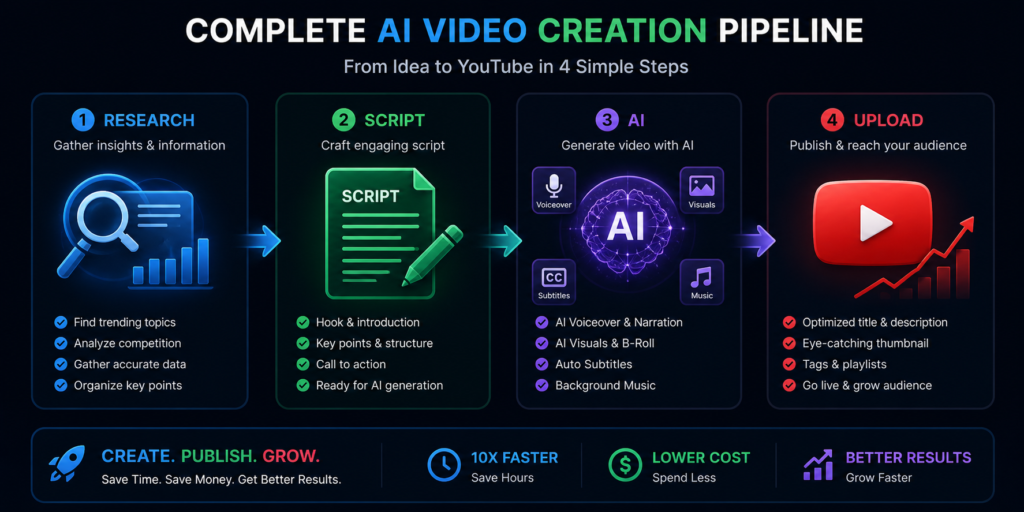
By now, you’ve understood the tools and the basics…
But the real question is:
👉 “How do you create daily videos?”
The workflow below is commonly used by many content creators and can be adapted based on your content goals and preferred tools.
🔹 Step 1: Topic Research (Find Trending Topics)
- YouTube search suggestions
- Google Trends
- Competitor channels
👉 Example:
- “Top 10 facts”
- “Hidden history”
- “AI tools tutorial”
🔹 Step 2: Script Creation
👉 Tools:
- ChatGPT
- AI writers
Keep the following in mind:
- Well-structured scripts are generally more engaging than scripts with little structure or context.
- Adding storytelling elements can help improve viewer engagement.
A simple structure could include:
- Hook
- Build curiosity
- Main content
- Ending twist
🔹 Step 3: Voice Generation
👉 Options:
- AI voice tools
- Your own voice
💡 Pro Tip:
Combining AI-generated voiceovers with suitable background music can create a more polished viewing experience.
🔹 Step 4: Video Generation (Core Step)
👉 Use:
- Runway ML
- Pika Labs
At this stage, you can convert:
- Text prompts into videos
- Images into AI-generated video sequences (if supported by the selected platform)
convert करते हो
🔹 Step 5: Editing & Enhancement
👉 Tools:
- CapCut
- Canva
Consider adding:
- Subtitles
- Effects
- Background music
🔹 Step 6: Thumbnail Creation

A clear and visually appealing thumbnail can help attract viewers.
👉 Tools:
- Canva
- AI image generators
💡 Tip:
Use clear text, relevant visuals, and a consistent design to improve click-through potential.
🔹 Step 7: Upload & SEO
Include relevant keywords naturally in your title, description, headings, and tags where appropriate.
- AI Video Tools
- free AI video tools
- AI video generator
Step 8: Review Performance
Monitor:
- Views
- Watch time
- Audience retention
- Click-through rate (CTR)
- Engagement
How to Make Money with AI Video Tools
AI video creation skills can be used to generate income through various online business models. However, earnings depend on factors such as content quality, audience growth, marketing efforts, and consistency.
💰 1. YouTube Ads
Eligible creators may earn advertising revenue through platforms that offer creator monetization programs, subject to their policies and eligibility requirements.
💰 2. Affiliate Marketing
Recommend AI tools through affiliate programs and earn commissions when eligible purchases are made through your referral links.
💰 3. Freelancing
Offer AI video creation, editing, or content production services to businesses, creators, or agencies.
💰 4. Course / Digital Product
Create and sell digital products such as online courses, templates, guides, or video editing resources.
5. Sponsored Content and Brand Collaborations
Work with brands to create sponsored videos or promotional campaigns once you have built an engaged audience.
6. Content Repurposing Services
Offer services to convert blogs, podcasts, webinars, or long-form videos into short-form content using AI tools.
Income is not guaranteed. Results vary depending on your skills, content quality, niche, audience, consistency, and the monetization policies of the platforms you use.
Content Ideas for AI Videos
If you’re looking for content inspiration, the following categories can help you generate ideas for AI-powered videos.
🔥 Evergreen Topics
- Interesting Facts
- History and Historical Events
- Motivational and Self-Improvement Content
⚡ Trending Topics
- AI News and Product Updates
- Trending News and Current Events (where appropriate and fact-checked)
🎥 Faceless Niches
- Horror Stories
- Mythology and Folklore
- Personal Finance and Investing (ensure content is accurate and includes appropriate disclaimers when needed)
Educational Content
Examples:
- Science
- Technology
- Geography
- Space
- Language Learning
Business and Productivity
Examples:
- Business Tips
- Career Advice
- AI Tools
- Productivity Hacks
Choose topics that match your audience’s interests and verify factual information before publishing, especially for news, history, finance, or educational content.
AI and Human Collaboration for Better Videos
AI tools can speed up video creation, but human creativity and review remain important for producing engaging and accurate content.
The best results come when:
- AI can help automate repetitive tasks and improve production efficiency.
- Human input helps improve storytelling, creativity, accuracy, and audience connection.
👉 Example:
- AI-generated visuals combined with human storytelling and fact-checking.
- AI-generated drafts refined through manual editing and review.
Scaling Your AI Video Workflow
As your content production becomes more consistent, you may consider the following ways to scale your workflow:
🔹 Create content in batches
- Create multiple videos in batches to improve workflow efficiency.
- Consider expanding into additional niches only after establishing a consistent workflow for your primary channel.
- Covering different niches
🔹 Build a team
- Script Writer
- Video Editor
- Thumbnail Designer
- SEO or Channel Manager
Scale your workflow gradually while maintaining content quality, originality, and accuracy. Publishing more videos should not come at the expense of quality.
Advanced Tips for AI Video Creators
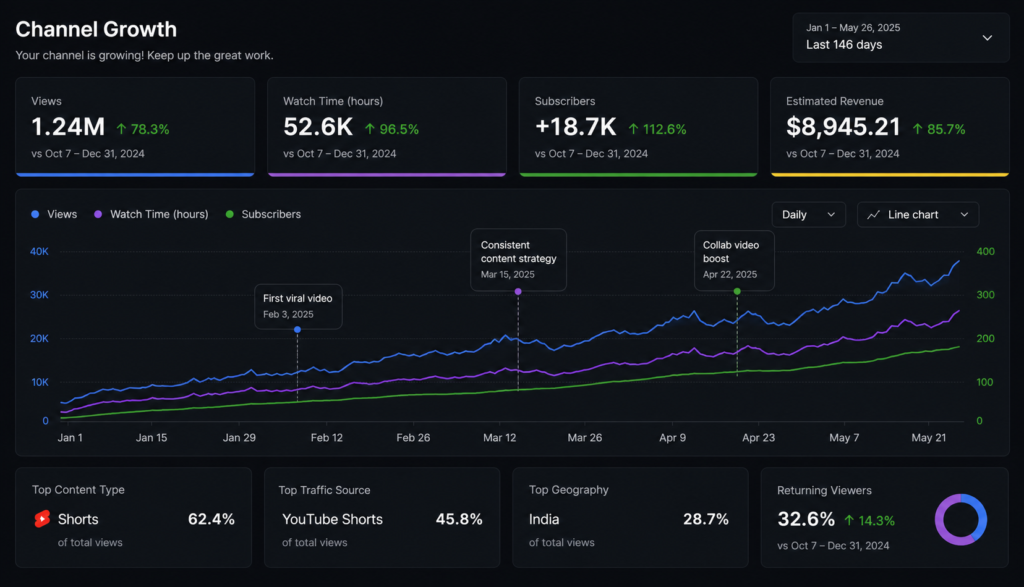
🔥 Hook in the first 5 seconds
🔥 Use pacing and transitions that match your content style.
🔥 Include subtitles whenever they improve accessibility and viewer experience.
🔥 Use storytelling techniques that are appropriate for your audience and content type.
These techniques can help improve viewer engagement and watch time when used appropriately.
- Review AI-generated content for accuracy before publishing.
- Maintain consistent branding across your thumbnails, titles, and videos.
Common Mistakes (Avoid These)
❌ Low quality content
Fix: Create well-structured, accurate, and engaging scripts that provide value to your audience.
❌ Copy paste videos
Fix: Create original videos or add meaningful commentary, editing, or educational value instead of reusing content without transformation.
❌ Inconsistency
Fix: Follow a realistic and consistent publishing schedule that you can maintain over time.
❌ Ignoring Audience Feedback
Fix: Review comments, analytics, and audience retention data to improve future videos.
❌ Skipping Final Review
Fix: Check AI-generated visuals, voiceovers, captions, and factual accuracy before publishing.
Sample Content Publishing Schedule
| Content Type | Suggested Frequency |
|---|---|
| Shorts | Daily or several times per week |
| Long Videos | 1–3 videos per week |
| Community Posts | At least once per week |
Choose a publishing schedule that you can maintain consistently. Quality and consistency are generally more important than publishing a large volume of content.
Monitor your analytics regularly and adjust your publishing schedule based on audience engagement and available resources.
Future of AI Video Tools (2026 & Beyond)
Based on current AI trends, the following developments may become more common in the coming years:
- AI is expected to play a larger role in movie production, including script assistance, visual effects, and scene generation.
- AI-generated digital avatars and realistic virtual presenters are likely to become more advanced.
- AI may automate more parts of the content creation workflow, although human oversight is likely to remain important for quality and accuracy.
👉 The bottom line:
Learning AI video tools early can help creators adapt more quickly as the technology continues to evolve.
If you seriously want to grow in content creation…
AI video tools can help streamline the content creation process when combined with creativity, planning, and human review.
Start today:
- Start with simple projects and gradually build your skills.
- Publish consistently and focus on improving over time.
- Use a well-planned content strategy based on your audience and goals.
🎯 And remember:
Continuous learning, experimentation, and consistent practice are key to improving your content creation skills over time.
Future AI capabilities are based on current industry trends and may vary depending on technological advancements, platform updates, and regulatory developments.
Are Free AI Video Tools Good Enough?
This is a common question among beginners.
In many cases, free AI video tools provide enough features for learning, experimentation, and creating basic video content.
Free AI video tools are excellent for:
- Learning
- Testing features
- Small projects
- Social media content
However, paid plans often provide:
- Higher export resolutions and additional export options (if supported by the platform).
- Commercial usage rights (where included in the subscription).
- Higher usage limits or additional AI credits
- Premium templates
- Priority processing or faster rendering (if available).
For many beginners, starting with a free plan is a practical way to explore AI video tools before deciding whether a paid subscription is necessary.
🏁 15. Conclusion
If you are serious about content creation…
AI video tools can help simplify many aspects of video creation when used alongside creativity and human review.
Start today:
- Beginners may prefer easy-to-use tools such as Pika.
- Creators who need more advanced editing features may consider tools such as Runway.
- Businesses creating training or presentation videos may find tools such as Synthesia suitable.
As AI technology continues to evolve, creators who learn how to use these tools effectively may be better prepared to adapt to future content creation workflows.
Remember that AI is most effective when combined with original ideas, accurate information, and thoughtful editing. Focusing on quality and consistency will help you build long-term success.
❓ 14. FAQ Section
Q1: What are AI video tools?
Tools that create videos from text
Q2: Can I create videos for free?
Yes, some tools are free
Q3: Is monetization possible?
Yes, if the content is original
Q4: Which is the best tool?
Runway ML
Q5: How do I create a video from an image?
Upload → Generate
✅ You are now ready to create videos using AI 🚀